
jdbnofccmhefkmjbkkdkfiicjkgofkdh
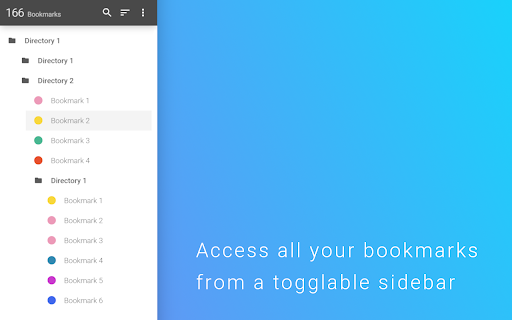


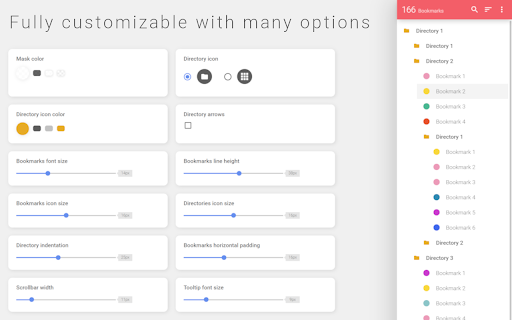
Adds a toggleable sidebar with all your bookmarks at the edge of your browser window. This extensions allows you to access your bookmarks by clicking on the left or right side your screen. You can edit, delete or rearrange your bookmarks by drag&drop and view some information about them by just clicking them with your left mouse button. You can check your bookmarks for updated or broken urls, too. You can also open your bookmarks in the side panel provided by Chrome. The sidebar will then be opened alongside the websites and stays there as a permanent sidebar. You can also optionally use a New Tab Page with the bookmark sidebar that can be enabled in the settings. If you found a bug, have ideas for features or improvements, please let me know.

Bookmarkie - Bookmarks in popup
View and manage your bookmarks in a popup. Maybe the most beautifully designed popup bookmark you can ask for Chrome. View, organize or edit your bookmark within a popup menu. @Ztail, Daniel and Mirosław Żylewicz also contributed to this extension.

MONKNOW New Tab - Personal Dashboard
This is the new tab you are dreaming of. Support website URL group management, data sync, dark theme mode. • Search & Speed Dial. • Data Sync, just create an account then all your data will be synced. • Icon groups, sort your speed dial icons based on your needs. • Match official icon image automatically when you are adding a custom icon. • Customize icon, you can upload jpg, png, svg, even gif for your own icon. • Customize icon layout, you can set icon size, gap, opacity and so on. • Customize wallpaper, you can upload jpg, png for your own wallpaper. • Thousands of icons in official icon library. • Thousands of HD wallpapers in official wallpaper library. • Display the standby page when you are inactive or every time when you open the new tab. • Support light theme mode and dark theme mode. • ToDo gives you focus. • Tabs (NECESSARY), When you click the MONKNOW toolbar button, the extension needs this permission to get current tab's URL and title so that you can add this website as an icon to your extension. This is not sent or stored elsewhere. • Bookmarks (OPTIONAL), To import your browser bookmarks to MONKNOW New Tab, the extension needs this permission to read your bookmark data. This is not sent or stored elsewhere. For more information on privacy and the security of your data visit https://www.monknow.com/privacy-policy.

Cubox
Highlighter, Clipper, AI Reader. Read, annotate and take notes with AI assistant. One-click Saving, Clipping, Highlighting and Taking Notes. Cubox is an AI reader built for learning. With the Cubox browser extension, you will unleash the full potential of highlights and notes. • You can quickly select multiple sections of text, images, or links on a webpage with just one shortcut, and easily highlight or clip them. • In capture mode, you can multi-select, or click and drag to batch select adjacent content. • Select contents on webpage with mouse dragging, then highlight them with just one click. • It supports adding notes, changing colors, allowing you to fully experience all the highlighting features right on the webpage. • Get a quick understanding of the article’s summary through summarization. Use key questions to understand the main points of the article and their answers. • Automatically highlight with Ghost Highlight and mark your favorite sections with annotations. • Save the web page you are browsing with one shortcut. • Save web snippets by dragging, Capture, dropping, and right-clicking. • Suggest tags, website title, description, and cover image. • Update information for already saved content. • Automatically detect same saves. More features on https://cubox.cc/ Please visit the Cubox web app or download Cubox apps. Your collections will automatically sync across all your devices.

Infinity New Tab (Pro)
Infinity New Tab Pro allows you to customize your New Tab page Infinity New Tab (Pro) replaces your browser’s New Tab page with a customizable dashboard for faster access to your everyday sites and tools. This extension ONLY overrides the New Tab page (chrome://newtab). It does NOT change your default search engine or startup settings. Key features (all shown on the New Tab page): 1) Speed Dial / Shortcuts - Add, edit, reorder, or remove any shortcut. - The New Tab may include a few optional partner shortcuts by default (e.g., eBay). You can delete or replace them at any time. 2) Bookmarks & Top Sites - Show your Chrome bookmarks and frequently visited sites for quick access. 3) Wallpapers & Appearance - Customize wallpaper, layout, and icon style. 4) Widgets & Sidebar Tools - Weather, to-do list, and notes to keep things handy while you open a new tab. 5) Gmail Badge (Optional) - If enabled, show unread count on the Gmail shortcut and notify you when new emails arrive. 6) Sync & Backup (Optional) - Sign in (Google/Facebook/WeChat/Weibo/QQ) to back up and sync your shortcuts and settings across devices. - Access to bookmarks/history/Gmail notifications is optional and only used to provide the corresponding New Tab features you enable. Affiliate Disclosure: Infinity New Tab (Pro) may include affiliate/partner shortcuts (e.g., eBay). If you click and make a qualifying purchase, we may earn a commission at no additional cost to you. You can remove or replace these shortcuts anytime in Settings.
