
nnnkddnnlpamobajfibfdgfnbcnkgngh
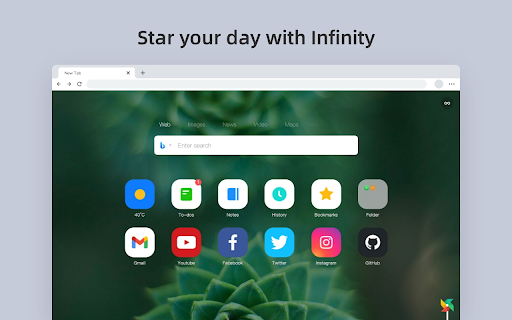

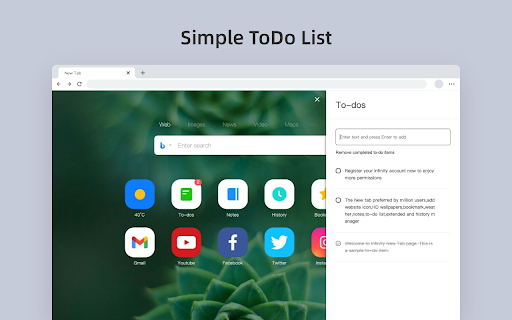

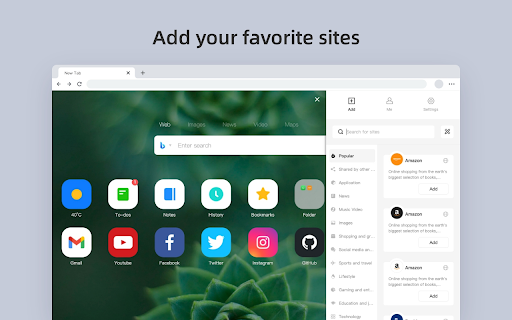
Infinity New Tab Pro allows you to customize your New Tab page Infinity New Tab (Pro) replaces your browser’s New Tab page with a customizable dashboard for faster access to your everyday sites and tools. This extension ONLY overrides the New Tab page (chrome://newtab). It does NOT change your default search engine or startup settings. Key features (all shown on the New Tab page): 1) Speed Dial / Shortcuts - Add, edit, reorder, or remove any shortcut. - The New Tab may include a few optional partner shortcuts by default (e.g., eBay). You can delete or replace them at any time. 2) Bookmarks & Top Sites - Show your Chrome bookmarks and frequently visited sites for quick access. 3) Wallpapers & Appearance - Customize wallpaper, layout, and icon style. 4) Widgets & Sidebar Tools - Weather, to-do list, and notes to keep things handy while you open a new tab. 5) Gmail Badge (Optional) - If enabled, show unread count on the Gmail shortcut and notify you when new emails arrive. 6) Sync & Backup (Optional) - Sign in (Google/Facebook/WeChat/Weibo/QQ) to back up and sync your shortcuts and settings across devices. - Access to bookmarks/history/Gmail notifications is optional and only used to provide the corresponding New Tab features you enable. Affiliate Disclosure: Infinity New Tab (Pro) may include affiliate/partner shortcuts (e.g., eBay). If you click and make a qualifying purchase, we may earn a commission at no additional cost to you. You can remove or replace these shortcuts anytime in Settings.

Minecraft New Tab (updated)
Get a Minecraft-themed New Tab for your browser. 1. Install and pin 📌 the extension to Chrome. 2. That’s all you have to do, Chrome will automatically open a new tab that will be Minecraft-themed. 1. Customize and play with the available themes to get the “New Tab” you want. 2. Get Minecraft news on Facebook, Twitter, Youtube, and more from your New Tab. Add this extension to stay connected with one of the biggest communities in gaming.

Beyond Tab
Transform New Tab to Beyond Tab , with Beyond Tab you can customize your New Tab in every aspect. Transform New Tab To Your Personal World With Beyond Tab. • 100% Safe And Secure (CSP) • Different View Option • Clock • Weather Status • Quick Access Website Hub • To Do List • Main Focus • Popup Quick Access (Weather Status, To Do List And More..) • Special Day Celebration (Birthday And More..) • Personal Preferences (Interface Customization, Content Customization And More..) • Multi Language Support (EN, TR, DE, FR, RU, ZH) • Background Style Customization (Video, Image And More..) • Theme Style Customization (Icon, Text And More..) • Random Background - Offline (In Your Collection) • Random Background - Online (Everyday One New Image And Video With Refresh Option) • Screensaver Mode • Background Download Option • Search Type Customization • Search Auto Suggestion • Direct Search On Popular Platforms (YouTube, Reddit And More..) • Search Engine Customization • Top Visited Websites • SYNC Between Devices (To-Do List, Quick Access Website Hub And More..) • And More.. Note-1: If You Are Going To Use "Beyond Tab" On Multi PC With Synchronization , Be Sure Signed In To Browser Also Check The Synchronization Status In Your Account To Avoid Any Data Lose. Note-2: If You Encounter Any Issues You Can Report To "beyondtabask@gmail.com".As Temporary Solution You Can Restart The Browser.This May Help Until Bug Fix Update Release. Whats The New ? -Upgraded To Manifest V3 (More Fast And More Secure) -General Revisions

Awesome New Tab Page
Enhance your New Tab Page with ultimate customizability and power. Awesome, like you. [ANTP] Awesome New Tab Page transforms your Chrome new tab into a personalized dashboard with apps, shortcuts, and widgets you'll actually use. Features: - Interactive widgets that display real-time information - Fully customizable layout - add, remove, and resize tiles - Create personalized shortcuts to your favorite sites - Direct search from shortcuts - Flexible resizing for apps and widgets Awesome New Tab Page is a privacy-oriented extension. It does not track your browsing activity or sell it or in any way share it with third parties. Awesome New Tab Page is 100% ad free and completely customizable. Current Widgets: - Weather - xkcd Comic - Cryptocurrency Price Trackers (BTC, XRP, ETH) - More crypto widgets coming soon with enhanced features! Have suggestions? Contact us at hi@antp.co How to Use: 1. Unlock the grid with the padlock icon 2. Open the widgets drawer and drag a widget out onto the grid 3. Customize to your heart's content 4. Lock the grid when finished FAQ Q: How can I add my own links and images? A: Unlock the grid, then click on an empty tile. This will create a custom shortcut and open the tile editor, allowing you to start customizing. Q: Can I remove tiles from my dashboard? A: Yes! Unlock the grid, click the "X" on any tile, then lock again to use your dashboard. Q: Can I change the background image or color? A: Yes! Click the settings icon and use the color picker to select any background color. Q: How do I go back to the default Chrome new tab page? A: Uninstall the extension through Chrome's extension management. Thanks for trying it, and please share any feedback you have! It would mean a lot if you would like and share on Bluesky: https://bsky.app/profile/antp.co Use License: Permission granted for personal, non-commercial use only. This license prohibits: - Modifying or copying materials - Commercial use or public display - Reverse engineering - Removing copyright notices - Redistributing materials Disclaimer: Awesome New Tab Page is provided "as is." Awesome HQ, LLC makes no warranties regarding merchantability, fitness for purpose, or non-infringement of rights. We do not guarantee accuracy, results, or reliability of materials within Awesome New Tab Page. Widgets may display content from third-party sources including weather services, cryptocurrency data providers, and other external sources. Awesome HQ, LLC is not responsible for the accuracy, content, or availability of these third-party services. User-created shortcuts, bookmarks, and custom content are the sole responsibility of the user who created them.

New Tab Custom Colour Blank Page
New Tab opens with a (user chosen) colour blank page Customise your New Tab with this fast loading, cusomtisable New Tab Extension. Choose your own colour from some popular colours (Black, White, Incognitio, InPrivate, Red, Greed, Blue, Yellow) or choose from a palette of 256 colours to suit your individual mood and taste. With this Extension your New Tabs will load faster (compare this Extensions 10 lines of HTML versus the default Chrome New Tab 2554 of lines of HTML and scripts); this Extension will respect your privacy (no cookies or tracking) and by not displaying your Most Visited websites. Avoid that awkward moment when you open Chrome or a New Tab in front of your boss and all those recruitment websites are displayed :^) You may also be interested in the ultra-lightweight and simple "New Tab Blank Black Page" which uses a simple blank black page for the New Tab, available here: https://chrome.google.com/webstore/detail/new-tab-blank-black-page/ijmmakaohfkpngajfinbgcbbnbfhleoo Enjoy the extension, I welcome your feedback and suggestions. Alan.
