
hnmpgleggfcndpeflbjhpjfckfmojnpo
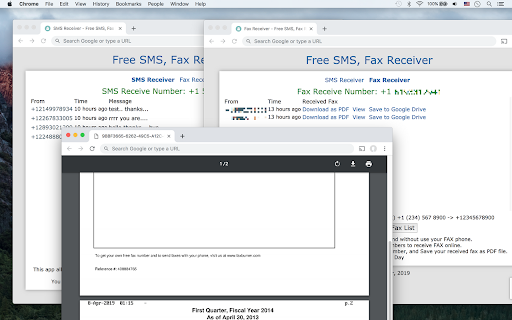

This extension allows you to use our free phone numbers to receive SMS, FAX document without Registration. Receive SMS online for FREE, without Registration and without use your personal phone. This extension allows you to use our free phone numbers to receive SMS online. Make use of free phone number to get text messages from websites requiring SMS verification code. Receive FAX online for FREE, without Registration and without use your FAX phone. This extension allows you to use our free phone numbers to receive FAX online. You can send FAX documents to US, Canada (+1) FAX phone number, and Save your received fax as PDF file. Fax arrivals may take more than a few minutes depending on the network situation. You can view the latest received SMS directly from the default popup in the Chrome extension toolbar. This extension is easily accessible via the Chrome context menu on the top-right toolbar. you will find several menus there.

WiseFax
WiseFax enables you to send fax from Chrome to any fax number in the world. Wisefax – send fax quickly and easily Sending fax with WiseFax was never so quick and easy. You only need internet connection on your device. Send fax in four simple steps from Chrome. Pay as you go, with no monthly or yearly subscription and send fax anywhere in the world. With WiseFax extension, you can easily fax an opened online PDF document from Chrome, or an image that is part of a website, by right-clicking anywhere on its content and selecting "Send fax" menu option. Similarly, you can select fax number that is part of a website text and send fax to that number by selecting "Send fax" menu. WiseFax supports numerous document and file formats such as PDF documents, Microsoft Office, OpenOffice and LibreOffice documents and spreadsheets, Hancom Hangul documents, ScanWritr documents, and JPEG, GIF, PNG, BMP, HEIC images. You can also import a picture and send it directly to fax. When doing so, WiseFax efficiently detects edges of your document using advanced edge detection algorithm and makes picture clearer with picture enhancement algorithm. This makes scanning easier and fax more readable. You can easily select which pages you want to fax. Displayed preview of the pages will look the same as they will come out on fax at recipient side. Type fax number and wait for response. If it was successful or no you will get an email notification. Sending fax with WiseFax is as simple as that. Try it, you’ll like it. Four easy steps of how to send fax with WiseFax are: 1.) Upload your existing document or picture. 2.) Click and select / deselect pages you want to send to fax and check them on screen as you already see them as they will come out on fax. 3.) Select among 240 countries where you want to send your fax and type fax number. 4.) Authenticate with your existing account on Facebook, Google, Windows Live and Vanaia or create a new one. Buy fax token, if you already didn’t do so, and send fax. Wait for fax status confirmation which you ‘ll receive to provided e-mail.

MightyText - SMS from PC & Text from Computer
SMS from PC or Mac using your Android #. Sync Text Messages, Calls, Notifications, Photos, Battery Status ★ Send & Receive SMS Text Messages on your PC or Mac ★ Uses your CURRENT Android Phone Number ★ 100% Free ★ Get started in less than 60 seconds ★ Sync your phone's photos and videos instantly to MightyText ★ See your Android app notifications on your Computer (from any app - not just your sms app) ★ Sync your phone's MMS Picture Messages to your computer ★ Get low battery alerts on your computer (when your phone has low battery) Step #1: Install our Android App on your phone: https://play.google.com/store/apps/details?id=com.texty.sms Step #2: Link your Google Account and Complete Setup on your phone Step #3: Go to https://mightytext.net/app in Chrome on your desktop Step #4: Sign in to MightyText on your desktop browser with the same Google Account used on your phone Step #5: Install this extension Note - This MightyText Chrome Extension will work only AFTER completing the steps above. Send & receive SMS text messages & MMS from Chrome using your current Android™ phone and number. You can still send/receive texts on your phone as you normally would. We are different from apps like Google Voice or SendHub, which requires the user to set up a different number or to port their number to Google Voice. With MightyText, you can keep using your same phone number, as usual for texting. Note: Google Voice does not use your carrier phone number By clicking "Install", you agree to these Terms of Service: Android Phone with version 4.4 or above Working and active mobile data or wi-fi connection Background Data must be enabled on your phone Phone must have battery charged and be on, since all texts are routed through the phone Portions of this page are modifications based on work created and shared by Google and used according to terms described in the Creative Commons 3.0 Attribution License. - updated colors and logos - more reliable incoming SMS notification popups 8.1 and 8.2 - For WebApp users, now marks messages as read on phone after clicking on an incoming SMS notification, or closing an incoming SMS notification. (Auto-dismiss won't mark it as read) - Works more efficiently with new web app (http://mightytext.net/install) - Improved performance and stability - Support notifications of upcoming web app beta release. - Fixed bug with popup notifications not showing up from certain recipients - Cleaned up UI of notification window - Increased stability for upcoming web app release - Minor UI changes (links on header) - No longer closes window when replying to a message from the result of a popup notification - Fixed UI glitch on reply popup page - Reduced memory footprint - Improved speed of loading tabs - Fixed intermittent problem of repeated "You have many text messages" notification - Background color change, based on many users' feedback :) - Removed check for invite. MightyText is now open to all! - Speed improvements on desktop notifications - Revert to standard fonts in some text areas - Started rollout of faster push notifications to Chrome - Performance improvements on data storage latency - New UI header - New action buttons with pictures - Fixed broken FB link - New name: MightyText - New Calling Features: Calling Now, Missed Calls notifications (can turn off on Android side) - Can see which Android version you have in the About on Android App - Fixed Bug - escaped character issue with Close/Reply buttons on Popup Notification - Fixed >160 character bug - wasn't sending properly - Reduced font size of name/numbers in tab - New Font for application: “Open Sans” - Fixed Bug - Close/Reply buttons on Popup Notification were sometimes non-responsive - Automatically Mark Messages as “Read” on phone after clicking Close or Reply on Popup Notification (NOTE - we can't remove Android notifications on the phone as they were created by another Android app) - Faster confirmation process after Sending messages from Chrome Extension - Cleaned UI on notifications when Desktop Notification option is set to “Just Sender Name” - Fixed neverending loop that prompted users to log-in when a user is not invited to the beta yet. - Removed MightyText name image file from user interface (app will soon have a new name) - Pressing Enter while typing message much smoother and faster. - Automatically bring focus to same text entry box after hitting Enter - Automatically bring focus to text entry box when clicking a tab - Checks if at least 1 number is present in "Send To" field - Reduced left margin of reply bubble from 150px to 100px - Fixed Bug - was cutting off message too early if user hit enter in middle of message - Fixed Bug: Some short message codes cause loading problems - Fixed Bug: SOmetimes empty message sent if Enter was held down for too long - Fixed Bug: Delete All Messages flaky when "-" and " " present in phone number - Fixed bug with excessive internet connection error popups - Fixed bug with "Delete All from this Sender" for some types of threads - Improved Contact matching speed 3.31 and 3.32 (May 15, 2011) - Fixed contact matching issues with numbers with spaces and dashes in Google Contacts - Overhauled contacts matching algorithm; no more "+1" auto-guessing of country code, etc. - Now showing contact phone # along with name (for matched contacts) - Fixed bug: pressing enter under "Compose New" sometimes caused confirmations to stall - All unicode characters now working - Smarter and more efficient message pulling timing - Added static links to facebook page and Chrome Web Store review page - Can now send a text by pressing Enter (Highly Requested Feature) - Can open MightyText in it's own tab (Highly Requested Feature) - Added Feature Request page and link - Added FB Like button - Improved stability and speed enhancements - Fixed Bug - Intermittent "blank" screens upon loading your texts, and/or when replying to a text from a popup notification. - Fixed Bug - The "+1" setting labels under options were swapped. - Smarter Handling when lots of new messages: Whenever there are lots of new messages since MightyText last ran, popup a single "FYI notification" instead of trying to pop up a notification for each - Fixed Blank Popup Notif Bug: Some users were seeing blank popup notifications intermittently, typically when starting up Chrome - Logging and stability improvements: To help MightyText team better identify user issues in a more automated way. - Most Requested Feature to date -- Contacts Search. When Composing a New message, a typeahead search of your sync'd contacts. NOTE: Will only work if you have previously sync'd your contacts. - Picks up new incoming text messages faster - More gracefully handles error if user is not set up for beta. (Shouldn't affect anyone receiving this email since you are already part of the beta) - Shows character countdown from 160 characters as you type a text message - Option to allow an override of using the "+1" prefix. Some verizon phones weren't doing well a "+1" at the front of a phone number. - Increased performance when loading messages

Temp Phone Number
Use Temp Phone Number app to get a disposable phone number to receive sms online for free verifications and avoid spam calls. 🛡️ Temp phone number: Your digital privacy shield Elevate your digital privacy with Temp phone number, the premier solution for secure, temporary SMS communication. Our platform offers disposable phone numbers for safe, quick verification, to receive SMS online while ensuring your personal contacts remain private and unexposed. It's the ideal tool for one-time use for seamless free online verifications. 🌟 Instant privacy with disposable numbers 💠 Maintain your anonymity effortlessly with our disposable phone numbers. 💠 Protect your personal contact details from exposure. 💠 Experience peace of mind in digital activities. 📲 Instant connect 1. Access a variety of contacts instantly for every communication need. 2. Enjoy no-cost texting, perfect for quick confirmations. 3. Seamless integration with existing apps enhances usability. 🌐 Unlimited global reach ◆ Choose from a wide array of country-specific phones. ◆ Establish local or global presence effortlessly. ◆ Enjoy smooth global connectivity with our diverse phone options. 🔒 Robust security protocols 🔹 Implement cutting-edge encryption to safeguard all communications. 🔹 Regular audits and updates to maintain the highest level of security. 🔹 Dedicated privacy features to ensure user anonymity. 🔄 Dynamic allocation 1️⃣ Phone numbers are refreshed more frequently to enhance privacy. 2️⃣ Advanced algorithms ensure you get the most reliable phones. 3️⃣ Smart selection feature to recommend the best number for your needs. 📈 Analytics and insights 🔸 Track the usage patterns and success rate of verifications. 🔸 Gain insights into the most popular country codes. 🔸 Use data to make informed decisions about your communication strategies. 📑 Transparent usage policies ♦️ Clear guidelines on the proper use of temporary numbers. ♦️ Commitment to transparency in all our operations. ♦️ Comprehensive FAQ section expanded to cover more user queries. 🌍 Cultural and linguistic support 🌐 Numbers that support local languages and dialects. 🌐 Cultural considerations for a more personalized experience. 🌐 User support in multiple languages to assist a global audience. 🔝 Enhanced user experience ➤ User-friendly interface for effortless navigation. ➤ Absolute security and confidentiality of communications. ➤ Quick and efficient access to all features. 👥 Growth through community ❗️ Regular feature updates driven by user feedback. ❗️ Active community engagement for continuous improvement. ❗️ Commitment to innovation and user-centric development. 🚀 Exclusive perks ① Custom-tailored services for personal and professional use. ② Range of personalized options from free second phone numbers to temporary SMS. ③ Unique perks and benefits tailored to individual user needs. 🎉 Experience smooth digital communication Join our community for effortless temporary contacts, ensuring privacy and seamless verification. Download now for a transformative experience! 🧐 FAQs about the extension 🔒 How does the app protect my primary contact? 🔹 Your main contact remains concealed with our service. 🔹 We provide a free virtual number, ensuring your real details are never exposed. ✨ Can I use multiple numbers for online messaging? 🔹 Absolutely! Our service supports a variety of numbers for different purposes. 🔹 Ideal for maintaining privacy in personal and professional communications. 📲 What benefits do additional phone contacts offer? 🔹 Perfect for platform sign-ups without revealing your primary contact phone. 🔹 Simplifies your digital life with global, verification-ready contacts. 💸 Is this service really free? 🔹 Yes, it's completely free! No hidden fees. 🔹 Our temporary contacts for message reception are at no cost to you. ⏳ How long can I use a temporary phone? 🔹 Designed for short-term use, typically for single verification events. 🔹 We constantly refresh our contacts to ensure you always have a new number. 🌐 Can I select a contact from a specific country? 🔹 Yes! Choose from a wide range of global numbers, including USA-based options. 🔹 Ideal for local or international verification needs. 🔐 Are messages private and secure? 🔹 Your privacy is our top priority. 🔹 Messages are highly secure, with private number options coming soon.

Pulse SMS Extension
Text message your friends from your computer This is a Chrome extension to go along our Android Messenger app: https://play.google.com/store/apps/details?id=xyz.klinker.messenger If you would like to use the stand alone Web App, it can be found here: https://chrome.google.com/webstore/detail/messenger/nimjciaekjijpinhkhpmcbaoanjjojfi -------------------- You won't find any rivals on Android, for this next generation text messenger. Pulse SMS is fast, secure, beautiful, and packed with all the features and customization you could want! Pulse SMS re-imagines the way you socialize by making SMS and MMS available - seamlessly - across all your devices. Start by creating an account on your phone, and you will have instant access to all your messages, from anywhere. Here are some of the features that make Pulse SMS the ultimate messaging experience: - Endless global and per-conversation theme options - Share GIFs from Giphy - Delayed sending - Snooze notifications - Powerful searching for messages and conversations - Beautiful, readability-style browser, for the best web experience - Conversation archive - Blacklist phone numbers - Schedule messages - Automatic message backup and restore - Dual-SIM support (Android 5.1+) - and so much more! Supported Platforms: With our website, you can send and receive messages and manage the app from ANY device connected to the internet! On top of the web application, Pulse SMS also has native apps for Android tablets, Android Wear, Google Chrome, Firefox, and even Android TV: https://home.pulsesms.app/supported_platforms.html All of your conversations are stored in the cloud using strong end-to-end encrypted, so you never have to worry about your data getting out: https://home.pulsesms.app/encryption.html Price: The Android side of this app is FREE to use, enjoy Pulse SMS on your phone and replace your boring old SMS/MMS app! To text from other devices, you can choose between a subscription fee, or a one-time payment. We don't sell your data, like some free services! For full pricing details, see here: https://home.pulsesms.app/faq.html Please reach out to support@pulsesms.app with any questions or concerns, we would love to hear from you!
