
jjbjdleccaiklfpcblgekgmjadjdclkp
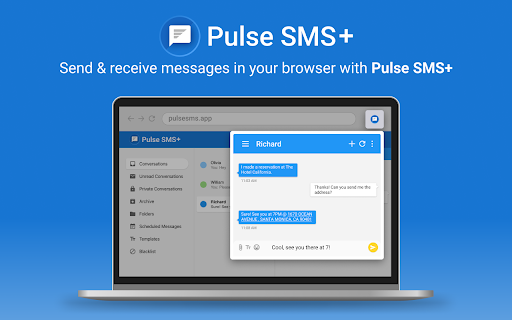

Text message your friends from your computer This is a Chrome extension to go along our Android Messenger app: https://play.google.com/store/apps/details?id=xyz.klinker.messenger If you would like to use the stand alone Web App, it can be found here: https://chrome.google.com/webstore/detail/messenger/nimjciaekjijpinhkhpmcbaoanjjojfi -------------------- You won't find any rivals on Android, for this next generation text messenger. Pulse SMS is fast, secure, beautiful, and packed with all the features and customization you could want! Pulse SMS re-imagines the way you socialize by making SMS and MMS available - seamlessly - across all your devices. Start by creating an account on your phone, and you will have instant access to all your messages, from anywhere. Here are some of the features that make Pulse SMS the ultimate messaging experience: - Endless global and per-conversation theme options - Share GIFs from Giphy - Delayed sending - Snooze notifications - Powerful searching for messages and conversations - Beautiful, readability-style browser, for the best web experience - Conversation archive - Blacklist phone numbers - Schedule messages - Automatic message backup and restore - Dual-SIM support (Android 5.1+) - and so much more! Supported Platforms: With our website, you can send and receive messages and manage the app from ANY device connected to the internet! On top of the web application, Pulse SMS also has native apps for Android tablets, Android Wear, Google Chrome, Firefox, and even Android TV: https://home.pulsesms.app/supported_platforms.html All of your conversations are stored in the cloud using strong end-to-end encrypted, so you never have to worry about your data getting out: https://home.pulsesms.app/encryption.html Price: The Android side of this app is FREE to use, enjoy Pulse SMS on your phone and replace your boring old SMS/MMS app! To text from other devices, you can choose between a subscription fee, or a one-time payment. We don't sell your data, like some free services! For full pricing details, see here: https://home.pulsesms.app/faq.html Please reach out to support@pulsesms.app with any questions or concerns, we would love to hear from you!

Pulse SMS App
Text message your friends from your computer If you would like to use the Chrome extension instead, it can be found here: https://chrome.google.com/webstore/detail/messenger/jjbjdleccaiklfpcblgekgmjadjdclkp Pulse SMS is fast, secure, beautiful, and packed with all the features and customization you could want! Pulse SMS re-imagines the way you socialize by making SMS and MMS available - seamlessly - across all your devices. Start by creating an account on your phone, and you will have instant access to all your messages, from anywhere. Here are some of the features that make Pulse SMS the ultimate messaging experience: - Endless global and per-conversation theme options - Share GIFs from Giphy - Delayed sending - Snooze notifications - Powerful searching for messages and conversations - Beautiful, readability-style browser, for the best web experience - Conversation archive - Blacklist phone numbers - Schedule messages - Automatic message backup and restore - Dual-SIM support (Android 5.1+) - and so much more! Supported Platforms: With our website, you can send and receive messages and manage the app from ANY device connected to the internet! On top of the web application, Pulse SMS also has native apps for Android tablets, Android Wear, Google Chrome, Firefox, and even Android TV: https://home.pulsesms.app/supported_platforms.html All of your conversations are stored in the cloud using strong end-to-end encrypted, so you never have to worry about your data getting out: https://home.pulsesms.app/encryption.html Price: The Android side of this app FREE, enjoy Pulse SMS on your phone and replace your boring old SMS/MMS app! To text from other devices, you can choose between a subscription fee, or a one-time payment. This allows us to fully encrypt your data we don't sell it, like free services! Your security is paramount for us, but that does mean a few dollars for hosting costs. For full pricing details, see here: https://home.pulsesms.app/faq.html Please reach out to support@pulsesms.app with any questions or concerns, we would love to hear from you!

Ink for Google™
Get your favourite Google sites a new coat of paint. Update their look with Material Design Ink for Google allows to change the icons used on Google websites. You can choose between the modern gradient/glass set, use the old colorful google material 2 set, or go for the classic material design icons! In addition to the icons, Ink for Google improves the look of well-known Google websites like Search, Gmail and Calendar. It unifies them under the guidelines defined by the Material Design team at Google. Ink takes inspiration from the visual style of Android apps and their newest websites to create a better and consistent experience across all of these services. Ink currently works on most Google websites, even websites which already have material design. On those websites, it improves the design to better match the guidelines. This extension requires the permission to read and change your data on google.com sites to make the visual changes. See something that you think needs a visual tweak? Click the Ink icon to send us some feedback or to report a bug.

Gmail Web Clipper by cloudHQ
Save anything you see from web articles, texts, and snippets, directly in your Gmail. Free and simple. Give it a try today! Plus - save anything you want from the web like: ✔️ Articles, ✔️ Texts, ✔️ Images, and more! Everything is neatly saved in a Gmail label directly in your email. cloudHQ. Helping your productivity 1 click at a time. cloudHQ Website: https://www.cloudhq.net App Website: https://www.gmail-web-clipper.com/ Pricing: https://www.gmail-web-clipper.com/pricing Support page: https://support.cloudhq.net/category/browser-extensions/gmail-web-clipper/ Blog: https://blog.cloudhq.net Gmail, Google Shared Drive, Google Drive, and Google Workspace are trademarks of Google LLC. Use of these trademarks is subject to Google Permissions.

Simplify Gmail
Make Gmail simpler, more capable, and more respectful Brought to you by the co-founder and design lead for Google Inbox, Simplify Gmail is a browser extension for desktop Gmail that boosts productivity, strengthens privacy, and reduces️ stress by: ✔️ BETTER DESIGN: Hundreds of improvements (small and large) to streamline, simplify, and enhance Gmail’s design and functionality. Hide the features you don’t use, customize the ones you do including setting the list and message width and fonts. ✔️ BUNDLES: Group conversations with the same label or category into a single row in your inbox for easier bulk reading and processing. ✔️ SAVED SEARCHES: Add commonly used searches or bookmark any message to your nav for easy access. Simplify includes 24 useful searches by default like Travel, Purchases, Archived, Attachments, Notes to self, PDFs, Photos, and more. ✔️ PAUSE INBOX: Pause new mail or hide the inbox entirely for deep focus. Optionally disable notifications when the inbox is paused or hidden. ✔️ BLOCK TRACKERS: Simplify blocks over 250 email spy trackers (more than any other tracker blocker extension). ✔️ KEYBOARD SHORTCUTS: Navigate faster with your arrow keys, Enter (to open, then to reply), and Escape (close a message, then to return to inbox). Use familiar shortcuts like Ctrl+A / ⌘A to select all or Ctrl+Z / ⌘Z to undo. Press "?" in Gmail to see all shortcuts. Also includes advanced shortcuts like [ I ] to reply to an intro and move the sender to BCC. ✔️ DARK MODE: Auto-switch with OS with options to invert all of Gmail’s UI and some or all messages. ✔️ GROUP BY DATE: Group messages list by date with bulk actions to one-click archive or delete. ✔️ INBOX ZERO BACKGROUND: Choose a different background to get when you reach inbox zero. ✔️ AUTO-CC/BCC: Set addresses to add to every new message and/or reply And much more... Comes with a free 1-month trial after which a paid plan is required. Learn more and sign up when you're ready at https://simpl.fyi/plans You should always be super careful what extensions or apps you use with your email. ✔️ Simplify always puts your security and privacy first. ✔️ The code for Simplify is entirely stored on your computer (no remote code) and is for the sole purpose of improving and enhancing Gmail's user interface and functionality. ✖️ Simplify does NOT request full access to your email (no API permissions required). ✖️ None of your data is collected, stored, or sent to Simplify. ✖️ Simplify has no tracking or analytics software. ✖️ Simplify will never have ads. Ever. Simplify's products have no ads, no analytics, no trackers, no cookies, and do not send or receive personal information of any kind from your account or device. Your privacy and the security of your account and data is of the utmost importance to us. We aim to make software worth paying for and taking the strictest stance on privacy possible. Our full privacy policy is at https://simpl.fyi/privacy You can send feedback or report issues via https://simpl.fyi/support (I usually respond within one business day). Note that there are over 100,000 unique combinations of Gmail’s options, features, and user states. Add in other 3rd party add-ons, different languages, browsers, screen sizes, and more and it grows to over a billion. Simplify strives to support them all, along with the more popular 3rd party extensions and add-ons. I wrote more about the complexity of building on top of Gmail here: https://on.simpl.fyi/p/complexity-of-simplify
