
hmffdimoneaieldiddcmajhbjijmnggi


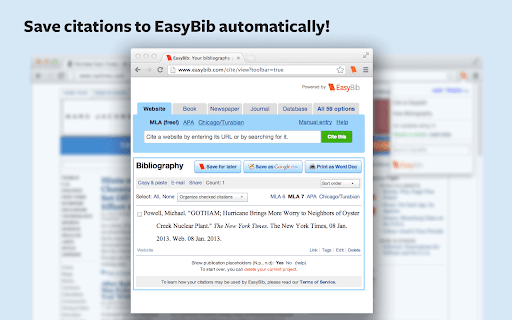
Cite web sites with one click using the EasyBib Toolbar and receive advice on the credibility of the web site you're citing. EasyBib is the world's largest bibliography maker and citation machine. Our EasyBib toolbar will let you cite web sites with one click. Receive advice on the credibility of the web site you're citing. Cite as many sources as you need to build a fully-formatted, alphabetized, and Word-processor-ready bibliography.

Move It
Busy working on your computer? Spending hours searching the internet? Get active with Move It. Your brain works better when your body moves. Move It is a productivity extension that interrupts your work sessions with short, randomised movement breaks — helping you stay focused, avoid burnout, and build healthy habits without thinking about it. Whether you follow the Pomodoro Technique, manage ADHD, or just spend too many hours at a desk, Move It gives your brain the reset it needs to keep performing. How it works Set your break interval (anywhere from 5 to 55 minutes). When the time is up, Move It takes over your screen with a randomly selected physical activity. Complete it, click Done, and get back to work. No willpower required. Why it works Regular movement breaks are proven to improve concentration, reduce mental fatigue, and support attention regulation — making Move It a natural fit for anyone with ADHD or anyone using focus techniques like Pomodoro. The randomised activities remove decision fatigue entirely: you don't choose what to do, you just do it. Customisable break intervals from 5–55 minutes 160+ randomised activities — from desk stretches to full body exercises Work Hours mode — only active during your working hours and days Daily completion counter to track your movement Shuffle to swap any activity that doesn't suit you

Bibcitation Bibliography & Citation Generator
Cite websites and journal articles, bibliographies with our free citation and bibliography creator. MLA, APA, Chicago, and more. Automatically create MLA, APA & Chicago citations and generate bibliographies in one click with our add-on for Chrome. ✓ Navigate to the website or the journal article you want to cite and activate the extension to create a citation for that source. ✓ Copy website citations directly into your paper or add them to your selected citation list on Bibcitation.com. ✓ Visit Bibcitation.com to automatically cite books and journal articles or manually create citations for additional sources, such as videos, images, artwork and more. ✓ Copy and paste citations into your paper or export your citation lists in MLA, APA, Chicago and more than 9,000 other citation styles. Bibcitation is a simple alternative to citation generators such as EasyBib, Mendeley, Endnote, MyBib, Zotero, Cite This For Me and other bib citation tools.

Kami for Google Chrome™
Kami is an interactive learning platform empowering students and enhancing the way teachers teach, feedback, and assess. Kami’s game-changing learning platform turns any resource into interactive, accessible experiences that spark curiosity and success. Trusted by over 50+ million users, it brings learning to life—engaging every student, including English language learners with built-in tools to help them thrive. Teachers save hours every week on teaching, grading, and planning lessons. School leaders gain a powerful, cost-effective solution that drives insight and real impact. Results from the Kami Teacher Survey 2023 | 1665 respondents | USA only | 95% Confidence | 2% Margin of error Seamlessly works with Canvas, D2L Brightspace, Google Classroom, Microsoft Teams and Schoology. Ready for more? Try Kami for free today www.kamiapp.com

Citationsy - Cite Websites and Papers
Reference websites and papers with a single click, powered by Citationsy Cite websites, books, papers, articles, podcasts, songs, and much more using Citationsy. Perfect references and footnotes every time. Citationsy is perhaps the world’s best referencing tool. This Chrome extension will let you cite any website with a single click. We support citations in APA, Harvard, DIN, Chicago, MLA, and thousands of other referencing styles. When you find a website or link you want to cite, simply click the Citationsy icon in the toolbar (*) and a little window will pop up to let you choose which one of your Citationsy projects you’d like to add the link to.
