
cnjkoanefhlhkagbpofjbafaonfejpgc

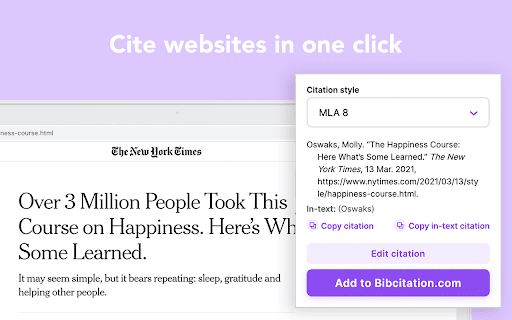


Cite websites and journal articles, bibliographies with our free citation and bibliography creator. MLA, APA, Chicago, and more. Automatically create MLA, APA & Chicago citations and generate bibliographies in one click with our add-on for Chrome. ✓ Navigate to the website or the journal article you want to cite and activate the extension to create a citation for that source. ✓ Copy website citations directly into your paper or add them to your selected citation list on Bibcitation.com. ✓ Visit Bibcitation.com to automatically cite books and journal articles or manually create citations for additional sources, such as videos, images, artwork and more. ✓ Copy and paste citations into your paper or export your citation lists in MLA, APA, Chicago and more than 9,000 other citation styles. Bibcitation is a simple alternative to citation generators such as EasyBib, Mendeley, Endnote, MyBib, Zotero, Cite This For Me and other bib citation tools.

Citation Hero - Free Citation Generator
Generate citations in APA, MLA, Chicago, Harvard, and Vancouver formats with Citation Hero's free Chrome Extension. Citation Hero is a free citation generator that makes it easy for students and academics to generate formatted citations for websites, books, journal articles, and other sources. With a wide range of supported citation styles, including APA, MLA, Chicago, Harvard, and Vancouver, Citation Hero is the perfect companion for anyone who needs to cite sources in their writing. Simply visit the website or webpage that you want to cite, click on the "Get Citation" button in the bottom left, and select the appropriate citation style. The extension will then generate a properly formatted citation for you, which you can copy and paste into your own document. Whether you're a student working on a research paper, an academic writing a scholarly article, or anyone else who needs to cite sources in their writing, Citation Hero is an essential tool that will help you get the job done quickly and easily.

Citation Manager for Google Chrome™
Quickly cite a Website Source for writing essays & research papers Do you need to write an essay/research paper? To prevent any plagarism issues, its very important to cite all the sources you use. Our software allows you to do research on the Internet and save each and every website which you wish to use quotes/statistics. To get started, all you need to do is install the extension Go to the website which you want to quote from Click on the extension icon, choose the type of citation method. Our software will automatically save this citation for you and you can paste these citations into the essays you are writing. Our software supports the most common citations methods such as APA / Chicago Citation/ MLA Citation / Harvard Citation method. Disclaimer: Please note this extension is NOT made by Google and is made by an independent development team. All copyrights belong to their respective owners. Google doesn’t endorse or sponsor this Chrome extension. Citation Manager for Google Chrome™ is not owned by, is not licensed by and is not a subsidiary of Google Inc.

Research Notes
Bookmark, tag or add notes to pages, highlight and save quotes or images, save selected Google searches, filter out search results. KEEP NOTES AND ORGANIZE PAGES Bookmark, tag or add notes to pages. SAVE & HIGHLIGHT QUOTES Save quotes or other text snippets from pages (or PDFs), highlight quotes on the page. SAVE IMAGES Save images with pages - either pictures directly from the page or copy-pasted screenshots via a tool like Snipping Tool or Paint. TAGS WITH VALUE Advanced tagging: you can add values to the tags. For example, to record a page’s author, add a tag like “Author: ”. Or, when searching for products and comparing good websites with alternative offerings, add tags to pages such as “Product: ” or “Price: ”. You can group and sort by tags and values separately on the all notes -page. RESEARCH UNDER SEPARATE TOPICS All your pages and searches will be saved under topics that you define. This helps keep your different research topics - be it work, school or hobbies - separated from each other. SAVE YOUR GOOGLE OR GOOGLE SCHOLAR SEARCHES When studying a topic in-depth, save searches to remember what search terms you’ve used, which ones got great results and how far into the results you have looked. By default, search saving is turned off, it can be activated for each Google search tab separately. HELPFUL SEARCHING OPTIONS Cross out and hide search results that are not useful. Instantly add notes and tags to results straight in your Google search. OVERVIEW OF SAVED RESEARCH A special all notes -page gives a comprehensive overview of your topics, pages and searches. See your researched pages either in list or table format. Filter pages by text, tags, notes or bookmarks. PRIVATE The information that you create while working with the extension - addresses, searches, notes, tags, etc - is stored exclusively in your own browser and is not shared with anyone. We only collect anonymous analytics information about this products usage to get an overview of what features are used. DO YOU HAVE QUESTIONS OR RECOMMENDATIONS? We are open to feedback about this product, about existing features or new ideas - just send as an e-mail (feedback@onlineresearchnotes.com) or drop by in our Discord server (https://discord.gg/pE9BMg2m). And please do inform us also about any possible bugs that may be lurking. FREE This extension is free to use.

Citationsy - Cite Websites and Papers
Reference websites and papers with a single click, powered by Citationsy Cite websites, books, papers, articles, podcasts, songs, and much more using Citationsy. Perfect references and footnotes every time. Citationsy is perhaps the world’s best referencing tool. This Chrome extension will let you cite any website with a single click. We support citations in APA, Harvard, DIN, Chicago, MLA, and thousands of other referencing styles. When you find a website or link you want to cite, simply click the Citationsy icon in the toolbar (*) and a little window will pop up to let you choose which one of your Citationsy projects you’d like to add the link to.
