
ananhmnkepfflgfdklgcdpgdngejokkn
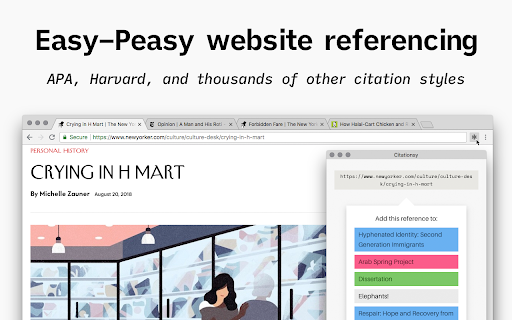


Reference websites and papers with a single click, powered by Citationsy Cite websites, books, papers, articles, podcasts, songs, and much more using Citationsy. Perfect references and footnotes every time. Citationsy is perhaps the world’s best referencing tool. This Chrome extension will let you cite any website with a single click. We support citations in APA, Harvard, DIN, Chicago, MLA, and thousands of other referencing styles. When you find a website or link you want to cite, simply click the Citationsy icon in the toolbar (*) and a little window will pop up to let you choose which one of your Citationsy projects you’d like to add the link to.

Paper Of The Day
ARCHIVE NOTICE Paper Of The Day ran from 2018 to 2021. The Mendeley API that powered this extension has been decommissioned. The extension now displays cached paper data and remains available as an archive of the project. ----- Paper Of The Day replaced your new tab with trending academic papers across disciplines — from computer science and medicine to economics and psychology. Features • Browse papers by subject category • Beautiful background images from Unsplash • Keyboard navigation (arrow keys, number keys) • Swipe gestures for touch devices • Accessibility options (reduce motion, high contrast, text size) How it worked Each new tab displayed a randomly selected trending paper with its title, authors, abstract, and a link to read more. ------ Thank you to everyone who supported this project. It was a lot of fun. Created by Adrian Raudaschl

Research Notes
Bookmark, tag or add notes to pages, highlight and save quotes or images, save selected Google searches, filter out search results. KEEP NOTES AND ORGANIZE PAGES Bookmark, tag or add notes to pages. SAVE & HIGHLIGHT QUOTES Save quotes or other text snippets from pages (or PDFs), highlight quotes on the page. SAVE IMAGES Save images with pages - either pictures directly from the page or copy-pasted screenshots via a tool like Snipping Tool or Paint. TAGS WITH VALUE Advanced tagging: you can add values to the tags. For example, to record a page’s author, add a tag like “Author: ”. Or, when searching for products and comparing good websites with alternative offerings, add tags to pages such as “Product: ” or “Price: ”. You can group and sort by tags and values separately on the all notes -page. RESEARCH UNDER SEPARATE TOPICS All your pages and searches will be saved under topics that you define. This helps keep your different research topics - be it work, school or hobbies - separated from each other. SAVE YOUR GOOGLE OR GOOGLE SCHOLAR SEARCHES When studying a topic in-depth, save searches to remember what search terms you’ve used, which ones got great results and how far into the results you have looked. By default, search saving is turned off, it can be activated for each Google search tab separately. HELPFUL SEARCHING OPTIONS Cross out and hide search results that are not useful. Instantly add notes and tags to results straight in your Google search. OVERVIEW OF SAVED RESEARCH A special all notes -page gives a comprehensive overview of your topics, pages and searches. See your researched pages either in list or table format. Filter pages by text, tags, notes or bookmarks. PRIVATE The information that you create while working with the extension - addresses, searches, notes, tags, etc - is stored exclusively in your own browser and is not shared with anyone. We only collect anonymous analytics information about this products usage to get an overview of what features are used. DO YOU HAVE QUESTIONS OR RECOMMENDATIONS? We are open to feedback about this product, about existing features or new ideas - just send as an e-mail (feedback@onlineresearchnotes.com) or drop by in our Discord server (https://discord.gg/pE9BMg2m). And please do inform us also about any possible bugs that may be lurking. FREE This extension is free to use.

Auto Highlight
*Auto Highlight* automatically highlights the important content on article pages. This extension automatically highlights the important content on article pages. To use, click the highlighter icon in the location bar. Clicking multiple times changes the highlighting coverage. As the page receives more highlighting from clicking the icon, the icon will show less available ink in the highlighter. Please let me know if you find particular pages where the extension does not work well. *Auto Highlight* currently uses an algorithm for picking important sentences based on term frequencies in the entire article. With examples of problematic pages, I can possibly improve the technology. I would also like to incorporate more advanced techniques from extraction-based article summarization research. The source code is available on GitHub: https://github.com/dstein64/highlight Privacy Policy: This extension does not collect user data nor transmit user data remotely. Options for the extension are saved locally.

BibGuru: Free Citation Generator
Generate citations in APA, MLA, Harvard, and hundreds of other citation styles directly on any website! Cite while you research and write directly from Chrome in APA, MLA, and thousands of other citation styles. This extension works with BibGuru, a free (and ad-free) citation tool designed specifically for students. With Bibguru, you can: 💻 Search for website, article, and book sources and add them to a bibliography with one click. Use our up-to-date database to search for the sources you're using and add them instantly to a bibliography. ⭐️ Add citations for more than 60 other source types. Create additional citations for source types like textbook chapters, datasets, emails, government reports, and newspaper article. 📔 Create bibliographies in APA, MLA, and thousands of other citation styles. Change the citation style to any major style, as well as thousands of field-, university-, and publication-specific styles. 📝 Export your citations as a Word file or add them directly into Google Docs. Copy your citations and bibliographies directly into Google Docs or export your work as a Word file. 🗃️ Sign-up to save your citations and organize them into projects and folders. Save citations and bibliographies for different classes or assignments and organize them in individual projects or folders. By installing this item, you agree to the BibGuru Terms of Service and Privacy Policy at https://www.bibguru.com/tos/and https://www.bibguru.com/privacy/.
