
ecnphlgnajanjnkcmbpancdjoidceilk


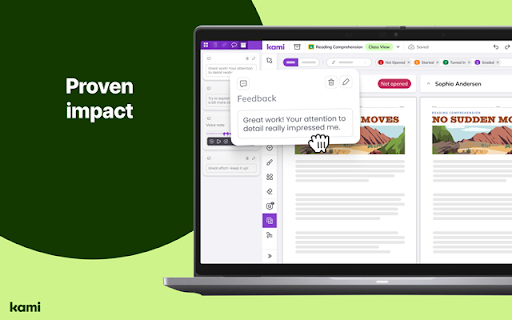
Kami is an interactive learning platform empowering students and enhancing the way teachers teach, feedback, and assess. Kami’s game-changing learning platform turns any resource into interactive, accessible experiences that spark curiosity and success. Trusted by over 50+ million users, it brings learning to life—engaging every student, including English language learners with built-in tools to help them thrive. Teachers save hours every week on teaching, grading, and planning lessons. School leaders gain a powerful, cost-effective solution that drives insight and real impact. Results from the Kami Teacher Survey 2023 | 1665 respondents | USA only | 95% Confidence | 2% Margin of error Seamlessly works with Canvas, D2L Brightspace, Google Classroom, Microsoft Teams and Schoology. Ready for more? Try Kami for free today www.kamiapp.com

MagicSchool AI - AI Assistant for Teachers
Your favorite MagicSchool AI tools are now just a click away, anytime, anywhere. Founded by a lifelong Teacher and Principal, MagicSchool is the leading generative AI platform for educators - fighting burnout and helping teachers thrive in the classroom. MagicSchool contextualizes the power of AI for educators to tools that are immediately relevant in their world and eliminates the need for complex prompting. It helps them be more effective and more efficient - with the magic of AI! Unlock the Power of AI—Right Where You Need It With our Chrome browser extension, your favorite MagicSchool AI tools are just a click away, anytime, anywhere. Say goodbye to the hassle of switching between multiple tabs and copying-pasting. We've packed MagicSchool AI with over 50 specialized Magic Tools that help you: Craft engaging lesson plans Give feedback on student work Create personalized math problems Generate rubrics Draft comprehensive IEPs Differentiate instruction effortlessly Generate quizzes and assessments Streamline email communication with families And so much more! Your Toolkit, Your Platforms Get instant access to our expansive library of 50+ templates across various platforms you use daily: Gmail and other Web Email: Communicate efficiently with parents and staff. Google Docs: Create and edit lesson plans on the fly. Google Classroom: Update your class effortlessly. Canvas, Schoology and Blackboard: Design engaging educational material in a snap. So, are you ready to revolutionize your teaching workflow? Install the Chrome browser extension today and bring the magic of MagicSchool AI to your classroom.

edpuzzle
Import your favorite educational YouTube video into Edpuzzle with a click! The extension lets you make any YouTube video interactive, by embedding questions (either manually or instantly with Teacher Assist AI), and safe, with no ads, no tracking, and no recommended videos. The extension also includes an amazing screen recording tool so you can create your own educational videos! Record your screen and take your students through a presentation they can watch at their own pace, walk them through a math problem using the interactive whiteboard complete with drawing tools, or use the camera to record a science experiment or any other creative classroom ideas you dream up.

Pear Deck Power-Up
Ensures that videos, animations, and GIFs embedded in your Pear Deck slides play at full resolution—exactly the way they should! Using Videos, Animations, and GIFs in your Pear Deck? Get ready to power up! The Power-up is a free Google Chrome extension. Installing it ensures that videos, animations, and GIFs embedded in your Pear Deck slides play at full resolution—exactly the way they should! To use, simply install the Power-up from the Chrome Web Store on the device you use in class. Now when you present with Pear Deck, the Power-up magically enables the display of your videos, animations, and GIFs on the projector and student devices. For more information about Pear Deck, visit www.peardeck.com.

Snap&Read
Text reader (TTS) that simplifies vocabulary, translates text, reads inaccessible text (OCR), and captures and cites sources. Snap&Read is the Next-Generation reading tool that can cover the most diverse reading needs. Read Aloud - Listen to text as it’s read aloud across websites, PDFs, and Google Drive. It also reads in other languages. Dynamic Text Leveling - Dynamically adjust the readability of text without changing the meaning. Study Tools - Pull text into an outline, then organize it and add notes. Remove Distractions - Remove distracting content and adjust fonts, spacing and number of characters per line creating the best online reading experience possible. The Remove Distractions tool also reformats any webpage to read—distraction-free—alongside an open outline. Color Overlay / Reading Line Guides- Color Overlay and Reading Line Guides brings focus to text paragraph-by-paragraph and even line-by-line—by masking the reading area. Screenshot Reader - Instantly get access to text embedded in images, inaccessible PDFs, and Flash through Optical Character Recognition (OCR). Readability Analyzer - See the grade level equivalent of the text on any webpage. Annotation - Highlight and add text to PDFs then save to Google Drive, One Drive, or download. Try it for free and see if it works for you. Pricing and more information can be viewed at https://snapandread.com If you already have an account for snap and read, you can manage it at https://snapandread.com
