
hkmpnondmidmfdlaphahbalnmphelnfo

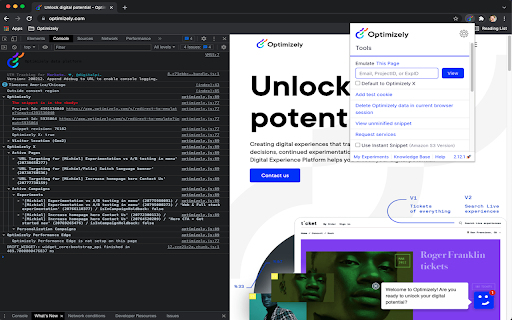
Debug your Optimizely experiments with useful JavaScript console logging and powerful caching and snippet injection options. This extension reads Optimizely JavaScript data and state for any snippet that you have access to in your Optimizely account. Visit the website your snippet is installed on and it prints useful debugging information to the JavaScript console. The messages include information about what experiments are running on the page and what experiment and variation you are currently bucketed into. The extension also enables you to use a non-cached version of your Optimizely snippet or even swap to use a different snippet you own on that page. These are useful tools for reducing wait time when debugging and trying out staging content on a production site. Here are the steps to setup the extension: - Turn on the extension by clicking on the Optimizely logo to the right of the address bar. - Login to your Optimizely account when prompted. This fetches the list of projects and snippets you have permission to view with the extension. - Open the Chrome JavaScript console to see the messages. - On Windows and Linux, press Control-Shift-J. - On Mac, press Command-Option-J. - Navigate to a site where your snippet is installed to see the console log populate with Optimizely information. - You will need to enable developer mode in order to use certain features The terms of the applicable agreement between you and Optimizely (including the online terms of service located at the following URL, https://www.optimizely.com/terms/ ) shall govern your access, installation and/or usage of this Optimizely Assistant Extension. You can learn more about the extension in our Knowledge Base at https://help.optimizely.com/QA_Campaigns_and_Experiments/The_Optimizely_Chrome_extension.

Datalayer Checker
The easiest way to debug and check the dataLayer implementations without having to use the browser console! We are happy is happy to release Datalayer Checker 3 with several new features and a revamped design! NEW VERSION AVAILABLE! 🔹 Redesigned interface and intuitive user experience 🔹 Integrated event search engine 🔹 Flexible variable visualization: table format or JSON object 🔹 Google Tag Manager container injection removed (to respect manifest v3 rules) EXCLUSIVE FEATURES: 🔹 Capture what matters! Save up to 100 dataLayers with our revolutionary "Snapshot" function 🔹 Deep analysis! Verify your dataLayers in batches by methodically inspecting your captures 🔹 Organize efficiently! Structure your workspace with intelligent filters by domain, dataLayer name, or specific search (e.g.: event_name) to automatically classify your snapshots 🔹 Stay up-to-date! Reopen all your snapshot URLs to capture new data and compare them instantly Transform your analytics experience with Datalayer Checker! Because we're passionate about analytics...

Tealium Tools
Evaluate website data, tags, and events with powerful tools for seamless Tealium iQ integration and server-side enrichments. Access quick links to documentation, training, and support, along with a catalog of custom tools built by the community. Improve your Tealium implementations with features like Web Companion for data layer validation, Server-side Trace for real-time action debugging, and Environment Switcher for seamless testing. Additional tools for troubleshooting, real-time interaction, and comprehensive testing ensure efficient, error-free setups. NEW FEATURES in V3: - New Side Panel Support - SSO Login - Click-and-Hold to Custom Sort - Built-in Feedback form 🔍 | Web Companion Easily inspect and validate your website's data layer, including cookies, JavaScript variables, and other critical elements. Fully integrated with Tealium iQ, Web Companion allows you to evaluate tags, extensions, and load rules directly on your web pages. 🎯 | Server-side Trace Monitor and debug your audience segmentation and real-time actions with Trace. Ensure the accuracy of visitor attributes, segment updates, and action firing to refine your digital marketing strategies. 🔄 | Environment Switcher Seamlessly switch between development, QA, and production environments within Tealium iQ to test and validate tags before deployment, ensuring error-free implementations across your digital properties. 🛠️ | uTag Debugger Diagnose and troubleshoot your Tealium iQ Tag Management setup with real-time logs that display tag execution and data layer interactions, ensuring accurate and efficient tag deployment. 💡 | Custom Tools Build complex and rich apps for the Tealium ecosystem. Custom tools allow you to run JavaScript on the current page, similar to an advanced bookmarklet, enabling you to gather data and create powerful, tailored tools for your specific needs. ➔ Real-Time Interaction: Make adjustments instantly with immediate feedback within your browser. ➔ User-friendly interface: Simplifies complex processes, making it accessible for both technical and non-technical users. ➔ Comprehensive Testing and Debugging: Provides tools for thorough testing and validation to ensure reliable performance and accurate data collection.

A/B Pre-test Calculator by Speero
Speero's A/B Pre-test Calculator helps you answer vital pre-test questions like MDE, sample size, duration, and more. Speero's A/B Pre-test Calculator helps you answer all important pre-test questions like: — What is the minimal detectible effect I can test for? — How long should I test for considering the effect? — What's the sample size? Type in the number of weekly sessions or users, conversions, and a number of test variants, and see if your website has the capacity to test your ideas. Or just sign in with Google Analytics and let Speero’s calculator get the results for you. Speero’s A/B Pre-test Calculator is pre-defined for 2 variants (including control), confidence of 95% and statical power of 80%. One of the best A/B Pre-test Calculators, now in Plugin mode. Determine sample size, MDE, and test duration on the go. Filter By Page Path and compare pre-test data from multiple URLs. The best part is that Speero’s A/B Pre-test Calculator connects with your GA4, letting you answer all your pre-test questions without leaving the tab.

Contentsquare - CS Live
Contentsquare’s CS Live extension will allow you to display Contentsquare’s unique UX metrics directly on your website. For every zone on each page, you can seamlessly see metrics like click recurrence, hesitation time or engagement rate.
