
hjpbafkbdcdlojmhaklhfbdighpdpghn
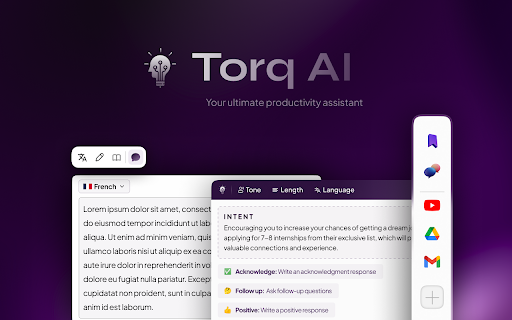
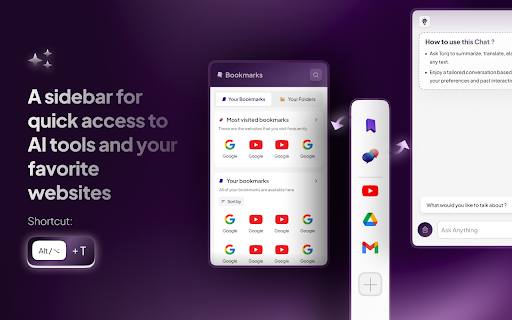
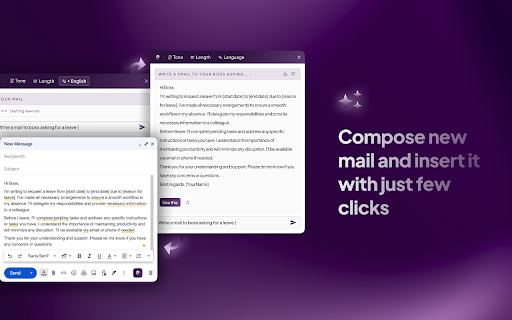
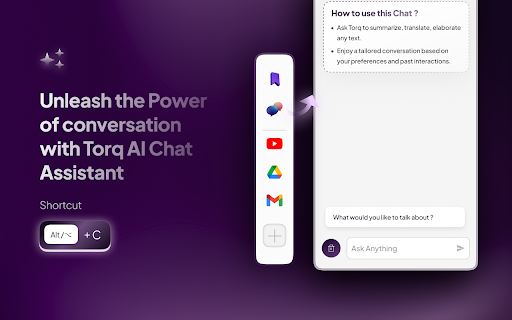
Harnessing the prowess of ChatGPT to revolutionize your productivity through advanced AI assistance. Introducing Torq AI, your advanced browsing assistant powered by state-of-the-art AI capabilities. This innovative Chrome Extension is built to elevate your browsing experience, bolster productivity, and offer a suite of new features including our brand new "Sidebar". No matter the browsing context, be it engaging with your Gmail or needing smarter, AI-integrated responses, Torq AI is your solution to streamline workflow. With Torq AI, you don't just have instant access to the data you need; you have an intelligent assistant enhancing your browsing experience at every step. From generating smart responses to assisting with real-time Gmail suggestions, Torq AI is your go-to for effective and engaging web navigation. 1️⃣ AI Smart Reply and Response Generation - Engage in dynamic conversations about any topic on the web with your personal AI assistant, Torq AI. - Benefit from smart response generation, quick answer provision, and simplification of complex texts you're reading. - How to use it? ⬇️ - Interact with Torq AI by selecting text and clicking on the Torq AI icon for inquiries about your selected reading. - Smoothly navigate your Gmail communications with the aid of Torq AI's Smart Reply feature, offering real-time suggestions for responses. - Leverage Torq AI for quick access to essential information, thus streamlining your workflow and saving precious time. - Experience a highly responsive and stable user interface, guaranteeing smoother transitions and superior usability. - Engage in an interactive AI chat, manage bookmarks and folders, access quick links, and customise the sidebar according to your needs. Torq AI is FREE and does not require any CREDIT CARD. Torq AI is here to transform your browsing experience. With our cutting-edge AI technology, you can generate smart responses, receive real-time Gmail suggestions, and have immediate access to required data. Torq AI offers you a seamless, efficient browsing journey, saving time and making web navigation intuitive and easy. Experience the power of an AI assistant that enhances your browsing experience wherever you go. Simply install the Torq AI Chrome Extension and click on the Torq AI icon on the right side of the browser to start a smart and efficient interaction with the AI. Torq AI is an intelligent browsing assistant empowered with advanced AI technology. It's designed to facilitate smart responses to inquiries, improve Gmail communications, and offer an efficient web navigation experience. Torq AI is here to boost your productivity by offering an enhanced browsing experience. Access Torq AI's Side Bar by using the Alt + T shortcut, and utilise the AI chat with the Alt + C shortcut or the trigger on the right of the page for a seamlessly interactive and customisable browsing experience. ➕ How do I utilise AI and Torq AI in Chrome? To use Torq AI on Chrome, install the Torq AI Chrome extension from the Chrome Web Store. After installation, you can start interacting with Torq AI on any website, enjoying smart AI responses and improved Gmail communication. ➕ Subscribe to us for more! Stay updated with Torq AI, your advanced Chrome Extension for an engaging browsing experience. Enjoy the power of AI in your browsing journey with Torq AI! Event Tracking for Torq Interactions: 📊 To better understand user interactions and improve the overall experience, we've introduced event tracking for interactions with Torq components. 🛡 We prioritise your privacy, and we want to assure you that events are sent only when you interact with Torq components. Importantly, no personally identifiable information (PII) is being used or collected. Your data remains confidential, and we're committed to maintaining the highest privacy standards.

Mano - Your AI Copilot powered by GPT-4
Mano brings the most powerful AI tools directly into any site. Powered by OpenAI. Mano uses the most innovative AI to make your day easier. Simply by pressing ⌥ + m, you'll have all the help you need. Just add to chrome at https://www.usemano.com 🚀 Expert Agents: Mano comes with expertly curated prompts that turn ChatGPT into a Travel Guide, a Prompt Generator, and a ton of other useful agents. Use Agents to automate and speed up your work. 🖱️One-click actions: Explain complicated topics, summarize long articles, and ask questions about any text directly from Mano's popup. You can answer any doubt you have without slowing doing what you are doing. 💌 Search the web Mano can now search the web for any new information you want it to keep in mind. No more having to search and then copy and paste text. 🔍 Access to your screen Grabbing your entire screen with a single click? Now that's what we're talking about. No more loosing context or annoying explanations 👩🏼💻 Summarize Articles Quickly from our Mano sidebar, you can summarize articles at the click of a button. 💌 Write emails like a native speaker Feel confident about your grammar, spelling and writing style. Simply select the text and press ⌥ + m. 🔍 Get human-like answers to your searches Get the answer you need instantly, without searching through pages of Google results. Simply press ⌥ + m. 👍 Boost your social engagement Generate post drafts for your social media in case you are stuck or have run out of ideas. Simply press ⌥ + m. 👩🏼💻 Fix code bugs 10x faster Quickly get code explanations and answers to hard coding issues not answered on StackOverflow. Simply press ⌥ + m. For more information visit https://www.usemano.com If you have any issues reach out to support@usemano.com or https://www.usemano.com/help

BrainBuddy: AI Assistant with ChatGPT & Bard
BrainBuddy is an All-in-one AI-powered Sidebar Assistant, with ChatGPT, Bard, & more! ⚡ Introducing BrainBuddy, the ultimate AI-powered Sidebar Assistant that revolutionizes the way you browse. 🚀Seamlessly maintain your efficiency & flow by leveraging amazing 1-click prompts and powerful pre-defined actions! 🚀Take your work quality & output to new heights by prompting both (Bard & ChatGPT) simultaneously with just a single click using the all-in-one AI sidebar! 🚀Prevent damage caused by rapid context-switching by quickly accessing the AI sidebar using quick-access keyboard shortcuts, pre-defined actions, and the AI assistant floating button! 🚀Improve your research quality and build perspective by parallelly & simultaneously comparing outputs from Bard & ChatGPT, all from the AI-powered side panel! 🚀Super-charge your ChatGPT & Bard with phenomenal AI-powered integrations and transform your browser into an AI-integrated beast! BrainBuddy is an All-in-one AI Assistant, equipped with advanced AI models like (GPT4-powered) ChatGPT and Google Bard, making it a powerful AI collaborator that's accessible anywhere and anytime at your fingertips. It is an AI extension that seamlessly integrates with your browser, providing you with a side panel that's just a shortcut key or a click away, making AI assistance available at your fingertips. One of the key features of BrainBuddy is its ability to prompt both Bard and ChatGPT simultaneously with a single input. This unique capability allows users to compare and contrast answers from both AI chatbots, offering a more comprehensive understanding and a broader perspective. Whether you're searching for data points, seeking solutions, or exploring different perspectives, BrainBuddy enhances your research quality and work output. BrainBuddy is not just an AI chatbot; it's an AI collaborator that works with you to improve your browsing experience. Its top use cases include quick information retrieval, efficient web browsing, and effective online research. It's perfect for professionals, students, researchers, writers, creators, developers, marketers, and anyone who wants to leverage the power of AI to enhance their work output & quality. With BrainBuddy, you get an 'AI anywhere & AI everywhere' experience. Experience the future of browsing with BrainBuddy, your All-in-one AI-powered Sidebar Assistant. BrainBuddy is not just an AI extension; it's your AI collaborator that's ready to assist you anytime, anywhere, whenever you need it. Leverage jaw-dropping AI-powered integrations & add superpowers to your browser, with BrainBuddy.🚀

Syncia - Power of ChatGPT on any website
Syncia is a browser extension that allows you to use Open AI's GPT in any website. Syncia enables users to chat with ChatGPT by opening a sidebar on any website by using the shortcut ctrl+shift+x. In addition, it provides a floating menu underneath any selected text on any website that allows users to generate text summaries, check grammar issues, and customise text length so on ! 🦾 Features 🗨️ Chat with ChatGPT through a sidebar. 🔑 Use your own Open AI API key. 📜 Quick menu underneath any selected text which allows you to summarise, simplify language, translate, and more. 🗂️ Allows to store custom prompts and use them with quick menu. 💯 Fully customisable settings page. 🔐 Secure and fully Free and open source forever. (Please consider giving this project a star 🌟 and contributing 💖 to support the project.) For more info check out https://github.com/Royal-lobster/Syncia Note: If shortcut is not working, Enter "chrome://extensions/shortcuts", under Syncia set new keyboard shortcut for "Open the sidebar"

ChatSider AI Copilot : ChatGPT & Claude
ChatSider: GPT & Claude Sidebar is an assistant for AI writing, translating, ChatGPT for Bing and more. ChatSider is a ChatGPT & Claude sidebar and AI co-pilot software. This remarkable AI co-pilot software is proficient in solving any of your questions or inquiries. Its capabilities are not limited to answering questions, but it can also improve essays or articles, generate work reports, translate content in any language, provide entertainment through interactive games, and much more based on your requirements. ChatSider AI Copilot uses OpenAI's ChatGPT3.5, GPT - 4, Claude to provide you with advanced AI intelligence, and here are its highlight features: 🔜 Sider Sidebar Response: the ChatSider will be displayed in the sidebar of your browser at all times, making it easy for you to get quick answers to a variety of questions while browsing any page, currently powered by the official ChatGPT-3.5, GPT - 4, Claude . 🏷 Quick Response for Selected Text: When you select text on a web page, you can quickly perform translation, expand text, answer, touch-up, etc. without spending time opening a new page. 📄 Intelligent optimization of articles: essays, blogs, social media platform posts, and almost any type of article can be optimized and expanded in one click with ChatGPT's content touch-up feature. ✒️ authentic translation: you can use ChatSider's intelligent translation function to translate authentic foreign language content recognized by locals, say goodbye to machine translation and be more accurate than translation software! 📝Study Helper: Whether you are an elementary school student, a secondary school student or a college student, you can get detailed answers to your homework problems with the help of ChatSider. 📚 A must-have for working people: work daily weekly reports, video scripts, PPT outlines are generated in one click, resume optimization, brainstorming to solve inspiration depletion. 🔍 Enhanced Search Page: Support for All Popular Search Engines (Google, Bing, DuckDuckGo, etc.). ChatGPT for Bing, ChatGPT for Google How to use ChatSider:Free ChatGPT Sidebar&AI Copilot❓ 1⃣️ Click the extension button to show the ChatGPT sidebar and ask ChatGPT questions at any time; 2⃣️ Select the built-in useful templates to generate answers in one click. You can also customize your own template! 3⃣️ Check the text on the page to quickly enable the AI Copilot. Why use ChatSider:Free ChatGPT Sidebar&AI Copilot❓ 🌟ChatSider will always be present in the browser sidebar to take care of issues for you. 🌟 ChatSider can help you write, translate, summarize, rewrite, explain or answer any question with one click. 🌟 Built-in more than ten commonly used templates help you get higher quality answers. 🌟 No need to log in to your ChatGPT(OpenAI) account, return answers as fast as ChatGPT Plus. 🌟 Supports viewing chat history to avoid losing useful answers. 📝ChatSider:Free ChatGPT Sidebar&AI Copilot's feature list: Sidebar function that can be turned on at any time 1. You can chat with ChatGPT in any website at any time. support use of GPT-3.5, GPT - 4, Claude ; 2. You can customize the prompts to ask GPT-3.5, GPT - 4, Claude questions. 3. Support all history chat queries. Quick processing functions 1. Optimize, translate, expand, etc. text selected in a web page; 2. Small browser memory footprint and lag-free Chatgpt experience. Built-in super templates 1. Built-in more than ten kinds of practical templates, support for thesis touch-up, resume optimization, code interpretation, etc.. 2. If you are not satisfied with the official templates, you can also customize the templates to serve you better. All the above features support GPT-3.5, GPT - 4, Claude , you are completely free to use. Frequently used questions: Q: What is the relationship between ChatGPT Sidebar&AI Copilot and ChatGPT? A: ChatGPT Sidebar&AI Copilot and ChatGPT helps you use the official Openai's ChatGPT feature in the browser sidebar. Q: Will more AI models be added in the future? A: Yes, we will try to develop more AI models online, such as Bard, New Bing ...... ChatSider:ChatGPT Sidebar&AI Copilot is free to use anytime and is a great alternative to Monica. We utilize OpenAI's ChatGPT service to help you with your daily life, studies, work and more.
