
hjdoplcnndgiblooccencgcggcoihigg
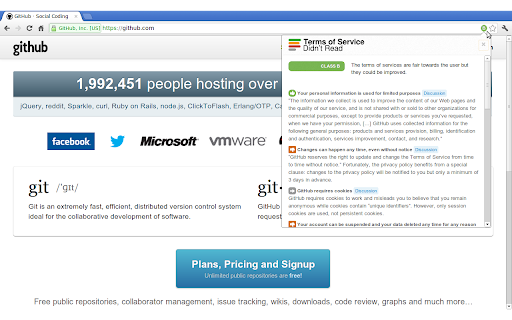
Get information about websites' terms of service and privacy policies, with ratings and summaries from ToSDR. “I have read and agree to the Terms” is the biggest lie on the web. We aim to fix that. "Terms of Service; Didn't Read" is a user rights initiative to rate and label website terms & privacy policies, from very good (Class A) to very bad (Class E). This extension shows this rating for rated websites by an unintrusive icon in the address bar. You can click on this icon to get a list with the most important rated points of the website's term of services. Additional the extension will warn you when you visit for the first time a website with a bad rating. Optionally you can notify companies for their grades by sharing on Twitter, if you do not like this feature, simply head over the settings and hide the share button. This extension is open source. You can report bugs or propose new features at https://github.com/tosdr/browser-extensions.

PixelBlock
PixelBlock is a Gmail extension that blocks people from tracking when you open their emails. PixelBlock is an Gmail extension that blocks email tracking attempts used to detect when you open and read emails. PixelBlock displays a 'red eye' when it finds and blocks a tracking attempt inside of an email.

Consent-O-Matic
Cookie pop-ups are designed to be confusing and make you 'agree' to be tracked. This add-on automatically answers consent pop-ups for you, so you can't be manipulated. Set your preferences once, and let the technology do the rest! This add-on is built and maintained by workers at Aarhus University in Denmark. We are privacy researchers that got tired of seeing how companies violate the EU's General Data Protection Regulation (GDPR). Because the organisations that enforce the GDPR do not have enough resources, we built this add-on to help them out. We looked at 680 pop-ups and combined their data processing purposes into 5 categories that you can toggle on or off. Sometimes our categories don't perfectly match those on the website, so then we will choose the more privacy preserving option. The first version of this add-on works with 4 popular pop-ups: Cookiebot, OneTrust, QuantCast, and TrustArc. The add-on is open source, so anyone can add additional pop-ups through our template system: https://github.com/cavi-au/Consent-O-Matic. Most recent changes: * Fixed issues related to manifest v3 * Fixed a bug causing some rules to not complete properly, leaving the popup open

SimpleLogin by Proton: Secure Email Aliases
Easily create a different email for each website to hide your real email. Protect your inbox against spams, phishing, data breaches Use email ALIAS instead of your real email address to: - defend your mailbox from spams, phishing and data breaches. - protect your privacy from cross-site tracking. 1- Next time a website asks for your email address, give an alias instead of your real email. 2- All emails sent to an alias is *forwarded* to your personal email address. 3- Just hit "Reply" if you want to reply to a forwarded email: the reply is sent from your alias and your real email stays hidden. You can also easily send emails from your alias. SimpleLogin is an *open-source* email alias solution that allows you to quickly create an email alias. Use an email alias when: - subscribing to a newsletter - signing up for a new account - giving your email to someone you don't trust. Later on you can simply block an email alias if it's too spammy. When you give away your personal email online, there is a good chance that your email address would end up with a spammer or leaked during a breach. You could check whether your email is leaked using website like https://haveibeenpwned.com SimpleLogin could also help manage your business emails. If you own a domain and don't want to pay a full solution like GSuite, you could add the domain into SimpleLogin and create emails like contact@my-domain.com, partner@my-domain.com with aliases. All our business emails (the @simplelogin.io) are actually aliases. ## What distinguishes SimpleLogin - Generous free plan: there's no cap on bandwidth or number of replies/sends. The Free Plan is enough for protecting your personal email. Premium Plan targets at more "advanced" users with features like custom domain, unlimited alias, PGP, directories, etc. - Fully open source: both SimpleLogin server and client code (browser extension, JS library) are open source so anyone can freely inspect and (hopefully) improve the code. You would not trust a blackbox to handle your emails, do you? - The only email forwarding solution that can be self hosted, i.e. you can run SimpleLogin on your server. - Not just email alias: we are working on providing a similar technology for phone number and credit cards. Stay tuned! - Easily export your data: allows you to change the service provider if someday you decide to leave SimpleLogin.

NoScript
Maximum protection for your browser: NoScript allows active content only for trusted domains of your choice to prevent exploitation. NoScript 13 (20th anniversary): finally a cross-browser NoScript for Chromium (also MV3!) and Firefox-based web clients. Please report any issue at https://noscript.net/forum in the Support section with [Chrome] in the subject. For the more technical inclined, bug reports and/or contributions at https://github.com/hackademix/noscript/ (source code repository). Winner of the "PC World World Class Award", bundled with the Tor Browser but available on most Chromium and Firefox based browsers, NoScript gives you with the best available protection on the web. It allows JavaScript, embedded objects, media and other active content to run only from trusted domains of your choice, e.g. your home-banking site, mitigating remotely exploitable vulnerabilities including Spectre and Meltdown, and provide a wide range of additional protections. Such a preemptive approach prevents exploitation of security vulnerabilities (known and even unknown!) with no loss of functionality where you need it. Experts do agree: your browser is really safer with NoScript!
