
jmpmfcjnflbcoidlgapblgpgbilinlem
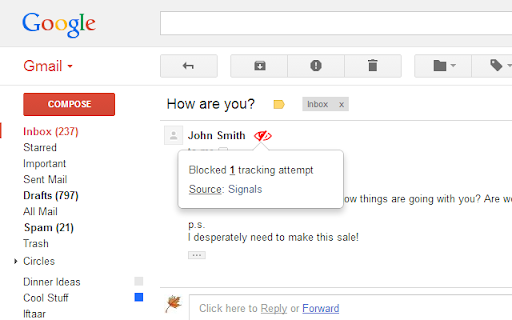
PixelBlock is a Gmail extension that blocks people from tracking when you open their emails. PixelBlock is an Gmail extension that blocks email tracking attempts used to detect when you open and read emails. PixelBlock displays a 'red eye' when it finds and blocks a tracking attempt inside of an email.

Simplify Gmail
Make Gmail simpler, more capable, and more respectful Brought to you by the co-founder and design lead for Google Inbox, Simplify Gmail is a browser extension for desktop Gmail that boosts productivity, strengthens privacy, and reduces️ stress by: ✔️ BETTER DESIGN: Hundreds of improvements (small and large) to streamline, simplify, and enhance Gmail’s design and functionality. Hide the features you don’t use, customize the ones you do including setting the list and message width and fonts. ✔️ BUNDLES: Group conversations with the same label or category into a single row in your inbox for easier bulk reading and processing. ✔️ SAVED SEARCHES: Add commonly used searches or bookmark any message to your nav for easy access. Simplify includes 24 useful searches by default like Travel, Purchases, Archived, Attachments, Notes to self, PDFs, Photos, and more. ✔️ PAUSE INBOX: Pause new mail or hide the inbox entirely for deep focus. Optionally disable notifications when the inbox is paused or hidden. ✔️ BLOCK TRACKERS: Simplify blocks over 250 email spy trackers (more than any other tracker blocker extension). ✔️ KEYBOARD SHORTCUTS: Navigate faster with your arrow keys, Enter (to open, then to reply), and Escape (close a message, then to return to inbox). Use familiar shortcuts like Ctrl+A / ⌘A to select all or Ctrl+Z / ⌘Z to undo. Press "?" in Gmail to see all shortcuts. Also includes advanced shortcuts like [ I ] to reply to an intro and move the sender to BCC. ✔️ DARK MODE: Auto-switch with OS with options to invert all of Gmail’s UI and some or all messages. ✔️ GROUP BY DATE: Group messages list by date with bulk actions to one-click archive or delete. ✔️ INBOX ZERO BACKGROUND: Choose a different background to get when you reach inbox zero. ✔️ AUTO-CC/BCC: Set addresses to add to every new message and/or reply And much more... Comes with a free 1-month trial after which a paid plan is required. Learn more and sign up when you're ready at https://simpl.fyi/plans You should always be super careful what extensions or apps you use with your email. ✔️ Simplify always puts your security and privacy first. ✔️ The code for Simplify is entirely stored on your computer (no remote code) and is for the sole purpose of improving and enhancing Gmail's user interface and functionality. ✖️ Simplify does NOT request full access to your email (no API permissions required). ✖️ None of your data is collected, stored, or sent to Simplify. ✖️ Simplify has no tracking or analytics software. ✖️ Simplify will never have ads. Ever. Simplify's products have no ads, no analytics, no trackers, no cookies, and do not send or receive personal information of any kind from your account or device. Your privacy and the security of your account and data is of the utmost importance to us. We aim to make software worth paying for and taking the strictest stance on privacy possible. Our full privacy policy is at https://simpl.fyi/privacy You can send feedback or report issues via https://simpl.fyi/support (I usually respond within one business day). Note that there are over 100,000 unique combinations of Gmail’s options, features, and user states. Add in other 3rd party add-ons, different languages, browsers, screen sizes, and more and it grows to over a billion. Simplify strives to support them all, along with the more popular 3rd party extensions and add-ons. I wrote more about the complexity of building on top of Gmail here: https://on.simpl.fyi/p/complexity-of-simplify

Gmail Sender Icons
Quickly identify the sender of email messages in Gmail without opening the message. Gmail Sender Icons is a Google Chrome extension that makes it easy for you to quickly and visually identify email senders in Gmail. It shows the company domain name of the email sender and the official logo (favicon) of the sender's organization alongside the email message. For instance, if you receive an email from larry@google.com, the Gmail extension will add a virtual label google.com to your email message and also a logo of the Google website next to the message so you can immediately identify the sender in the email list. Gmail Sender Icons has been featured on Product Hunt, LifeHacker, The Next Web and host of popular websites. The favicons and the sender's domain are visible across Gmail including search results. The sender's label is applied virtually and the actual labels of the email message are left unchanged. The Gmail Chrome extension uses the Google S2 service for generating the website's favicon while the Gmail messages are parsed with the Inbox SDK framework. All processing is done locally in your browser and no Gmail data is ever shared or uploaded anywhere. The add-on is open source and the code is available on Github.

Gmelius: Shared Inboxes & AI Email Assistants for Gmail
Save 1 hour daily: AI Assistants sort your emails, draft replies & shared inboxes let your team take over conversations for you. Gmelius is the AI-powered email management platform built natively for Gmail. It lets generative-AI assistants sort, draft replies and dispatch messages, offers shared inboxes and shared labels inside Gmail, and keeps everything in perfect sync across your team and tools. ✨ AI Assistants for Gmail – Reply, Sorting and Dispatch agents cut routine email work by an hour a day. 📨 Shared Inbox inside Gmail – manage support@, sales@ or any group address with clear open → pending → closed statuses, assignees, tags, @mentions and notes. 🏷 Shared Gmail Labels – turn any Gmail label into a live thread your whole team can follow. 🎛 Custom views – flip an inbox or label into specific views depending on your operational needs. 🤖 Automation rules and SLA timers – create “If-This-Then-That” flows, auto-assign owners and stay inside promised response times. 📊 Analytics dashboards – track volumes, resolution time and teammate workload at a glance. All features live where you already work, so your team keeps its Gmail muscle memory and gains new productivity super-powers. ✨ Highest Star Rating in our Class. 🏆 Leader of the shared inbox space. 🚀 Y Combinator S19 This is our browser extension that completes our solution for Gmail and Google Workspace customers. Key features: ✨ AI Assistants for Gmail: Meet AI assistants whose job it is to manage your Gmail inbox. ✓ AI Reply Assistants - They draft replies to your emails. ✓ AI Sorting Assistants - They sort and classify your incoming emails. ✓ AI Dispatching Assistants - They route emails to the right teammates. 📨 Shared Inbox: Transform Gmail into a collaboration platform. Make great teamwork possible in Gmail by reinventing how your team manages inboxes like support@ or invoices@. Replace cluttered Google Groups and help desks with a shared inbox built for Gmail. Discover the smartest alternative to Google Groups, Help Desks, Hiver, Front, etc. 🏷️ Gmail Shared Labels ✓ Share existing or new Gmail labels with members of your team ✓ Synchronize conversations in real-time across all devices (e.g., mobile, desktop) 👥 Team Collaboration ✓ Real-time syncing across all devices ✓ No more bcc nor fwd! ✓ Email Notes and @mentions to add context to any conversation ✓ Assign or delegate emails to members of your team 🤓 Workflow Intelligence ✓ Automate repetitive tasks with rules for internal and external workflows ✓ SLA rules, auto responder, auto assignment and more ✓ Ex: “when this email gets answered add automatically reply and assign it to that team member” 📧 Shareable Email Templates for Gmail ✓ Make email writing easy and fast ✓ Improve your team's consistency and performance ✓ Proposal, Sales, Marketing, Custom Templates - easily created and shared Swiss-grade privacy and security Headquartered in Switzerland, Gmelius follows a strict Privacy-by-Design framework. Your data stays confidential, is securely processed, and is never used to train AI models. Explore our Trust Center any time. For more details, please see https://gmelius.com/legal/security Install the extension, start your 7-day free trial, and see how AI + Gmail can unlock real email productivity for your team. Need a guided tour? Book a demo at gmelius.com/request-demo =============================== © Gmelius. Less Email. More Life. Gmail is a registered trademark of Google Inc.; Gmelius is not affiliated with Google.

Terms of Service; Didn’t Read
Get information about websites' terms of service and privacy policies, with ratings and summaries from ToSDR. “I have read and agree to the Terms” is the biggest lie on the web. We aim to fix that. "Terms of Service; Didn't Read" is a user rights initiative to rate and label website terms & privacy policies, from very good (Class A) to very bad (Class E). This extension shows this rating for rated websites by an unintrusive icon in the address bar. You can click on this icon to get a list with the most important rated points of the website's term of services. Additional the extension will warn you when you visit for the first time a website with a bad rating. Optionally you can notify companies for their grades by sharing on Twitter, if you do not like this feature, simply head over the settings and hide the share button. This extension is open source. You can report bugs or propose new features at https://github.com/tosdr/browser-extensions.
