
doojmbjmlfjjnbmnoijecmcbfeoakpjm
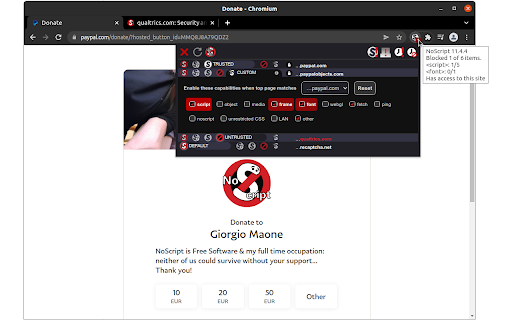

Maximum protection for your browser: NoScript allows active content only for trusted domains of your choice to prevent exploitation. NoScript 13 (20th anniversary): finally a cross-browser NoScript for Chromium (also MV3!) and Firefox-based web clients. Please report any issue at https://noscript.net/forum in the Support section with [Chrome] in the subject. For the more technical inclined, bug reports and/or contributions at https://github.com/hackademix/noscript/ (source code repository). Winner of the "PC World World Class Award", bundled with the Tor Browser but available on most Chromium and Firefox based browsers, NoScript gives you with the best available protection on the web. It allows JavaScript, embedded objects, media and other active content to run only from trusted domains of your choice, e.g. your home-banking site, mitigating remotely exploitable vulnerabilities including Spectre and Meltdown, and provide a wide range of additional protections. Such a preemptive approach prevents exploitation of security vulnerabilities (known and even unknown!) with no loss of functionality where you need it. Experts do agree: your browser is really safer with NoScript!

Font Fingerprint Defender
Font Fingerprint Defender is a lite extension that let you easily hide your real font fingerprint by reporting a random fake value and protect your privacy. This add-on does NOT block the fingerprint, instead, it simply adds a small noise to the actual fingerprint and "renews" it every time you visit a website or reload a page. It is important to note that, this add-on does not have any settings or options to adjust. Simply add it to your browser and start surfacing the internet. If you want to test this add-on, please visit a website that show your fingerprint (i.e. webbrowsertools.com/font-fingerprint/). Every time you reload the page, you will see a new fake fingerprint. This extension is made in collaboration with the author of "Canvas Fingerprint Defender": https://chrome.google.com/webstore/detail/canvas-fingerprint-defend/lanfdkkpgfjfdikkncbnojekcppdebfp Note 1: depending on your browser and platform, you may need to (Shift+Refresh) a web page to renew Font fingerprint. Note 2: To report bugs, please visit addon's homepage (https://mybrowseraddon.com/font-defender.html) and fill the bug report form.

Disconnect — Tracker Protection
Block the tracking of your personal data that feeds AI-powered attacks. Faster, more private browsing. Your data has been collected for years. Now AI weaponizes it. Criminals and bad actors steal and buy personal data at scale. AI transforms this data into precise, hyper-targeted attacks. Disconnect blocks the trackers that feed these systems, stopping surveillance at the source. We help power privacy for over 350 million users through integrations with Edge, Firefox, and other major platforms. - **Block trackers** across advertising, analytics, social, and fingerprinting categories - **Load pages faster** with up to 44% faster page loads and 39% less bandwidth - **See what's hidden** and visualize the invisible network of trackers on every site you visit - **Per-site control** to toggle protection on or off for any site Trusted by the New York Times, BBC, Washington Post, and NBC News to expose what others can't find. Named best privacy tool by the New York Times and Innovation Award winner at South by Southwest. Open source. Pay what you want. **Using Disconnect with other content blockers:** For best results, install Disconnect before adding other filtering extensions.

Don't track me Google
Removes the annoying link-conversion at Google Search/maps/... This extension gets rid of Google's ugly (tracking) URL. This speeds up loading search results and allows you to normally copy links. As of version 4.23 (January 2021), link tracking via the "ping" attribute is disabled by default. This prevents Google from tracking your link clicks. If you want Google to track your link clicks, visit the options page to disable this feature.

Script Blocker Ultimate (NoScript,Disable JS)
While using blocking Java Scripts, you might encounter some irregular behavior in web pages which can be solved by white listing said web page. I suggest to blacklist News sites that are full of ads and only their texts is important for us. You can use '*' character in whitelisting and blacklisting domains (e.g., *.google.com). If you have any suggestions or found bugs/errors, please feel free to contact us on MojtabaDaneshi@Gmail.com We look forward to your feedback.
