
onedokhafbakmhkblnokgjcliehfognj
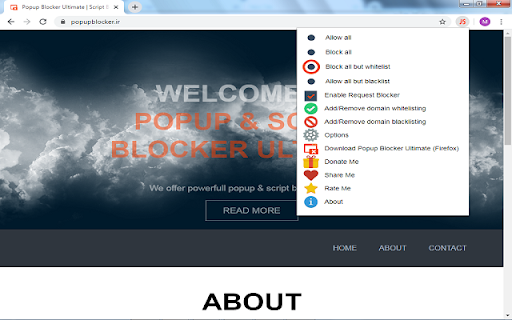
While using blocking Java Scripts, you might encounter some irregular behavior in web pages which can be solved by white listing said web page. I suggest to blacklist News sites that are full of ads and only their texts is important for us. You can use '*' character in whitelisting and blacklisting domains (e.g., *.google.com). If you have any suggestions or found bugs/errors, please feel free to contact us on MojtabaDaneshi@Gmail.com We look forward to your feedback.

HTML Content Blocker
HTML Content Blocker provides a user-friendly interface to quickly block various HTML contents (Script, Style, Image, Object, and Media) on any webpage. To work with this addon, please open the toolbar popup and press the desired content button (at the top) to block, then reload the tab. This extension has two modes to operate. The first and default mode is Global. In this mode, the addon is active for all domains except those listed in the allow-list table. The other mode is per-domain, where the addon is active only for the domains in the block-list table. To switch modes, please press the toggle button at the bottom-left corner of the interface. To add domains to the allowlist or blocklist table, please navigate to a website, then press the plus (+) button at the bottom footer. Likewise, to remove the domain from the table, press the minus (-) button. Badge icon text shows the number of blocked items for the active tab. Note: The toolbar popup interface supports dark mode. To switch the interface theme to dark, please press the moon icon on the bottom toolbar. To report bugs, please visit the addon's homepage and fill out the bug report form (https://mybrowseraddon.com/html-content-blocker.html).

NoScript
Maximum protection for your browser: NoScript allows active content only for trusted domains of your choice to prevent exploitation. NoScript 13 (20th anniversary): finally a cross-browser NoScript for Chromium (also MV3!) and Firefox-based web clients. Please report any issue at https://noscript.net/forum in the Support section with [Chrome] in the subject. For the more technical inclined, bug reports and/or contributions at https://github.com/hackademix/noscript/ (source code repository). Winner of the "PC World World Class Award", bundled with the Tor Browser but available on most Chromium and Firefox based browsers, NoScript gives you with the best available protection on the web. It allows JavaScript, embedded objects, media and other active content to run only from trusted domains of your choice, e.g. your home-banking site, mitigating remotely exploitable vulnerabilities including Spectre and Meltdown, and provide a wide range of additional protections. Such a preemptive approach prevents exploitation of security vulnerabilities (known and even unknown!) with no loss of functionality where you need it. Experts do agree: your browser is really safer with NoScript!

Script Control
• Allow or block JavaScript globally. • Allow or block JavaScript for multiple domains. • Allow or block JavaScript for individual domains. • Light and dark theme preferences. Chrome only allows 5000 simple rules (single domain) and 1000 complex rules (multiple domains). If you think you need more rules you may want to try an extension like NoScript or uBlock Origin that may not be using Chrome's new rule based technology. Script Control modifies security headers at low level to allow or block JavaScript. If you are using another security focused extension that is using the same technique, one or both extensions may interfere with each other. Script Control respects your privacy. https://nightmode.fm/software/script-control/privacy This software is provided under a no-contact and no-support model. Do not contact the author, for any reason, even if you think it would benefit the author.

JavaScript Toggle On and Off
Toggle JavaScript engines (inline, data URL, remote, and external) on and off the easy way The "JavaScript Toggle On and Off" extension provides a reliable method to switch JavaScript execution. After installation, you can still run JavaScript. Whenever you need to block, click on the action button. Exception Lists: The domains listed will allow JS execution, even when it is globally forbidden or vice versa. Auto Reload: The extension auto-refreshes the current tab after the JavaScript execution state changes. This is a forced refresh to bypass browser caches (similar to pressing Shift + F5 keyboard combination). Supported Types: 1. Inline JavaScript on top and frame elements 2. Data URI JavaScript on top and frame elements 3. External JavaScript on top and frame elements 4. Inline events 5. "javascript:" URIs 6. setTimeout evaluation 7. "document.write" execution Notes: By default, the extension is not available in incognito mode. Activate it by opening the extensions manager page (chrome://extensions) and checking the "Allow in incognito" option.
