
gdbofhhdmcladcmmfjolgndfkpobecpg
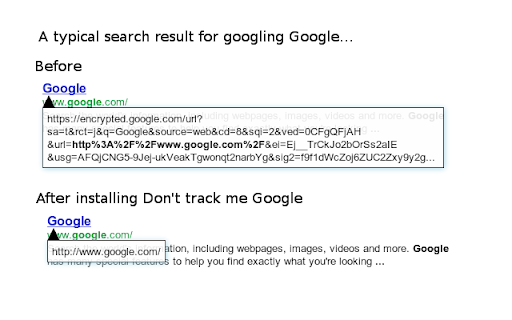
Removes the annoying link-conversion at Google Search/maps/... This extension gets rid of Google's ugly (tracking) URL. This speeds up loading search results and allows you to normally copy links. As of version 4.23 (January 2021), link tracking via the "ping" attribute is disabled by default. This prevents Google from tracking your link clicks. If you want Google to track your link clicks, visit the options page to disable this feature.

Linkumori (URLs Cleaner) - formerly Neat URL
Remove tracking parameters from URLs and protect your privacy Remove tracking parameters from URLs and protect your privacy Linkumori (Clean URLs) - Reclaim Your Online Privacy In today's data-driven world, your browsing habits and online activities are constantly being tracked and analyzed by a myriad of third-party services. One of the primary ways this is accomplished is through the use of tracking parameters embedded in the URLs you visit. These parameters allow advertisers, analytics providers, and other companies to follow your digital footprint across the web, compromising your privacy. The Linkumori (Clean URLs) Chrome extension is designed to combat this pervasive issue by automatically cleaning and purifying the URLs you encounter. It methodically removes the various tracking identifiers and parameters that are appended to URLs, preventing these third-party services from collecting and aggregating your personal data. By installing Linkumori, you can enjoy a more private and secure browsing experience, where your online activities are shielded from unwanted surveillance and profiling. The extension works seamlessly in the background, ensuring that your URLs are cleansed without interrupting your normal browsing workflow. Automatic URL cleaning: The extension automatically identifies and removes tracking parameters from the URLs you visit, protecting your privacy. Comprehensive coverage: Linkumori is equipped with an extensive set of rules to handle a wide range of URL-based tracking mechanisms, ensuring a robust and effective cleaning process. Whitelist support: You can easily add domains to a whitelist, allowing you to exclude specific websites from the URL cleaning process if needed. Minimal impact: The extension's efficient design ensures that the URL cleaning process has negligible impact on your browsing performance, providing a seamless user experience. Customizable settings: Linkumori offers the flexibility to enable or disable the extension's features, allowing you to tailor the privacy protection to your preferences. In today's digital landscape, where our online lives are increasingly exposed to data collection and monetization, the Linkumori (Clean URLs) extension stands as a powerful tool to reclaim your privacy. By installing this extension, you can take a proactive step in safeguarding your personal information and regaining control over your digital footprint. Download Linkumori (Clean URLs) now and experience the freedom of browsing the web with enhanced privacy protection. Before: http://www.phoronix.com/scan.php?page=news_item&px=Ioquake3-Auto-Updater&utm_source=feedburner&utm_medium=feed&utm_campaign=Feed%3A+Phoronix+(Phoronix) After: http://www.phoronix.com/scan.php?page=news_item&px=Ioquake3-Auto-Updater Custom rules can be added in the settings. Bug reports and feature requests -------------------------------- You can open an issue on GitHub: https://github.com/Linkumori/Linkumori-Extension/issues/new

Privacy Tweaks
Improve your online privacy with few tweaks via toolbar popup! Privacy Tweaks is an extension that helps you improve your privacy while browsing by using ten different techniques. Simply open toolbar popup UI and mark a desired tweak. Please note that, only few tweaks are selected by default. Also, please keep in mind that, depending on your browser version and platform, this add-on might behave differently. There are few settings (related to timezone, geolocation and proxy) available in toolbar popup to adjust. Currently there are 10 tweaks available for this add-on: 1. Block most common ads. 2. Block canvas fingerprint. 3. Block font fingerprint. 4. Block webgl fingerprint. 5. Block audiocontext fingerprint. 6. Block webrtc IP leakage. 7. Change browser timezone. 8. Change browser geolocation. 9. Set custom socks5 proxy. 10. Block most common trackers. Note 1: I have made this extension with Yubi's collaboration. This add-on is inspired by Speed Tweaks made by Yubi: https://chrome.google.com/webstore/detail/speed-tweaks/afebilemcaepdkmhmibgmnpfppnjimjf Note 2: to report bugs, please fill out the bug report form on the addon's homepage (https://mybrowseraddon.com/privacy-tweaks.html).

Smart HTTPS
Automatically changes HTTP protocol to HTTPS, and if loading encounters error, reverts it back to HTTP. Smart HTTPS is an extension that helps you always use the secure HTTPS protocol if it is supported by the site's server. It automatically changes the HTTP protocol to the secure HTTPS, and if loading errors occur, the extension will revert to the original HTTP protocol. Key features a. Automatically change all HTTP requests to the secure HTTPS. b. All websites (addresses) that do not support HTTPS are remembered to speed up the protocol-check process. Note that you can see and delete these items from the extension's Options page. c. The toolbar button serves as the extension's ON|OFF switch. Blue indicates ON and Gray is OFF. d. Add desired websites to the whitelist (see Options page). Note: to report bugs, please visit the extension homepage (https://mybrowseraddon.com/smart-https.html) and find the bug report form.

I still don't care about cookies
Community version of the extension `I don't care about cookies` (no Avast) This is a community updated version of a popular extension that got acquired by Avast with the source code on https://github.com/OhMyGuus/I-Dont-Care-About-Cookies ------- This extension removes cookie warnings/pop-ups from almost all websites! The EU regulations require that any website using tracking cookies must get user's permission before installing them. Imagine how irritating that becomes when you surf anonymously or if you delete cookies automatically every time you close the browser. In most cases, it just blocks or hides cookie related pop-ups. When it's needed for the website to work properly, it will automatically accept the cookie policy for you (sometimes it will accept all and sometimes only necessary cookie categories, depending on what's easier to do). It doesn't delete cookies.
