
hihnblnamcfdfdjamdhhcgnpmkhmecjm
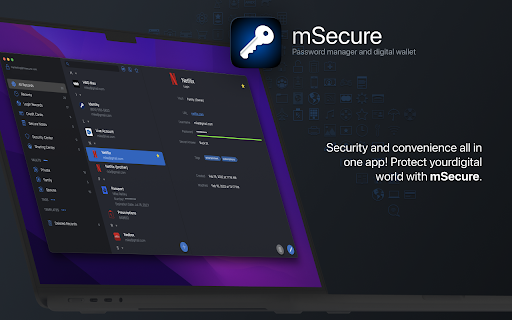

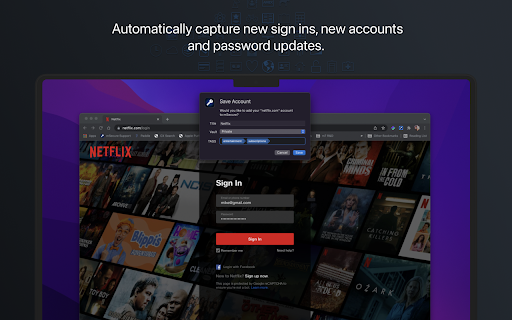
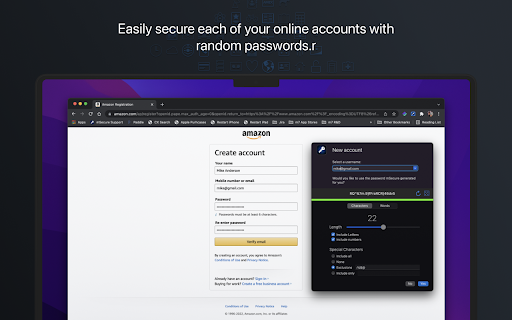
Companion browser extension for mSecure that provides auto-login features in your web browser. Your secure browser companion for mSecure, providing automated help for account management online! The mSecure Browser Extension extends mSecure's functionality into your web browser.* Instead of simply storing online account credentials, you can now access them without having to leave your web browser. All features run locally on your computer, through a secured connection, so your information is never transferred to the mSecure Extension through an online source. The source of your information is the mSecure app itself. * For the initial release of mSecure 6, mSecure's Browser Extension will only be available for Mac. Windows support is coming soon. AUTO-FILL FOR ACCOUNT SIGN IN Signing in to an existing online account is incredibly simple, as mSecure can now provide the Browser Extension with the proper credentials automatically. Instead of switching to the mSecure app to copy and paste your username and password, those items are now injected into forms automatically. AUTO-CAPTURE FOR ACCOUNT SIGN IN When signing in to an online account that has not yet been saved to your mSecure app, the Browser Extension will take the username and password you entered and send it to mSecure so a Login can be created automatically. This simplifies online account systems as your Login data is saved as you browse the web. ACCOUNT CREATION AND ACCOUNT UPDATES The mSecure Extension goes beyond just help with signing in to your existing accounts. When signing up for a new account, choose from a list of the most popular usernames in your existing Login records. When choosing your username, mSecure also provides a randomly generated password for making sure your new account is safe and secure. The process is similar for account updates. mSecure provides a randomly generated password so you don't have to worry if the password is strong enough. Simply accept the password mSecure generates, or tailor it to meet your needs in the password generator settings, and after the data is injected into the Sign Up or Update form, the new credentials are automatically saved in mSecure for easy access at a later time. Experience the security and simplicity only mSecure can provide. Simply download the mSecure app, create your account, and then download the Browser Extension here in the store. Your online account management will never be the same!

Locker - Password Manager
A browser extension makes your online presence secure and seamless. Locker is a cross-platform vault that help users secure sensitive digital assets such as logins and passwords, secret notes, payment cards, online identities, and crypto wallets. It also offers additional features to enhance browsing experience like password autofill, item sharing, and more. 1. Security - Locker uses military-grade encryption to secure your data. AES-256bit encryption combined with PBKDF2 and RSA algorithm makes your data is un-crackable. - Your vault is encrypted with a Master Password, which is the only key to decrypt your data. 2. Privacy & Transparency - Your Master Password is only yours. No body, even us, can see your Master Password thanks to Zero-knowledge development model. - Locker is an open-source product. Everyone can inspect its source code. We believe transparency is the key to better security. 3. Unlimited Sync - Once you add, edit, remove items in your Locker on a device, the data will be sync-ed across all other devices*. 4. Bring Your Passwords with You - With Offline Mode, you can use Locker anywhere, anytime, even when your phone is not connected to the internet**. No more password hassle. Free Your Mind. Install Locker. *Data is encrypted before they left the current device. **Offline Mode is only available on Locker mobile application (Android & iOS).

1Password Beta – Password Manager
The best way to experience 1Password in your browser. Easily sign in to sites, generate passwords, and store secure information. 🐞 The 1Password beta is for adventurous folks who enjoy living on the cutting edge. Be the first to get the latest features. This extension requires a 1Password membership. If you don't have one yet, you can sign up when you install the extension and try one free. 1Password is a password manager that keeps you safe online. You want to use different passwords for every website, but it can be hard to keep track of them all. With 1Password you only ever need to memorize…one password. All your other passwords and important information are protected behind the one password only you know. 1Password manages everything for you: generating, saving, and filling your passwords. Get to know 1Password in your browser: **About your privacy** 1Password was designed with a deep respect for your privacy. The data you save is encrypted and inaccessible to us. Anything else is only ever used to provide you with service and support. We believe strongly that your data is yours, and we don't want to know anything about it. This is one of the fundamental beliefs 1Password was built upon. That's why our privacy policy is simple: your data is your data. We don't use it, we don't share it, and we don't sell it. You're our customer, not our product.

Raycast Companion
A browser extension to give more context to Raycast Interact with the web in a new way by leveraging Raycast AI to summarize websites or videos, analyze content, and automate tasks in your browser. The extension gives Raycast a better understanding of what you are looking at in your browser. Create custom AI Commands with the {browser-tab} dynamic placeholder in Raycast. Explores commands on https://ray.so/prompts. Features you'll love: 🤏 Summarize the focused tab with the built-in "Summarize Website" command 🔤 Create custom commands that use AI to interpret the focused tab 🔁 Get inspired by our community (https://raycast.com/community) and share your commands Note: The extension requires Raycast to be installed.

pCloud Pass - Password manager
Easily log in to websites, autofill online forms and use suggested passwords without leaving your browser. pCloud Pass is the secure password manager for your passwords and personal data. The extension will make it easy to keep important information safe and secure without interrupting your browsing experience. ✔ Automatically save your passwords, usernames and your credit card details as you browse ✔ Autofill passwords and easily log in to the websites you use every day ✔ Instantly fill payment forms with your credit card details ✔ Generate strong & unique passwords ✔ Store unlimited passwords, credit card details or encrypted notes ✔ Access your passwords and personal data across all your devices, anywhere you go pCloud Pass was built with your privacy in mind. With our zero-knowledge privacy approach, the data you save is encrypted and only you can decrypt it with your Master Password. We do not have access to your data and we do not use, share or sell it to anyone. pCloud Pass uses client-side encryption to secure your data. Everything you save gets encrypted on your device, before it's uploaded to our servers. We use 256 AES encryption, PBKDF2 key strengthening and more to ensure your passwords and personal data are protected from all kinds of attacks. Over 16 million people worldwide have chosen pCloud as their service provider. Never remember a password again! Let pCloud Pass become your go-to password manager.
