
fgacdjnoljjfikkadhogeofgjoglooma
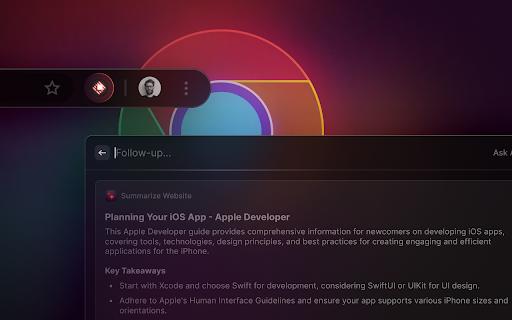

A browser extension to give more context to Raycast Interact with the web in a new way by leveraging Raycast AI to summarize websites or videos, analyze content, and automate tasks in your browser. The extension gives Raycast a better understanding of what you are looking at in your browser. Create custom AI Commands with the {browser-tab} dynamic placeholder in Raycast. Explores commands on https://prompts.ray.so. Features you'll love: 🤏 Summarize the focused tab with the built-in "Summarize Website" command 🔤 Create custom commands that use AI to interpret the focused tab 🔁 Get inspired by our community (https://raycast.com/community) and share your commands Note: The extension requires Raycast to be installed on your Mac.

Omni - Bookmark, History, & Tab Manager
Supercharge Chrome with commands, shortcuts, and more With Omni you can use Chrome like a pro. Manage tabs, bookmarks, your browser history, perform all sorts of actions and more with a simple command interface. FEATURES 🗄 Switch, open, close, and search your tabs 📚 Browse and manage your bookmarks 🔍 Search your browsing history ⚡️ 50+ actions to improve your productivity 🔮 Special commands to filter and perform more actions 🧩 Integrations with Notion, Figma, Docs, Asana... ⌨️ Shortcuts for actions such as muting, pinning, bookmarking... ⚙️ Advanced settings to help troubleshoot browsing issues 🌙 Dark mode ...and much more - all for free & no sign in needed! Want to self-host, add new features to Omni, or even make your own omnisearch extension? Feel free to check out the code on GitHub! 👉 https://github.com/alyssaxuu/omni Omni is built and maintained by Alyssa X (https://alyssax.com)

Readwise Highlighter
Save a page to Readwise Reader This is the official Reader browser extension made by and maintained by the Readwise team. You use the Reader Highlighter extension to: • Save articles to Reader – the first ever read-it-later app built for power readers. If you’ve ever used Instapaper or Pocket, Reader is like those, except it’s built for the modern era and brings all your reading into one place including: web articles, email newsletters, RSS feeds, Twitter threads, PDFs, EPUBs and more. You can get started with Reader here. • Highlight and annotate the open web. All highlights that you make using this extension will be synced with the Readwise ecosystem and, optionally, to your note-taking app of choice such as Obsidian, Notion, Roam Research, Evernote, Logseq, and more. Note: You must have an existing Readwise account to use this extension. If you are not already a subscriber, you can get a free 30-day trial with no credit card upfront. At the end of the trial, you will not be charged unless you choose to subscribe.

Obsidian Web Clipper
Save and highlight web pages in a private and durable format that you can access offline. The official extension for Obsidian. Bring the web to your personal knowledge base. Save content to your Obsidian vault so you always have access to it, even offline. Obsidian is secure, private, and designed around durable open formats that allows you to preserve your data for the long term. Obsidian Web Clipper is the best way to save, highlight, and interpret the web: - Save anything: From news articles and blog posts to recipes, product pages, and research papers — if it's on the web, you can save it. - Highlight: Easily highlight important passages, and save highlights to Obsidian. When you return to a page, your highlights are visible. - Interpret: Use natural language to extract and modify data from pages. Compatible with any model provider including local model options. - Save entire pages, selected text, or just the main content. - Templates let you automatically extract structured metadata from web pages. - Rules let you apply a specific template based on the website you're on. - Advanced templating variables let you extract data from OpenGraph, Schema.org, CSS selectors, and more. - Filters let you format and transform data before saving it. - Hotkeys let you save pages with a single keystroke. As with everything Obsidian, Web Clipper is designed to protect your privacy, and give you control over your data. - No lock-in: Your data is saved in durable, portable Markdown files. No proprietary formats. - Offline access: Your data is stored locally, and available later even without an internet connection. - 100% private: Obsidian doesn't gather or store any data about your requests. Obsidian helps you create connections and links between your notes so you can organize your thoughts. You can create links between everything — ideas, articles, lists, locations, books — anything you can put in a note, you can link to other notes. Obsidian Web Clipper is open source. You can help us improve it by submitting issues and feature requests on GitHub: https://github.com/obsidianmd/obsidian-clipper

Craft Web Clipper
FROM THE BROWSER TO YOUR CRAFT Turn inspiration into action the second you find it. Craft Web Clipper lets you capture articles, research, and images straight from Chrome or Safari and drop them into the powerful documents you already love. SAVE WHAT MATTERS Clip full pages with a clutter-free reader view, or just the parts you select – clean and readable. Every clip keeps its original link so you can jump back to the source in one click ORGANIZE AS YOU GO Save clips exactly where you want them – folders, docs, daily notes – or add them to the Unsorted folder to organize later. Create tasks directly from your web browser when something needs to be actioned on. INSTANTLY EVERYWHERE Clips sync in real time across Mac, iPhone, iPad, Windows and Web – anywhere Craft works. Use keyboard shortcuts to make your workflow even smoother. PRIVATE BY DESIGN Your clips live only in your personal Craft workspace. We never track what you read. GET STARTED IN SECONDS 1. Install the extension. 2. Sign in to your Craft account (or create one free). 3. Browse the web and click the Craft icon.
