
mdjgmfbmbedkhcmhknnjnlohbelcjckp


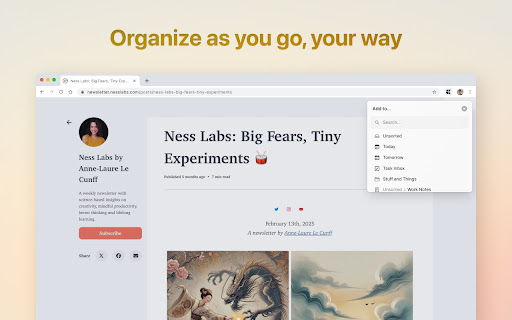

FROM THE BROWSER TO YOUR CRAFT Turn inspiration into action the second you find it. Craft Web Clipper lets you capture articles, research, and images straight from Chrome or Safari and drop them into the powerful documents you already love. SAVE WHAT MATTERS Clip full pages with a clutter-free reader view, or just the parts you select – clean and readable. Every clip keeps its original link so you can jump back to the source in one click ORGANIZE AS YOU GO Save clips exactly where you want them – folders, docs, daily notes – or add them to the Unsorted folder to organize later. Create tasks directly from your web browser when something needs to be actioned on. INSTANTLY EVERYWHERE Clips sync in real time across Mac, iPhone, iPad, Windows and Web – anywhere Craft works. Use keyboard shortcuts to make your workflow even smoother. PRIVATE BY DESIGN Your clips live only in your personal Craft workspace. We never track what you read. GET STARTED IN SECONDS 1. Install the extension. 2. Sign in to your Craft account (or create one free). 3. Browse the web and click the Craft icon.

Link Grabber
An easy to use extractor or grabber for hyperlinks on an HTML page Extract links from an HTML page and display them in another tab. Permissions Required: Link Grabber requires permission to copy links to the clipboard. No other special permissions are required. Features: * No usage information / analytics are collected from you * Use either browser action button or context menu item to activate * Configurable list of blocked domains * Filter links by substring match * Copy links to clipboard * Show/hide links that appear more than once on the page * Show/hide links to the same origin as the source page * Group links by domain

Notebook Web Clipper – Sticky Notes & Save Articles
Clear the clutter. Clip the web. Save to Notebook. Introducing 'Meeting Notes'. Taking notes during an online meeting is now a breeze with Notebook extension on Chrome. When you're on an online meeting using Zoom, Cisco Webex , Zoho Meeting, and Zoho Showtime, you can see a a popped out Notebook icon which helps you to take quick notes. If you have not logged into your Zoho account in the browser, you can export your meeting notes as a .txt file. You can choose a notebook and associate tags before you save your meeting notes to Zoho Notebook. Notebook Web Clipper Clip content from the web to your Notebook with Web Clipper. Clipped content, saved as Note Cards, are immediately synced across your devices. Please download Notebook apps from Google PlayStore(https://play.google.com/store/apps/details?id=com.zoho.notebook) or Apple AppStore(https://itunes.apple.com/us/app/notebook-take-notes-sync-across-devices/id973801089?ls=1&mt=8). You can also view your notes from https://notebook.zoho.com. What can you clip? * Be it a new recipe you want to try or the next place you want to visit, clip text, images, or links into a note card, and save to a specific notebook. * Want to save an article for future reference? With Clean View, you can save the entire article as a note card, minus the ads. * Need to quickly grab a screenshot of a web page? The 'Screenshot’ option quickly saves the screenshot as a Photo Card. * Convert any link to Smart Cards. Refer https://www.zoho.com/notebook/smart-card.html for more details on Smart Cards. * Annotate images / screenshots before you add those in Notebook. We've added a complete annotation tool to edit your images. * Use Meeting Notes to take quick notes on an online meeting using Zoom, Cisco Webex, Zoho Meeting and Zoho Showtime. Web Clipper can also be used to create note cards. Have a quick thought you want to note without leaving your browser? Create a quick note from scratch right from your browser. You can also add photos directly from your computer to Web Clipper. Write your feedback to support@zohonotebook.com zoho.com/notebook

RemNote Clipper
Easily take notes on any website with RemNote. Easily take spaced-repetition notes on any webpage with the RemNote extension. 1) To save a URL to a "Links" folder, click on the extension icon. 2) Take quick notes on an open webpage using the “Save Note” popup. 3) Open the RemNote editor any time by clicking "Continue Editing" 4) Highlight text and click "Add Note" to save source text to an associated Document.

Web Scraper
Scrape website in seconds with our web scraper tool.Easy-to-use,fast,and free interface for hassle-free scraping Scrape any website in seconds with our 𝘄𝗲𝗯 𝘀𝗰𝗿𝗮𝗽𝗲𝗿 chrome extension. Designed to be fast, simple, and user-friendly, this free web scraper helps you collect data without hassle. 🛠️ 𝗪𝗲𝗯 𝗦𝗰𝗿𝗮𝗽𝗲𝗿 𝗖𝗵𝗿𝗼𝗺𝗲 𝗘𝘅𝘁𝗲𝗻𝘀𝗶𝗼𝗻: Extract web data instantly with a lightweight and powerful tool. 💡 𝗛𝗼𝘄 𝗜𝘁 𝗪𝗼𝗿𝗸𝘀: Use this web scraper chrome to gather data from multiple websites in just a few steps. 𝗣𝗿𝗲𝗽𝗮𝗿𝗲 𝗨𝗥𝗟𝘀: List all the website links you want to scrape. 𝗣𝗿𝗼𝘃𝗶𝗱𝗲 𝗙𝘂𝗹𝗹 𝗫𝗣𝗮𝘁𝗵𝘀: Add the exact XPaths of the data elements you wish to extract. 𝗟𝗼𝗮𝗱 𝘁𝗵𝗲 𝗗𝗮𝘁𝗮: Enter your URLs and XPaths into the extension. 𝗦𝘁𝗮𝗿𝘁 𝗦𝗰𝗿𝗮𝗽𝗶𝗻𝗴: Click the Start Scrape button and watch as data is extracted within seconds. It’s that simple—start scraping with our free web scraper today and save hours of manual effort. 🚀🖱️
