
jjhefcfhmnkfeepcpnilbbkaadhngkbi
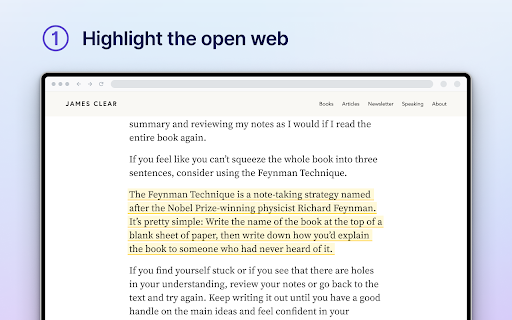
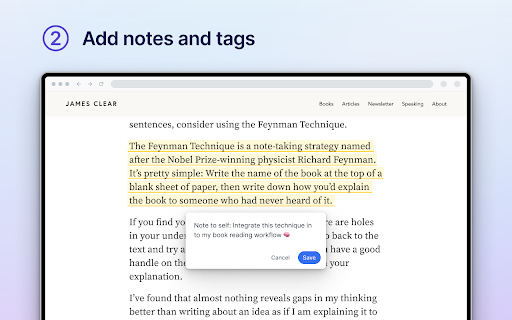


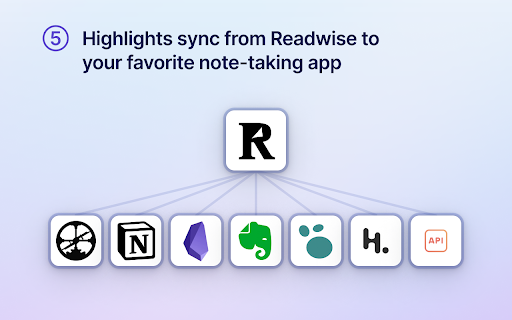
Save a page to Readwise Reader This is the official Reader browser extension made by and maintained by the Readwise team. You use the Reader Highlighter extension to: • Save articles to Reader – the first ever read-it-later app built for power readers. If you’ve ever used Instapaper or Pocket, Reader is like those, except it’s built for the modern era and brings all your reading into one place including: web articles, email newsletters, RSS feeds, Twitter threads, PDFs, EPUBs and more. You can get started with Reader here. • Highlight and annotate the open web. All highlights that you make using this extension will be synced with the Readwise ecosystem and, optionally, to your note-taking app of choice such as Obsidian, Notion, Roam Research, Evernote, Logseq, and more. Note: You must have an existing Readwise account to use this extension. If you are not already a subscriber, you can get a free 30-day trial with no credit card upfront. At the end of the trial, you will not be charged unless you choose to subscribe.

Roam Highlighter
Web highlighter for Roam Research 📢 Update: I'm working on a new and improved version of this web highlighter called Markway. To learn more and get notified about the release, go to https://markway.io 🙂 DESCRIPTION: This extension offers an easy way to highlight text on a web page and import it to note-taking apps like Roam Research, Obsidian, Logseq or Notion in the format that best suits your workflow. This is especially helpful of you are doing research, want to build your own knowledge-base or just want to save your favorite blog articles. FEATURES: Easily highlight any text on a web page → Add tags to bring your highlights into context → Customise the format of your copied highlights with placeholders → Jump to the next open Roam Research tab, to quickly insert your highlight HOW TO GET THE MOST OUT THE EXTENSION? The quickest way to launch the extension is with a hotkey (e.g CMD + SHIFT + R). You can set a hotkey in the Chrome Settings for Extensions. Next you can create your own format for the highlights, by going into the widget settings. Play around with the placeholders and use spaces to indent content. QUESTIONS / FEEDBACK: Do you have questions or feedback? The best approach is to write me directly on x.com/wirtzdan PERMISSIONS: Roam Highlighter needs to modify the websites you visit to display the widget. That's why it needs the requested permissions to function properly. However, the exact phrase ("Read and change all your data on the website you visit") make it sound more invasive than it actually is. Currently, the extension runs completely on your local machine and the only thing that is saved, are the settings you make.

Matter
Save articles to your Matter account Finally, a better reading app. The internet is full of things you want to read – articles, newsletters, Twitter threads, PDFs. Matter brings them together in one place. “Matter improves vastly on earlier read-later apps like Pocket and Instapaper, letting you easily access news and other stories whenever you get the time” –The Wall Street Journal (2022) Save in 1-click: - Save full articles if you’re within the paywall (eg. Bloomberg, NYT, WSJ) - Rollup Twitter threads into a single article page - Save PDFs and YouTube 3 ways to save: - Click the Matter button in the toolbar - Or right-click a link and “Save to Matter” - Or use the keyboard shortcut ‘Control + M’ Unified inbox for your subscriptions: - Sync your newsletters by connecting Gmail - Follow individual writers for their latest - Add any RSS feed The most elegant reading experience: - Best-in-class article parsing - Gorgeous night mode - Human-like text-to-speech - Fluid highlighting Export your knowledge: - Sync your highlights to Notion, Obsidian, Roam, Readwise, and others

Obsidian Web Clipper
Save and highlight web pages in a private and durable format that you can access offline. The official extension for Obsidian. Bring the web to your personal knowledge base. Save content to your Obsidian vault so you always have access to it, even offline. Obsidian is secure, private, and designed around durable open formats that allows you to preserve your data for the long term. Obsidian Web Clipper is the best way to save, highlight, and interpret the web: - Save anything: From news articles and blog posts to recipes, product pages, and research papers — if it's on the web, you can save it. - Highlight: Easily highlight important passages, and save highlights to Obsidian. When you return to a page, your highlights are visible. - Interpret: Use natural language to extract and modify data from pages. Compatible with any model provider including local model options. - Save entire pages, selected text, or just the main content. - Templates let you automatically extract structured metadata from web pages. - Rules let you apply a specific template based on the website you're on. - Advanced templating variables let you extract data from OpenGraph, Schema.org, CSS selectors, and more. - Filters let you format and transform data before saving it. - Hotkeys let you save pages with a single keystroke. As with everything Obsidian, Web Clipper is designed to protect your privacy, and give you control over your data. - No lock-in: Your data is saved in durable, portable Markdown files. No proprietary formats. - Offline access: Your data is stored locally, and available later even without an internet connection. - 100% private: Obsidian doesn't gather or store any data about your requests. Obsidian helps you create connections and links between your notes so you can organize your thoughts. You can create links between everything — ideas, articles, lists, locations, books — anything you can put in a note, you can link to other notes. Obsidian Web Clipper is open source. You can help us improve it by submitting issues and feature requests on GitHub: https://github.com/obsidianmd/obsidian-clipper

Save to Notion
Save the Web to Notion - 💾 Save web articles, emails, tweets, Youtube videos, Linkedin posts, cooking recipes and more… To read them later in Notion. - 🏷️ Fill database properties (tags, relation, checkbox…), right in the extension. - 📸 Take screenshots & pick images from the web and upload them to Notion. - ✍️ Highlight portions of text directly from the web and send them right to Notion. - 🧠 Automatically Map data on webpages, such as article’s publication date, author name etc… To database properties, so you don't have to copy/paste. - 👑 Create different forms for your various use cases, whether it be for work or personal purposes. Start using Save to Notion today for free! It is helping thousands of individuals everyday to be more productive and enjoy Notion in their personal and professional lives. You have an issue or want to give a feedback / suggestion? Drop me an email :) The extension doesn't collect any data unless you make an account. If you do, it may collect anonymous usage data to help us understand how you use the extension and what features we should work on first.
