
higemadklcnjhjpgcbnnbpgeeippjjcp
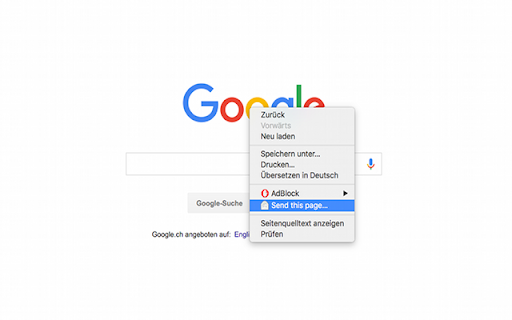

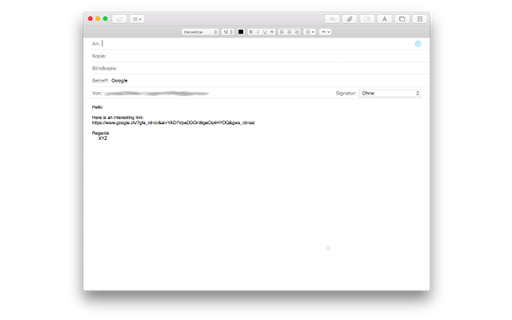

Allows you to easily send the url of a page, link, image or video per mail. This extension adds a new context menu entry called "Send this page.." when right clicking a image, video, link or page. By clicking on "Send this page.." your default (local or web) mail client will create a new mail with the page title as subject and the link as message body. It provides a fast way to quickly send a link to the current website per e-mail to somebody. It works with local Mail clients and WebMail accounts like GMail, Hotmail, etc. Note that if you use a local mail client a default Mail client must be registered on the computer. For sources, latest changes and troubleshoot infos go to: https://github.com/stadler/SendPage

Mailto: for Gmail™
This extension will make mailto: links open in a Gmail compose window. Nothing more, nothing less. It supports to, cc, subject, and body (and optionally bcc) fields, and is made to be compatible with RFC2368, the mailto: scheme standard. It doesn't modify the mailto:address itself, so you can still see the link in the status bar when you hover over it, which allows you to easily read the target at a glance. Please note, this extension doesn't need or provide any access to your mail account. It just makes links open in a Gmail account that you are already signed into. This extension can't help with mailto links outside of chrome. More info: RFC2368 - The mailto URL scheme: http://www.faqs.org/rfcs/rfc2368.html mailto links test page: https://www.ilikesleeping.co.uk/mailto-test-links/ Recent changes: * No longer need to refresh tabs on install, or after updating settings. * Updated code to avoid deprecation warnings, and warnings in console. Privacy policy: In short, this extension does not store or transmit any personal information. Read the privacy policy here: https://www.ilikesleeping.co.uk/mailto-privacy-policy/

AddToAny: Share Anywhere
Share to Facebook, Mastodon, email, and any other sharing or saving service quickly and easily with one share button. The AddToAny share button makes it easy and fast to share and save links using any service. - Share to Threads https://www.addtoany.com/blog/threads-share-button/ - Share to Bluesky - Share to Microsoft Teams - One-click sharing option if you enable just one service - Choose whether to open Email in a new tab - AddToAny's Universal Share Button - Sharing to Gmail, WhatsApp, LinkedIn, Threads, and more social media networks - AddToAny "More" button lets you instantly access any other service anytime - Right-click to share from the context menu (optional) - Share to multiple services quickly while keeping the share popup open: - Just Ctrl+click or ⌘+click on a service, or - Click the middle mouse button - Large buttons with vector icons - Perfectly crisp on high PPI screens such as Retina displays or the Chromebook family - Automatic dark mode based on system preference - Reassignable keyboard shortcut - Customize the services that appear in the sharing menu - Drag & drop to rearrange the order of services in the sharing menu - Enable one-click sharing if you select just one service - Toggle AddToAny in your context menu - Add a custom service to share to - Optimized to load instantly without slowing down Google Chrome - Directs to the HTTPS version of sites for privacy - Zero permissions needed

Share with for Google Chrome™
An extension that allows you to easily share web pages to various social sites and web apps. This is a simple extension which adds a share button to your toolbar. It allows you to share your current webpage to a variety of social sites and web apps. Version 2.0.1 • Fixed issue with encoded page titles Version 2.0.0 • Entire code re-written to optimize performance and streamline future updates • Updated toolbar icon to better match Chrome UI • Added new service • Email This extension does not collect or share your data in any way. All user preferences are saved locally. Version 1.0.0 • New look - updated to match Android 5.0 Lollipop share intent • Options - choose which services to display in the share list

Awesome Button Bar
Button bar, combining downloads, bookmarks, extensions, history, view source, print, and more from a single button. Awesome! Extensions, history, downloads, bookmarks, view source, options, new window, and print are all here. Recently added buttons are duplicate tab, second home, and refresh all tabs. Showing each button on the bar is optional so you don’t have to have them all if you don’t want them all. Also, each button can be configured to open either in the current window or in a new window. Note: print to a new window now works too!
