
hiblffephcchplieefnofjdfkchdbldh
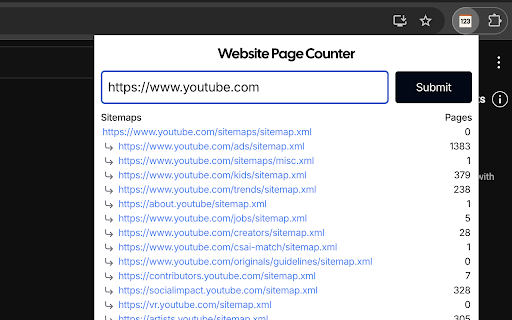
Quickly list and count all pages of any website in a single click. Built for SEO and web developers. Use this extension to quickly count all pages of any website in a single click. Features: - Crawl sitemaps to get the list of all pages of any website; - Download list of all pages in a single clicks. Built for SEO, by SEO

Detailed SEO Extension
Get SEO insights at the click of a button to any website you're currently on. Built by full-time SEO's for daily analysis. Get SEO-related insights at the click of a button to any website you're currently on. Pull back their title tag, meta description, meta robots tag and much more. Save hours of time looking through the source code of this page with our SEO analysis extension.

Easy Scraper - One-click web scraper
A free web scraper for instant results. Scrape any website with one click. No coding required. Easy Scraper is the easiest web scraper you’ll ever use. With just a single click, extract data from any website and streamline your data analysis, research, and content aggregation tasks. - Scrape lists: Scrape any list, on any website, with a single click. - Scrape details pages: After extracting a list of URLs, scrape each URL and extract data from each page. - Easy to use: Navigate to your desired webpage, click the extension icon, and watch as data is magically organized and ready for use. - Instant export: Conveniently save your scraped data in CSV or JSON, facilitating easy integration with your projects or databases. - Dynamic content handling: Skillfully manages JavaScript-rendered content, ensuring you capture data from even the most complex sites. - Privacy focused: Operates locally on your browser, ensuring your data remains private and secure without being sent over the network. 1. Install the extension with a single click from the Chrome Web Store. 2. Navigate to any website from which you wish to scrape data. 3. Click the extension icon to activate the scraper. 4. Customize your scrape by changing the list and scraping speed if desired. 5. Export your data in the format of your choice and you're done! - Lead generation: Effortlessly collect contact information and leads for your sales and marketing initiatives. - Market research: Quickly gather product details, prices, and reviews. - Data analysis: Compile data sets from various sources for analysis. - Content creation: Aggregate content for research or inspiration.

SEO Buddy - On-Page SEO Analyser
A complete On-Page SEO tool to help you analyse your webpage and optimize it for better ranking SEO Buddy is a complete On-Page SEO tool to help you analyse your webpage and guide you to optimise it for better ranking. ✅ Analyse On-Page SEO: This extension analyse the existing On-Page SEO following good practices and get a performance score ✅ Reliable Benchmark: Most essential On-Page SEO conventions are used to calculate the score of your current On-Page SEO score. ✅ Checklist for Improvement: It suggests checklist containing best practices to improve the SEO ranking. ✅ Detail overview of each factors: All the best On-Page SEO practices are presented in a detail manner like External/Internal/ Broken Links, Images missing alt, useful integrations etc. ✅ Technologies Detection: It has technology detection feature like Built-With and Wappalyzer to detect which technologies are being used on the webpage. ✅ Super fast and efficient: On-Page SEO analysis are done very efficiently within seconds ensuring reliable results. ✅ Clean and User friendly UI/UX: Ensuring a great experience is important to us. In every aspects we tried to guide the user through as less cluttered informations as possible. Besides all the above mentioned features, we are actively working bringing newer features. If you have questions, concerns or feature request, please send an email to rahulbaruri1@gmail.com. We will to reply you as early as possible.

Fast Schema Markup Checker - By Vryse SEO
Analyze and check on-page schemas and structured data of a webpage. Ideal for developers and SEOs Fast Schema Analyzer is a versatile Chrome extension designed to streamline the process of analyzing and validating schema markups directly within your browser. This tool is essential for anyone who needs to ensure that their web pages are properly optimized with structured data, meeting the necessary standards for Google’s rich results. ⭐️ Key Features 1. Schema Markup Checker: Instantly analyze any web page to determine whether it includes schema markup. This feature is the cornerstone of Fast Schema Analyzer, allowing users to quickly check if a URL has schema. 2. Validate Schemas: The extension goes beyond basic checking by validating the schemas found on the page. It ensures that the structured data is correctly implemented according to Google’s guidelines, making it a robust json-ld validator. 3. Copy JSON Code: Easily copy the JSON-LD structured data code from the page. This feature allows developers and SEOs to reuse or modify existing schema markup effortlessly. 4. Dropdown Accordion: The extension features a user-friendly interface with collapsible sections that allow users to expand and review each schema type found on the page. This makes the schema checking process more organized and efficient. 5. Rich Result Checker: Understand the potential impact of your schema on Google’s search results by checking which types of schema might trigger rich results, enhancing your site’s visibility. ❓ How It Works 1. Simple Interface: Just click the extension icon while browsing any webpage, and Fast Schema Analyzer will automatically scan the page for structured data. 2. Automatic Detection: The extension instantly checks if a URL has schema and presents the findings in a structured, easy-to-understand format. 3. Schema Validation: It validates the schema markup directly in your browser, making sure it adheres to Google’s standards, helping you avoid common errors that could affect your SEO performance. 4. Comprehensive Analysis: The extension supports all common schema types, including Article, Product, Event, FAQPage, and more, ensuring a wide application across different content types. 🤝 Benefits 1. Quick Schema Checking: No need for complex tools; simply open the extension to check structured data on any webpage in real-time. 2. Improved SEO: Ensure your pages are eligible for Google’s rich results by using the built-in rich result checker, which verifies the correct implementation of structured data. 3. Developer-Friendly: The ability to copy JSON-LD data directly from the extension makes it a practical tool for developers looking to implement or tweak structured data on their sites. 💡Frequently Asked Questions Q: What types of schema markups does Fast Schema Analyzer support? A: The extension supports a wide range of schema types, including but not limited to Product, Event, Article, and FAQPage schemas. Q: Can Fast Schema Analyzer check structured data on competitor sites? A: Yes, simply navigate to any URL, and the extension will check if the URL has schema and validate the structured data if present. Q: How does the extension validate schemas? A: Fast Schema Analyzer acts as a json-ld validator, ensuring that the structured data on the page conforms to Google’s guidelines, reducing the risk of errors.
