
hhkamhnnjfjfefgiojkggblpmkkcohgf
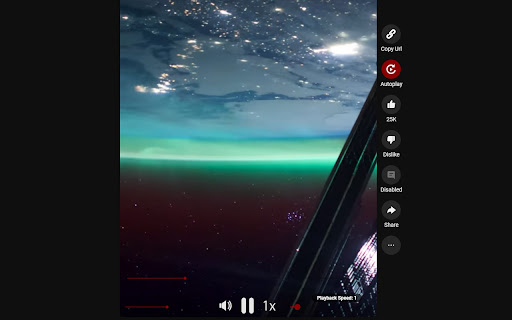


Adds more functions for desktop Youtube shorts reel. YT Shorts Improved offers enhancements to the YouTube shorts viewing experience by allowing users of this extension to tap into features such as: - AutoPlay - Seek slider bar - One click copy button - Configurable shortcut key for copying shorts url (default: ctrl + x) - Volume, Pause, Playback speed sliders and buttons Thank you for taking the time to browse and use my extension, feedback is appreciated!

Control Panel for YouTube
Gives you more control over YouTube by adding missing options and UI improvements • Disable new progress bar and controls (desktop version) - Note: this will stop working when YouTube removes the old player UI • Hide new full screen controls • Hide "More videos" in full screen • Always use compact Play button (desktop version) • Remove background from controls (desktop version) • Restore Miniplayer button (desktop version) • Restore corner click to toggle full screen (desktop version) • Hide full screen title (desktop version) • Hide full screen like/dislike buttons (desktop version) • Hide suggested sections • Hide Live videos • Hide Streamed videos • Hide Mixes • Hide Playlists • Hide Movies and TV • Hide Upcoming videos • Hide Members only videos • Hide Auto-dubbed videos in Related • Hide watched videos • Hide hidden videos - Hides the "Undo" button after 5 seconds • Hide channels - Adds "Hide channel" to video menus • Disable Home feed • Search thumbnail size (desktop version) • Minimum grid items per row (desktop version) • Hide Collaborations in Subscriptions (desktop version) • Hide Posts in Home (mobile version) • Disable Autoplay • Disable Ambient mode • Hide Related videos • Hide the Next button • Hide channel watermark • Hide Share/Thanks/Clip etc. • Hide video metadata • Hide Comments • Always use theater mode (desktop version) • Full size theater mode (desktop version) • Disable enlarged UI in theater mode (desktop version) • Always use original audio (desktop version) • Hide video end cards (desktop version) • Hide video endscreen content (desktop version) • Hide Chat (desktop version) • Add Take snapshot to video menu (JPEG / PNG) (desktop version) • Make Transcript downloadable (desktop version) • Hide Posts in Home (mobile version) • Hide Shorts • Redirect Shorts to the normal player • Hide suggested actions • Hide link to related Short by the same channel • Always show progress bar • Stop Shorts looping • Hide Remix button (desktop version) • Hide Shorts metadata until hover (desktop version) • Minimum Shorts per row (desktop version) • Show full video titles • Use square corners for thumbnails and videos • Hide categories in Home • Hide channel banner images • Hide Search with your voice • Link YouTube logo to Subscriptions (desktop version) • Tidy Guide sidebar (desktop version) • Hide "Latest" bar in Subscriptions (desktop version) • Use grid view for Subscriptions & Search (portrait only) (mobile version) • Hide Explore button in Home (mobile version) • Hide channel list in Subscriptions (mobile version)

Better Shorts Player
Better Shorts Player adds the ability to scrub through a shorts video, play, pause, adjust volume and mute the video. The controls fade away when not being hovered on as to not be intrusive to the video.

YouTube Looper
Custom loops extension for Youtube videos This is a great tool to help you do music training, or any kind of thing you can leverage repetition on video sections! Features - create multiple loops so you can train sections with ease - your loops are locally stored, when you get back to your videos your loops will still be there - set a custom playback rate (you can use very precise rates as 0.7 0.85 so you can train on your speed) - automatically generate loops for videos that have markers - quickly navigate to recent videos you looped at using the popup window - Manage, export / import and sync loops between different devices using the dashboard page Pro tips: - Hold shift key to adjust time in steps of 100ms instead of 1 second. - Hold shift and click on play to start loop 3 seconds before the loop time. - Click on the Speed label to reset speed to 100% - Click on the time numbers to edit via text (for very precise editing) - If you end a loop before the start, it will flip start/end automatically (actually, that happens if try to make the start to go after the finish in any editing way possible). You can find the source code and documentation for this project at https://github.com/wilkerlucio/media-looper.

YouTube Refined: Improve's YouTube UI
Updates the Desktop YouTube UI to have rounded corners and further enhancements and tweaks. Refine and enhance the desktop experience of YouTube with more consistent UI, rounded corners and general tweaks. This extension does not change any functionality of YouTube, this is simply an UI polish and enhancement. The UI tweaks will work in both light and dark mode and will adapt accordingly. Below is a list of the UI tweaks that have been currently made: SUBSCRIPTIONS: - Increased spacing between each video - Added a hover animation to each video, making it clear which video you are clicking and to add some flare. - Video thumbnails now use rounded corners VIDEO PLAYER: - Adds rounded corners to video player - Increased the roundness of corners on action buttons - Adds rounded corners to the individual flyout cards - Adds a hover animation to the individual flyout cards - Fixes the flyout menu appearing below end slate elements - Adds a background colour to the Share, Download, Clip and Save buttons to make them more consistent with other action buttons - Increased the spacing of elements within the channel strip and top comment strip - Adds rounded corners to the channel strip and top comment sections - Adds rounded corners to the hover boxes of end slate items and video thumbnails COMMENTS - Adds clear separation of each comment by adding a faint border and increased padding - Increases the spacing between comments and the "See more replies" button. - Adds clear separation to each comment within the reply chain including a faint border RELATED VIDEOS - Adds a hover animation to each video (slight slide out) - All thumbnails have rounded corners - Made the progress indicator bar of unfinished videos slightly transparent - Adds a background colour and CONTINUE WATHCING label to videos that have been previously watched but not yet finished. This makes it super clear what is a new recommendation and what is a previously watched item. VIDEOS (Displayed anywhere) - Added a red background colour to the Live and Premiere indicators with white text. Also increased the rounded corners and padding. - Increased the roundness of corners of video length indicator - Slightly increased the padding of video length indicator SEARCH BAR - Adds rounded corners to the top search bar - Reduced the width of the search button v1.0.1 - Updated the extension to support the latest version of YouTube's UI
