
bidjeabmcpopfddfcnpniceojmkklcje

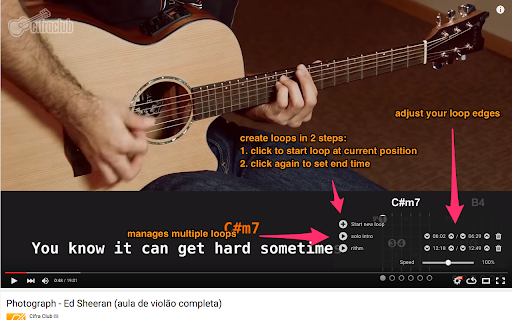

Custom loops extension for Youtube videos This is a great tool to help you do music training, or any kind of thing you can leverage repetition on video sections! Features - create multiple loops so you can train sections with ease - your loops are locally stored, when you get back to your videos your loops will still be there - set a custom playback rate (you can use very precise rates as 0.7 0.85 so you can train on your speed) - automatically generate loops for videos that have markers - quickly navigate to recent videos you looped at using the popup window - Manage, export / import and sync loops between different devices using the dashboard page Pro tips: - Hold shift key to adjust time in steps of 100ms instead of 1 second. - Hold shift and click on play to start loop 3 seconds before the loop time. - Click on the Speed label to reset speed to 100% - Click on the time numbers to edit via text (for very precise editing) - If you end a loop before the start, it will flip start/end automatically (actually, that happens if try to make the start to go after the finish in any editing way possible). You can find the source code and documentation for this project at https://github.com/wilkerlucio/media-looper.

iLoop: Youtube Loop Repeat Replay Part Video
=============================== Whether you need it? =============================== - You want to loop, repeat, replay part of the video on Youtube - You need to manually click to repeat every time - Then this extension is for you. - This is a simple extension which adds a repeat button and a slider to easily select the repeat range. =============================== How to use =============================== - To On/Off repeat: toggle the repeat button - To change the repeat range: use the slider or edit the start time, end time directly.

YouTube Parts Looper & Bookmarker
Sample Use Case ‾‾‾‾‾‾‾‾‾‾‾‾‾‾‾‾‾‾‾‾‾‾‾ Suppose a YouTube video is an album of 5 songs and you only want to listen to the 1st and the 3rd songs in it. Using this extension, you can specify the intervals (segments) of those songs, and only those portions will be played. Specifying Multiple Intervals ‾‾‾‾‾‾‾‾‾‾‾‾‾‾‾‾‾‾‾‾‾‾‾‾‾‾‾‾‾‾‾‾‾‾‾‾‾‾ An input box appears just below the video. There, you should specify the intervals as a comma separated list. Example: "00:00-00:30, 5:00-5:30" (without quotes) specifies two intervals, namely, the first 30 seconds and then the 30 seconds after the 5-minute mark. On clicking 'Apply', these intervals are played one after another. To make it easier to specify the intervals, two buttons 'Start' and 'End' are provided. This is how you should use them: Click 'Start' at time xx:xx. Then click 'End' at time yy:yy. This will automatically copy the interval "xx:xx - yy:yy" into the input box. Repeat this to add several intervals. **NEW:** Keyboard shortcuts. Ctrl+Shift+ for End, and Ctrl+Shift+' for Apply. Also, Ctrl+Shift+; is provided to set end time equal to video's end time. These are configurable in Settings. (Mac users: Cmd instead of Ctrl) Bookmarking ‾‾‾‾‾‾‾‾‾‾‾‾‾‾‾‾‾‾ You can also 'bookmark' the intervals that you have just applied (by clicking the 'Bookmark!' button). Next time you play the same video, those intervals are automatically loaded from bookmarks and only the corresponding portions are played. You can use this feature to essentially create a whole playlist of video segments (by first creating the playlist on YouTube, and then bookmarking the desired portions for individual videos in it). Clicking the button 'All B.s' opens up a side pane where all the previously bookmarked interval lists are shown. If there are multiple lists for the same video, then the most recently added interval-list will load automatically. Here, you can also manually delete a bookmark. **NEW** You can export all these bookmarks using the 'Export' button. This downloads an html file, which you can import into another browser which has this extension already installed. Make sure to move the imported bookmarks into the "YouTubePartsBookmarks" folder there (which should already be present, since the extension is already installed). Looping ‾‾‾‾‾‾‾‾‾‾‾ Finally, there's an option to play the sequence of portions on a loop. Configurable Options ‾‾‾‾‾‾‾‾‾‾‾‾‾‾‾‾‾‾‾‾‾‾‾‾‾‾‾‾ Click this extension's icon and click options. (Alternatively, go to 'Manage Extensions', click this extension's 'Details' and click 'Extension options'.) There you can configure the following: 1. Keyboard shortcuts for the Start and End buttons 2. Set looping as the default behavior 3. (Experimental feature) Allow up to 1 decimal place for seconds in the input. This will let you specify more granular intervals, like "0:0 - 0:0.9" After saving the settings, refresh existing YouTube tabs if any, for the changes to reflect. Miscellaneous ‾‾‾‾‾‾‾‾‾‾‾‾‾‾‾‾‾‾‾ - Timestamps can be in the hh:mm:ss format (e.g. "00:00:00-1:00:00" means the first 1 hour), or the mm:ss format, or just in seconds ("0-3600" also means the first 1 hour). - Intervals are ordered by their starting time. Overlapping intervals are merged. - This extension stores all the saved interval lists in a dedicated bookmarks directory called 'YoutubePartsBookmarks'. Ensure not to delete or modify it. Thanks to users for providing valuable feedback.

YouTube Repeat
Repeat YouTube videos based on user preference for each tab. Single repeat choice for all YouTube links. - Just save your preference once and then enjoy repeated playback of your favorite songs and videos on YouTube without reloading your webpage or requirement to consume additional Internet usage.

YouLoop - Replay your favorite video parts
Chrome extension to loop specific parts of your YouTube videos Easily loop specific parts of your favorite online videos with YouLoop. Introducing YouLoop, a powerful Chrome extension designed to enhance your video watching experience. Whether you're learning a new skill, enjoying music videos, or analyzing specific scenes, YouLoop allows you to loop precise segments of any online video effortlessly. ➤ Custom Loop Points: Set start and end points for looping any part of a video. ➤ Easy to Use: Intuitive interface seamlessly integrates with your video watching experience. ➤ Perfect for Learning: Ideal for practicing musical instruments, language learning, or going over educational content repeatedly. ➤ Entertainment and Analysis: Enjoy your favorite video parts on loop or analyze specific scenes in-depth. With YouLoop, you have the ultimate control over how you watch online videos. Get ready to loop, learn, and enjoy! 📪 Contact us: Any questions or suggestions? Please contact us at 💌 kaitodevstore@gmail.com We value your input and are here to assist you in making the most of our tools.
