
mnpkdmkepkfhepfokcmkbdnjpajcnajf
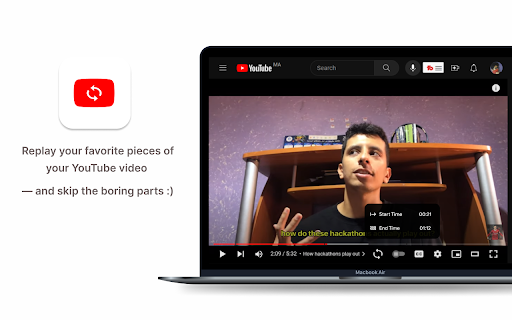

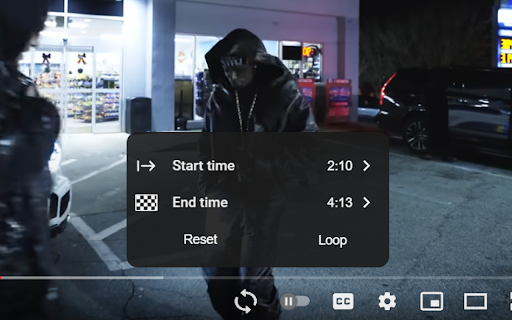
Chrome extension to loop specific parts of your YouTube videos Easily loop specific parts of your favorite online videos with YouLoop. Introducing YouLoop, a powerful Chrome extension designed to enhance your video watching experience. Whether you're learning a new skill, enjoying music videos, or analyzing specific scenes, YouLoop allows you to loop precise segments of any online video effortlessly. ➤ Custom Loop Points: Set start and end points for looping any part of a video. ➤ Easy to Use: Intuitive interface seamlessly integrates with your video watching experience. ➤ Perfect for Learning: Ideal for practicing musical instruments, language learning, or going over educational content repeatedly. ➤ Entertainment and Analysis: Enjoy your favorite video parts on loop or analyze specific scenes in-depth. With YouLoop, you have the ultimate control over how you watch online videos. Get ready to loop, learn, and enjoy! 📪 Contact us: Any questions or suggestions? Please contact us at 💌 kaitodevstore@gmail.com We value your input and are here to assist you in making the most of our tools.

Auto Replay for Youtube™
This extension adds an Auto Replay button to YouTube™ Videos. This is Auto Replay for YouTube! Watch your favorite videos on Youtube over and over again. This extension works by adding an auto replay checkbox in YouTube™ video page. You can also select a portion of the video to be auto replayed. HTML 5 videos are now supported. Auto Replay for YouTube is easy to use and has a user friendly design. - Switch on/off the auto replay function with one click - Show/hide auto replay options and choose how many times to replay/loop a YouTube video - Select the specific time period that you wish to auto replay/loop a YouTube video. Now you can create a loop for the best parts of your favourite YouTube videos. There is an easy to use interface which is being added to the YouTube video so you can create a loop of your choice. You can also bookmark your favourite YouTube videos and they will always be available for you to auto replay automatically. Auto Replay for YouTube is probably the best YouTube looper to repeat and replay videos. Enjoy your favorite video moments indefinitely and watch them over and over again!

iLoop: Youtube Loop Repeat Replay Part Video
=============================== Whether you need it? =============================== - You want to loop, repeat, replay part of the video on Youtube - You need to manually click to repeat every time - Then this extension is for you. - This is a simple extension which adds a repeat button and a slider to easily select the repeat range. =============================== How to use =============================== - To On/Off repeat: toggle the repeat button - To change the repeat range: use the slider or edit the start time, end time directly.

YouLoop
Put YouTube videos on loop with one click Loop your favorite YouTube videos. Just click the new loop icon next to the other YouTube video control icons while watching a YouTube video - the icon rotates and turns red indicating that the current YouTube video will be repeated. You can stop looping by pressing on the icon again. So why choose this extension instead of the others? • Much smaller than other extensions (= 100kB) • No support for Flash player which is old and deprecated. Let's help remove Flash Player from the internet! • Low memory usage since it is just a script. • Fancy animations! • Vanilla JavaScript only! • Other extensions of the same kind include unnecessary code and the code base is very messy. • If you have any problems or suggestions, feel free to click on "Support" and shoot me a question. • If you like this extension, please consider rating it.

YouTube Video Looper
Never worry about having to navigate back through the progress bar to replay your favorite songs in a mix again. Youtube Video Looper allows to create time intervals within YouTube videos, enabling them to play selected portions of the video repeatedly. Have you ever wanted to replay a specific song in a YouTube mix but found it annoying to keep navigating back in the progress bar to replay ? Youtube Video Looper solves this problem by allowing you to create time intervals within the video that you can easily access and replay whenever you want. With Youtube Video Looper, you can create multiple intervals within a single video and give each interval a custom name to make it easier to remember. The extension provides a simple and user-friendly interface for creating and managing these intervals.
