
lodcanccmfbpjjpnngindkkmiehimile
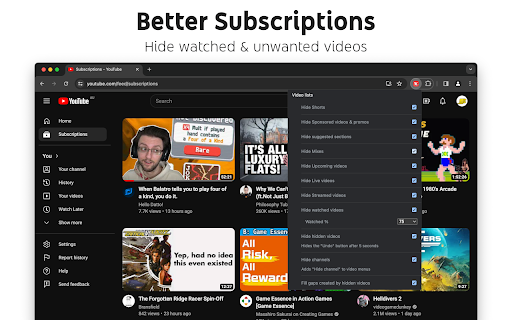
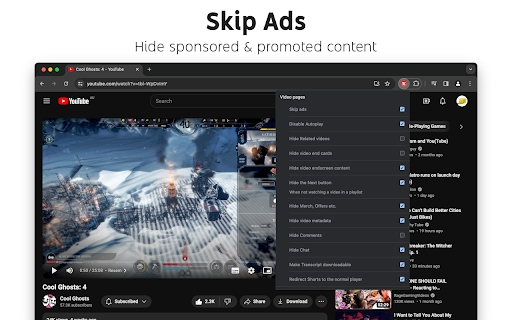
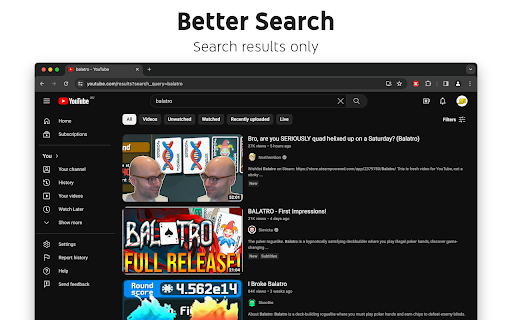
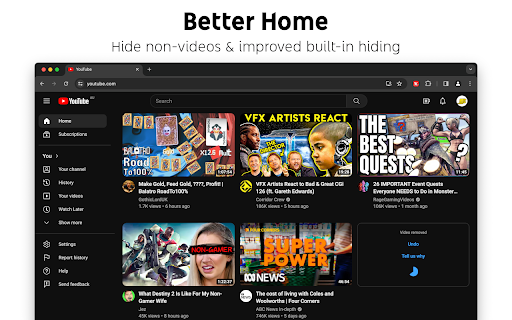
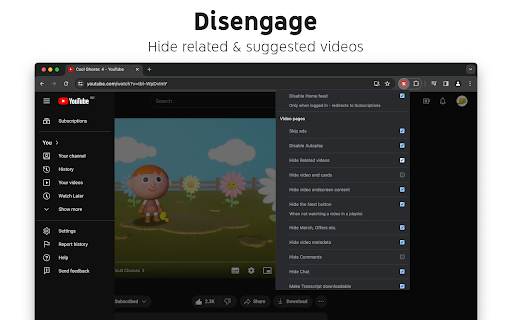
Gives you more control over YouTube by adding missing options and UI improvements • Disable new progress bar and controls (desktop version) - Note: this will stop working when YouTube removes the old player UI • Hide new full screen controls • Hide "More videos" in full screen • Always use compact Play button (desktop version) • Remove background from controls (desktop version) • Restore Miniplayer button (desktop version) • Restore corner click to toggle full screen (desktop version) • Hide full screen title (desktop version) • Hide full screen like/dislike buttons (desktop version) • Hide suggested sections • Hide Live videos • Hide Streamed videos • Hide Mixes • Hide Playlists • Hide Movies and TV • Hide Upcoming videos • Hide Members only videos • Hide Auto-dubbed videos in Related • Hide watched videos • Hide hidden videos - Hides the "Undo" button after 5 seconds • Hide channels - Adds "Hide channel" to video menus • Disable Home feed • Search thumbnail size (desktop version) • Minimum grid items per row (desktop version) • Hide Collaborations in Subscriptions (desktop version) • Hide Posts in Home (mobile version) • Disable Autoplay • Disable Ambient mode • Hide Related videos • Hide the Next button • Hide channel watermark • Hide Share/Thanks/Clip etc. • Hide video metadata • Hide Comments • Always use theater mode (desktop version) • Full size theater mode (desktop version) • Disable enlarged UI in theater mode (desktop version) • Always use original audio (desktop version) • Hide video end cards (desktop version) • Hide video endscreen content (desktop version) • Hide Chat (desktop version) • Add Take snapshot to video menu (JPEG / PNG) (desktop version) • Make Transcript downloadable (desktop version) • Hide Posts in Home (mobile version) • Hide Shorts • Redirect Shorts to the normal player • Hide suggested actions • Hide link to related Short by the same channel • Always show progress bar • Stop Shorts looping • Hide Remix button (desktop version) • Hide Shorts metadata until hover (desktop version) • Minimum Shorts per row (desktop version) • Show full video titles • Use square corners for thumbnails and videos • Hide categories in Home • Hide channel banner images • Hide Search with your voice • Link YouTube logo to Subscriptions (desktop version) • Tidy Guide sidebar (desktop version) • Hide "Latest" bar in Subscriptions (desktop version) • Use grid view for Subscriptions & Search (portrait only) (mobile version) • Hide Explore button in Home (mobile version) • Hide channel list in Subscriptions (mobile version)

PlayerTube
The secret ingredient for a older (and better) looking YouTube. PlayerTube is a free browser extension that is used for editing and changing up the style of the current YouTube player to a more older (and better) look. PlayerTube provides lots of features & options that can change the YouTube player's functionality and/or look, each can be enabled or disabled from it's extension menu. Users can customize the style of their YouTube player and share it across the web for others to use with custom theming. PlayerTube provides a whole page dedicated to it's custom themes feature so users can jump right in without looking up a YouTube tutorial. Latest update (v1.12.2): More bug fixes!!! (I just can't catch a break can I?) Also sorry for being a little late on sending this out to browser stores... * Fixed an issue where the settings popup would crash because of latest update (#95) * Fixed an issue with 2015 not disappearing (with & without fade out setting option) * Fixed settings menu not sizing on first launch with "Minify settings menu" enabled * Added error log to popup page/window * Touch ups to pt-resize

GoodTube - Adblock for Youtube + Remove Youtube Shorts + Restore old UI
Undetectable Youtube adblock / adblocker! With options to Remove Youtube Shorts, Auto Set Youtube Video Quality, Remove AI and more! If you've had trouble with your other adblockers being detected by Youtube and are looking for something more reliable - this extension is for you. It also allows you to customise Youtube in many different ways. 🚀 Features - Blocks 100% of video and page ads - Restores the old video player / ui - Removes the "are you still watching" popup - Fixes "experiencing interruptions" delays - Also works on Youtube Music ⚙️ Settings - Remove all shorts - Auto set the video quality (highest, lowest or pick one) - How many videos display per row on the home page - Hide "who's still listening in 2026?" style comments - Hide info cards - Hide end screen suggested videos - Hide sidebar suggested videos - Hide comments - Hide AI summaries & "ask" sections - Hide members only videos - Always play from the start - Use black background on video player - Instant pause (no delay) 💎 How much does it cost? This extension gives you a 7 day free trial. After that it costs $2 (once only) for unlimited access on as many devices as you like. ⭐ How is this adblocker different? Normal adblockers use "filter lists". Unfortunately Youtube keeps changing how their ads look and these filters must be constantly updated. They are also easy to detect. GoodTube takes a different approach. It uses a unique method to block ads via the "front end", which cannot be easily detected or stopped by Youtube. Made with love by just one developer. Enjoy!❤️

OldYTPlayer | YouTube Old Player UI + Minimal Tweaks
Restores YouTube's pre-2025 player UI and optional tweaks (dislikes, SponsorBlock, etc.). Includes popup controls. Take control of YouTube and bring back the classic player. OldYTPlayer restores YouTube’s pre-2025 video player and adds a handful of optional, privacy-friendly tweaks. If you prefer the familiar layout with fewer distractions—but still want modern conveniences like community dislikes and SponsorBlock, this extension is for you. Restore the Old Player • Reverts the YouTube player to its pre-2025 look • Hides the new fullscreen “grid” and quick controls • Keeps the classic style consistent Optional Tweaks • Return YouTube Dislike integration • SponsorBlock segment skipping • Classic like/dislike icons and more Easy Controls • Popup master enable/disable • “Only Revert Player” quick action • Hide/Unhide the OldYTPlayer settings entry Player and UI • Revert Old YouTube Player (pre-2025 UI) • Hide fullscreen “More videos” grid and quick-action overlays • Classic like/dislike buttons Tweaks and Cleanup • Remove AI Summary and “Ask AI” • Hide Shorts across home/search/sidebar/related • Hide sponsored panels, overlays, merch and promos • Hide Share/Thanks/Clip buttons Integrations • Skip sponsored segments with SponsorBlock • Show community dislike counts via Return YouTube Dislike ...and much more, all togge-able! OldYoutubePlayer is a third-party extension and is not affiliated with YouTube. YouTube is a trademark of Google LLC. Use of this trademark is subject to Google Permissions.

YouTube List View Mode
Keep YouTube Subscriptions/Channel Videos in List View. Click on the Extension Icon to Open the Menu. Stay Organized with YouTube List View Extension Tired of switching back to List View every time you browse YouTube Subscriptions? This extension is here to make your experience seamless and hassle-free by locking your subscriptions and channel videos in List View mode. ## Key Features: ✅ Subscriptions List View - Easily switch to List View for your subscriptions. - Prevents YouTube from reverting to Grid View, even after reloading the page. - Hide Shorts and Hide Most relevant options ✅ Channel Videos List View - Browse channel videos in List View for a cleaner and more organized layout. - Simple reload applies your preferred view instantly. ✅ Customizable Preferences - Use the intuitive menu to choose whether to apply List View to subscriptions, channel videos, or both. ## Why You'll Love It Struggling to save the default view for subscriptions? Prefer channel videos in an organized format? This extension is the solution you've been waiting for. We’re dedicated to making your YouTube experience as seamless as possible. If you encounter any issues or have ideas for improvements, don’t hesitate to reach out. Thank you for choosing the YouTube List View Extension – your support and feedback mean the world to us! Try it now and enjoy a clutter-free YouTube experience!
