
hhjeaokafplhjoogdemakihhdhffacia
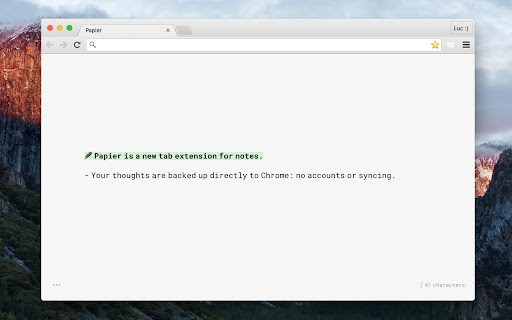
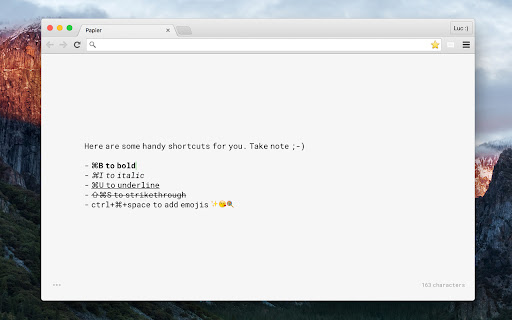


Open a new tab and trap your best thoughts. Got something on your mind? Did you know that the average person has about 60,000 thoughts a day? And that we spend about 7 hours looking at screens? Now with the Papier extension for Chrome, just open a new tab and trap your best thoughts. They'll be backed up directly to Chrome: no accounts, no syncing. Simple, clean, and distraction-free, Papier declutters your thoughts so you can focus on the content. Let nothing get in the way of your notes.

Link to Text Fragment
Browser extension that allows for linking to arbitrary text on a page. Update: Chrome now has a built-in feature ("Copy Link to Highlight" in the context menu) to copy text fragment links. The extension has an additional feature that allows you to also copy rich links. You can activate this feature in the options. This extension allows for easily creating a special link to the currently selected text on a page via the context menu. When opening such a special link, a compatible browser will scroll the selected text into view and highlight it. • Select the text that you want to link to. • Right-click and choose "Copy Link to Selected Text" from the context menu. • If the link creation succeeded, the selected text will be briefly highlighted in yellow. • Paste your link wherever you want to share it. • 💡 Pro-tip: you can assign a keyboard shortcut to the copy action! 📖 Article: https://web.dev/text-fragments/ 🧩 Extension: https://chrome.google.com/webstore/detail/link-to-text-fragment/pbcodcjpfjdpcineamnnmbkkmkdpajjg 🎬 Demo video: https://www.youtube.com/watch?v=Y5DmGqnzvBI For more information, see the Text Fragments specification (https://wicg.github.io/scroll-to-text-fragment/) where this feature is described. This extension is open-source (https://github.com/GoogleChromeLabs/link-to-text-fragment) and licensed under the terms of the Apache 2.0 license. By installing this item, you agree to the Google Terms of Service and Privacy Policy (https://www.google.com/intl/en/policies/).

Draft by Slite
Easily draft notes and ideas from a tab. Save them by sending them to your Slite workspace. Draft by Slite turns your new tabs into a distraction-free editor for your quick notes and ideas—no need to be a Slite user. Notes are automatically saved, even if you close your tab. When you’re done, send them to your Slite workspace in one click. It allows you to: • save your spur of the moment ideas the second they come to you • start writing meeting minutes in seconds • keep a quick access to your daily to-do list About Slite Slite is the fastest way to access trusted company information. Powered by AI, Slite’s knowledge base enables growing teams to instantly get the answers they need - without even searching. From onboarding guides to all hands notes, Slite keeps all types of company information centralized in one place. Docs stay organized, can be verified, and are tracked so everyone can get on with their work, informed. Replace all-in-one workspaces with a tool built for company knowledge and see it scale with your team. Join more than 200,000 companies that use Slite as their single source of truth today.

Panda New Tab
Replace your new tab page with all your favorite websites like Dribbble, Product Hunt, GitHub, Hacker News, Medium, and more. Panda is a new tab dashboard with widgets. It includes a simple, free newsreader. Discover the best tools, resources, and inspiration in the world of design and tech—all in one place. You’ll find the date and time, customizable wallpapers, a fullscreen toggle, and quick access to Chrome Apps. FEATURES Over 200+ news and inspiration sources 9 reading layouts to chose from Bookmark and read it later Dark mode for when it gets late Quick Notes for Post-it style notes Timezone Calculator ☆☆☆ TechCrunch ☆☆☆ An easy way to keep up with industry news and inspiration from a variety of sources in one interface. ☆☆☆ Lifehacker ☆☆☆ Panda is a news reader that keeps you inspired and informed by combining top-rated stories from sites like Hacker News and Product Hunt. CONTACT For general enquires: hello@usepanda.com To report a bug or suggestion: feedback@usepanda.com Twitter: @usepanda

Prioritab
A new tab page to remind you of your priorities A new tab page that emphasizes setting priorities. Set your priorities for the day, week and month, and be reminded about them every time you open a new tab! Newest version (v3.0.0, 7/16/25): (all credit to Github user SaltSpectre) updating to manifest v3 and other much-needed improvements Past updates: v2.0.0, 5/6/17: (all credit to Github user griffedge) responsive redesign v1.1.3, 3/26/17: (all credit to Github user griffedge) many design improvements v1.1.2, 11/26/16: (all credit to Github users bitvitez and pali) clearer way to remove Prioritab v1.1.1, 3/1/16: (all credit to Github user bitvitez) ability to customize date/time formats v1.1.0, 12/31/15: to-do items can now be edited in-line, and marked 'done' without deleting the card v1.0.1, 9/2/15: to-do items now have a 'cards' look to them v1.0.0, 05/10/15: drag-and-drop between lists; toggle for "workday" instead of day timer v0.1.3, 01/25/15: ability to customize your Prioritab's colors v0.1.2, 12/31/14: some backend changes that sync your priorities across devices!
