
napbejkndjhcciibiglkimmgdlfjcbnp
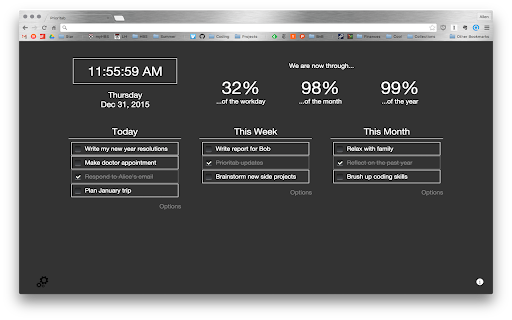
A new tab page to remind you of your priorities A new tab page that emphasizes setting priorities. Set your priorities for the day, week and month, and be reminded about them every time you open a new tab! Newest version (v3.0.0, 7/16/25): (all credit to Github user SaltSpectre) updating to manifest v3 and other much-needed improvements Past updates: v2.0.0, 5/6/17: (all credit to Github user griffedge) responsive redesign v1.1.3, 3/26/17: (all credit to Github user griffedge) many design improvements v1.1.2, 11/26/16: (all credit to Github users bitvitez and pali) clearer way to remove Prioritab v1.1.1, 3/1/16: (all credit to Github user bitvitez) ability to customize date/time formats v1.1.0, 12/31/15: to-do items can now be edited in-line, and marked 'done' without deleting the card v1.0.1, 9/2/15: to-do items now have a 'cards' look to them v1.0.0, 05/10/15: drag-and-drop between lists; toggle for "workday" instead of day timer v0.1.3, 01/25/15: ability to customize your Prioritab's colors v0.1.2, 12/31/14: some backend changes that sync your priorities across devices!

Present
Present helps you stay focused and mindful of how you spend your time online. You open Chrome to work. An hour later, you’re deep in Reddit. That’s not just a willpower issue. Browsers are designed to pull attention: endless scroll, recommendations, and one-click “just checking” tabs. A lot of blockers respond with a blank error page, which is easy to ignore, override, or resent. Present takes a different approach: it limits or blocks distracting sites, and when you hit the limit it routes you to a Focus Room instead of a dead end. 1. Set rules once - 12 categories, 2,700+ mapped domains (social, video, news, gaming, shopping, crypto, and more) - For each category: `Allow` (no limits), `Limit` (daily time cap), or `Protect` (hard block) - Add your own sites and set exceptions (whitelist domains) 2. Stay aware while you browse - On limited sites, a live timer banner shows how much time you have left 3. When time’s up, use the Focus Room - Instead of an error page, you land in a Focus Room with 133 ambient scenes (video + synced audio) - Built-in timers (standard sessions or Pomodoro) - Optional bells, plus a place to write what you’re focusing on 4. Check your patterns - Daily totals, 7-day trends, category breakdowns - One-click reset if you want to start fresh Also: - Optional New Tab override (new tabs can open the Focus Room) - Timer durations from 5 minutes to 3 hours, plus custom - 6 bell sounds with repeat intervals you choose - Rotating focus quotes and saved focus history - Timer state can persist even if you close the Focus Room - No account required; data stays local in your browser From the maker of TimeWarp (2013, 15,000+ users). Rebuilt from scratch.

Category Tabs for Google Keep™
Better organise your Google Keep notes Tired of wasting time looking look through and re-sorting all of your notes on Google Keep? With Category Tabs for Google Keep™, you can now sort your new and existing notes by category. Each category represents one color. Adding a note to a category is very easy, just change the color of the note. When you want to view the notes you have sorted by color, simply click on the note color you wish to view. If you would like to view your you entire collection of notes/checklists, there is an “All” option next to the color options (this option is set by default). Category Tabs for Google Keep™ seamlessly integrates into the page and the options to look at your notes/checklists in list view or gird view is still available. The ability to post a quick note/list/picture is still available as well and is still placed in the same spot as it usually is. This application supports all the colors offered by Google Keep. You can access the settings by opening the menu in google keep, and hit "Customize Categories"

Humble New Tab Page
Redesigned new tab page featuring your bookmarks, apps, most visited, and recently closed in a custom layout. Features: • Simple, clean design • Highly customizable • Fast loading and lightweight This extension replaces the default new tab page. Drag and drop folders to create new columns or reorder them. The font, colors, spacing, and more can be customized from the options menu. The source code is available under the MIT license github.com/ibillingsley/HumbleNewTabPage Version 1.26 - July 2, 2023 • Added font-weight option • Replaced Apps folder with a link to chrome://apps Version 1.23 - December 2, 2018 • Added tooltips for truncated text • Added option to remember open folders Version 1.14 - May 11, 2014 • Reduced memory usage • Added option to set number of items for recently closed, recent bookmarks, and most visited • Added option for background image size • Added link to bookmark manager in folder context menu Version 1.12 - August 18, 2013 • Reorder apps via drag and drop Version 1.11 - August 3, 2013 • Fixed launching packaged apps (Google Keep) • Fixed launching file:/// and chrome:// URLs • Fixed Mobile Bookmarks folder not being removable • Disable weather if geolocation is denied • Default layout changed to 2 columns • Uninstall apps from the context menu • Hide Google Wallet Service from apps Version 1.9 - December 30, 2012 • Uses geolocation for weather by default • Fixed bug with drag and drop • Added Chrome Web Store to apps Version 1.8 - November 9, 2012 • Redesigned options panel • Added several new settings • Performance tweaks • Source code released under the MIT license Version 1.7 - September 8, 2012 • Added custom CSS field for advanced users • Added option to hide Bookmarks bar and Other bookmarks • Added option to open links in new tabs • Support local file for background image • Weather errors fixed Version 1.4 - August 10, 2012 • Added option to disable the weather and other special folders • Minor bug fixes Version 1.2 - August 8, 2012 • Added apps, most visited, recently closed, and weather • More flexible layout with unlimited columns • Open all links in folder from context menu • Color themes and new default style • Added smooth animation and highlight shadow • Drag and drop to reorder folders and columns • Background image support • Bug fixes • New name (formerly New Tab + Bookmark Tree)

New Tab Todo List: Checklist, Notes, Outliner
Beautiful and sharable checklists, notes, and to-do lists. Collaborate and outline in real-time. Turn your New Tab into a Todo List! ✏️ A lightning fast new tab productivity page and dashboard with stunning backgrounds, todo, tasks, lists, and more. Make your new tab / start page the way it should be: Fast, customizable, beautiful and productive! Make lists, outlines, todos, and more. With the New Tab Todo List extension for Chrome, just open a New Tab to capture your ideas, goals, and daily tasks. New Tab Todo List is a friendly space for your lists, outlines, and teams. Use it as your simple to-do list and task manager. You can instantly make a list and share it with your friends, family, and team. Simple, clean, and beautifully designed with relaxing themes and backgrounds. New Tab Todo List declutters your thoughts so you can focus on your tasks, ideas, and getting things done. Use New Tab Todo List to capture your ideas, goals, daily tasks and stay organized. A homepage you will fall in love with! Checklists, tasks, todos, quick notes, calendar and more. Replace your new tab with a personal productivity tool featuring to-do, task lists, team outliner, and inspirations. • New Tab into a beautiful task list • Collaborate with others, with real-time syncing • Share your task lists instantly using a share link • Easily invite friends and teammates to New Tab Todo List • Work together in a shared team space • Task lists with a natural editing interface • Edit to-do lists like a word doc and document • Mark any items as complete, whether bullet, number, or checkbox. • Infinitely nested lists with indent / outdent • Tag and filter tasks using #hashtag and @mentions • Works on phones and tablets, with live real-time syncing between devices • Automatic syncing between your phone, tablet and computer • Simply click to edit, like a text document • Easily expand and collapse outlines and lists • Inspirational wallpapers and photos • Beautiful and minimal interface • Simple, instant and FREE • Feel good, get motivated, seize the momentum and get things done! Yes, New Tab Todo List is completely free. Soon you will have the option to upgrade to New Tab Todo List Pro, which will have additional features like themes, sticker packs, and customizations. ➜ CAN I USE New Tab Todo List WITH MY TEAM? Yes. Create a space and invite your team instantly. It helps keep your lists and team organized. Members will have full access to lists in space. Use New Tab Todo List as your collaboration tool to help each other get stuff done. Meeting notes, task lists, collaborative documents and processes are now in one place in your shared New Tab Todo List space. Unleash your team’s potential ➜ CAN I COLLABORATE WITH OTHERS? Yes. New Tab Todo List allows you to edit lists dynamically with anyone through a share link in real-time. Your task lists are in sync across all devices live and in real-time. Collaboratively edit together in real-time with teams and groups. Simply select and share the edit link. Stay organized and make progress with your team projects using New Tab Todo List. Your team is on the same page!
