
hfnfnnfgifeaeomfajafedceoghgdehp
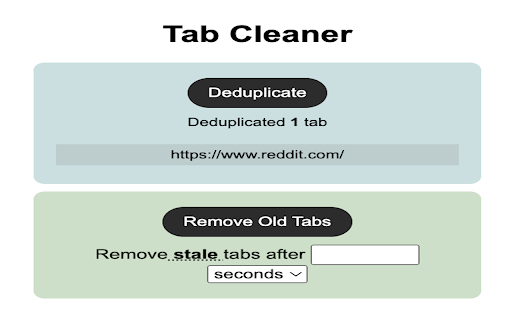
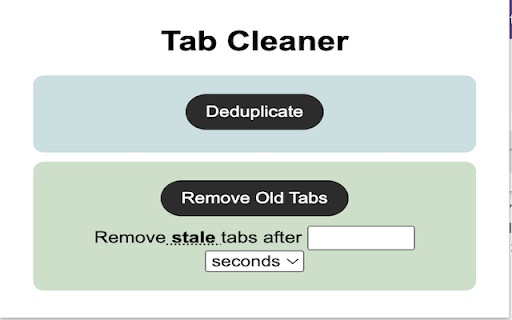
Help keep your chrome tabs in control * Deduplicate your tabs (closes Chrome tabs that are duplicates in your browser window) * Remove tab windows that have not been opened since a time you specify. I created this to solve my own itch. I usually have too many tabs open and I never close my old tabs. This tool helps me keep my Chrome organized. Use cases: 1. If you have a ton of the same tabs open, like reddit.com, then it will remove all but one tab. 2. Close all tabs that have not been opened in 2 hours (or any time you specify). I hope you enjoy! If you have problems or feature request, feel free to reach out. I'm happy to help solve this problem for others! You can view the open source code here: https://github.com/jchiare/tab-manager

Fingerprint Spoofer
Browser fingerprinting refers to the practice of collecting information about a user's web browser and using it to create a unique digital profile that can be used to track the user's online activities across different websites. This can include information about the user's device, operating system, browser version, installed plugins, screen resolution, and more. A combination of these attributes can be used to identify the user. We want to safeguard the user against this profiling. Here is a Chrome extension that anonymizes the user. -It can spoof the navigator values. It replaces real value with dummy values. -It can protect against Canvas fingerprinting. It replaces canvas elements with a dynamically generated image, which is unique every time. -It can spoof the User Agent to a random device -Block Images -Block Javascript from running on pages try out our Chrome extension here: -https://amiunique.org/ -https://coveryourtracks.eff.org/ -https://browserleaks.com/canvas - for canvas fingerprinting Note: - that only one spoofing feature works at a time. you can try multiple but they are not guaranteed to work - if you spoof the canvas element it causes a gray-scale/ gibberish/ garbage screen to appear. Commonly spotted while playing YouTube videos above the progress bar. just disabling canvas spoofing will make it go away. This is due to creating a unique canvas element every time fooling the fingerprinters.

Improved Potato
Chrome extension to manage bookmarks sanely Lets you export your bookmarks in markdown instead of the default shitty HTML format. Checkout the repo: https://github.com/patheticGeek/chrome-bookmark-exporter

Infinite Tabs Manager
Makes your Chrome faster and efficient 2.9.6 - May, 12 2026 Back with some fixes 2.9 Bug fixes and stability improvements 2.8 -Now in French and Spanish 2.7 -Pinned tabs will be excluded when grouping (credits : Erik Alcala Salero) -Provision to view links that you have shared previously -Click on the logo in the left top to toggle between dark and light mode :) It's your friendly neighbourhood browser Extension which will help you organise your messy Tabs and group them into a handy Dashboard. You can group by selecting multiple tabs , group tabs from the same site and Group every Tabs with a single click. Yeah IKR, its just Awesome. Try it out and Let us know what you think :) We care about your privacy, all the data this application reads from your browser stays in your local machine. we don't collect any of your data, as this application works 100% offline

Easy Extension Manager
Effortlessly Manage Your Chrome Extensions Easy Extension Manager is your all-in-one tool for optimizing and organizing Chrome extensions. Easily search, sort, snapshot, export, and import your extension setups in JSON format—all with a user-friendly interface. ☆ Complete List: View all your installed extensions from a single popup. ☆ Snapshot: Save and load your extension setups with a single click. ☆ Export & Import: Backup or restore your extension configurations in JSON format ☆ Toggle Extensions: Easily enable or disable extensions to improve performance. ☆ Sort Options: Sort extensions alphabetically or by enabled/disabled status for quick access. ☆ Quick Search: Find specific extensions quickly and easily. ☆ Dark Mode: Switch between dark and light themes for better viewing. ☆ Context Menu: Right-click for powerful options ☆ Disable All Extensions to temporarily boost performance. ☆ Enable All Extensions with one click. Effortlessly back up and restore your extension snapshots in JSON format. Export & Import Highlights: ☆ Backup Snapshots: Export your extension setups as JSON files for safekeeping. ☆ Restore Setups: Import your saved configurations and apply them instantly. ☆ Auto Save Snapshots: Automatically back up your latest extension setup, ensuring it's always up to date. ============================== Why Choose Easy Extension Manager? Easy Extension Manager simplifies managing Chrome extensions. Stay organized, perform backups and restores easily, and streamline your workflow. With powerful search and sorting with features like Snapshots, Export & Import, and Auto Save, managing extensions has never been simpler. Take control of your extensions today with Easy Extension Manager—the smarter way to manage Chrome.
