
facgnnelgcipeopfbjcajpaibhhdjgcp


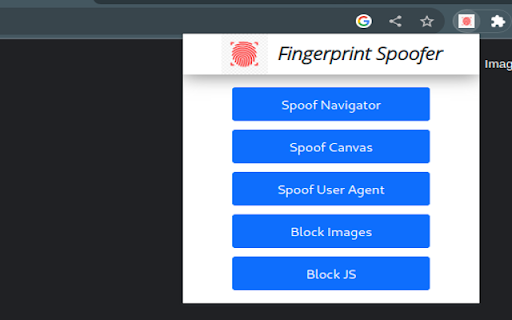
Browser fingerprinting refers to the practice of collecting information about a user's web browser and using it to create a unique digital profile that can be used to track the user's online activities across different websites. This can include information about the user's device, operating system, browser version, installed plugins, screen resolution, and more. A combination of these attributes can be used to identify the user. We want to safeguard the user against this profiling. Here is a Chrome extension that anonymizes the user. -It can spoof the navigator values. It replaces real value with dummy values. -It can protect against Canvas fingerprinting. It replaces canvas elements with a dynamically generated image, which is unique every time. -It can spoof the User Agent to a random device -Block Images -Block Javascript from running on pages try out our Chrome extension here: -https://amiunique.org/ -https://coveryourtracks.eff.org/ -https://browserleaks.com/canvas - for canvas fingerprinting Note: - that only one spoofing feature works at a time. you can try multiple but they are not guaranteed to work - if you spoof the canvas element it causes a gray-scale/ gibberish/ garbage screen to appear. Commonly spotted while playing YouTube videos above the progress bar. just disabling canvas spoofing will make it go away. This is due to creating a unique canvas element every time fooling the fingerprinters.

WebRTC Control
Have control over WebRTC (disable | enable) and protect your IP address. WebRTC Control is an extension that brings you control over WebRTC API in your browser. The toolbar icon serves as a toggle button that enables you to quickly disable or enable the add-on (note: the icon will change color once you click on it). This addon does not a have toolbar popup UI. When WebRTC is enabled in your browser, your real IP address will be exposed to the public (even if you're using a masking service such as VPN). But preventing WebRTC leaks helps you protect your IP address. WebRTC Control add-on will also disable the following WebRTC components (see add-on options page): To report bugs, please visit the extension's homepage (https://mybrowseraddon.com/webrtc-control.html) and fill the bug report form.

WebRTC Leak Shield
Disable WebRTC and prevent IP leak. Disable WebRTC and prevent IP leak. VPN Extensions can hide your IP address but they cannot prevent IP leaks caused by WebRTC. WebRTC Leak Shield protects you from this security threat. This is a must have extension for protecting your privacy on the internet. privacy: This allows the extension to change the webrtc settings of the browser to prevent WebRTC IP Leak storage: To store configuration file and current state of the extension management: This extension is standalone and does not require any other extension to function but other extension such as VPN extension can embed the functionality of this extension in their extension. (For example: Hoxx VPN). This permission is needed to ensure the communication between WebRTC Leak Shield and other extensions which are using its functionality.

Random User-Agent (Switcher)
Automatically change the user agent after specified period of time to a randomly selected one User-Agent is like a secret code your browser shares with every website you visit. It reveals details about your browser, your operating system, and even some plugins you have installed. Essentially, it's your browser's fingerprint! But here's the thing - sometimes you don't want to leave such a clear trail behind. That's where this extension comes in! 🚀 We created this extension to shield your online privacy and make it super easy to appear as if you're browsing from different devices. With this extension, your User-Agent string gets automatically swapped out with a randomized one at regular intervals. You can also manually set your User-Agent if you prefer. And guess what? It's super light on your system resources, so you won't even notice it's there. Plus, you're in control! You can customize which browsers and operating systems you want to emulate. We've even got an exceptions list for those special cases. And the best part? It keeps you safe from sneaky JavaScript tricks designed to uncover your identity. Best of all, it's completely free and ad-free. Give your online privacy a boost today! Made with ❤️ Check out the source code: https://github.com/tarampampam/random-user-agent

Fingerprint Protector
Professional anti-fingerprinting: DNR Client Hints, MAIN-world spoofing, iframes, site rules, and tracker blocking. Fingerprint Protector helps you reduce cross-site browser fingerprinting—the technique websites and trackers use to recognize you without cookies. HOW IT WORKS • Injects privacy protection early on every page load (including iframes) • Uses a stable, seed-based virtual identity so your spoofed profile stays consistent across tabs • Rewrites HTTP Client Hints (User-Agent, Sec-CH-UA*) at the network layer to match your profile • Optional blocking of known fingerprinting CDN hosts KEY FEATURES • Protection presets: Balanced, Maximum, Paranoid, Compatible • Per-site rules: relaxed mode for video calls, or disable on specific sites • Privacy score (0–100) with tips in the toolbar popup • Modules: Canvas, WebGL, Audio, fonts, screen, timezone, media devices, speech, battery, performance, ClientRects, Permissions API, hardware APIs, Privacy Sandbox signals • Right-click menu for quick site exceptions • Keyboard shortcut to toggle protection (Alt+Shift+F) • Local audit log and JSON export/import of settings • Built-in relaxed rules for Google Meet, Teams, Zoom, Discord, and more PRIVACY FIRST All processing happens on your device. We do not collect, upload, or sell your fingerprint or browsing data. No analytics server. COMPATIBILITY Maximum and Paranoid presets may break some sites (video calls, strict WebRTC blocking, tracker blocking). Use Balanced for daily browsing or add a site exception.
