
mikfghenfoonpchjjjgmhnkldhlbhgej
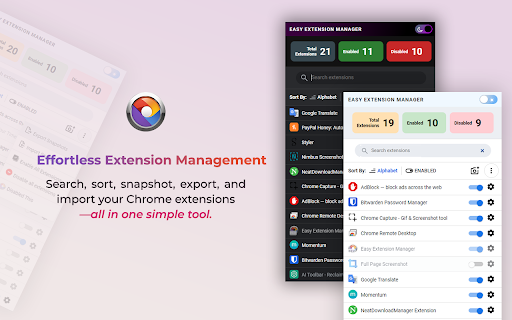
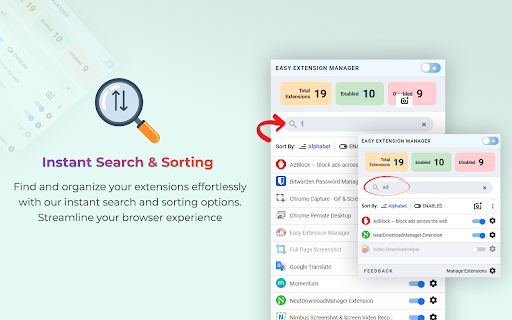


Effortlessly Manage Your Chrome Extensions Easy Extension Manager is your all-in-one tool for optimizing and organizing Chrome extensions. Easily search, sort, snapshot, export, and import your extension setups in JSON format—all with a user-friendly interface. ☆ Complete List: View all your installed extensions from a single popup. ☆ Snapshot: Save and load your extension setups with a single click. ☆ Export & Import: Backup or restore your extension configurations in JSON format ☆ Toggle Extensions: Easily enable or disable extensions to improve performance. ☆ Sort Options: Sort extensions alphabetically or by enabled/disabled status for quick access. ☆ Quick Search: Find specific extensions quickly and easily. ☆ Dark Mode: Switch between dark and light themes for better viewing. ☆ Context Menu: Right-click for powerful options ☆ Disable All Extensions to temporarily boost performance. ☆ Enable All Extensions with one click. Effortlessly back up and restore your extension snapshots in JSON format. Export & Import Highlights: ☆ Backup Snapshots: Export your extension setups as JSON files for safekeeping. ☆ Restore Setups: Import your saved configurations and apply them instantly. ☆ Auto Save Snapshots: Automatically back up your latest extension setup, ensuring it's always up to date. ============================== Why Choose Easy Extension Manager? Easy Extension Manager simplifies managing Chrome extensions. Stay organized, perform backups and restores easily, and streamline your workflow. With powerful search and sorting with features like Snapshots, Export & Import, and Auto Save, managing extensions has never been simpler. Take control of your extensions today with Easy Extension Manager—the smarter way to manage Chrome.

Extension Manager
Extension that manages other extensions If you have tons of extensions but don't want to leave them all on at the same time - this extension is for you. You can use this to turn them on and off. Ctrl+L is the default keybinding to open the popup Move with arrow keys Press enter to turn toggle extensions on and off This is mostly for personal use but if you find it useful as well then great :)

Ext Manager Pro: Your Extensions Control Hub
Revolutionize extensions control with Extensions Manager Pro! Swiftly manage, enable/disable addons. Transform your browsing now! 🚀 Tired of losing precious time navigating tedious menus to manage your web browser extensions? Say hello to Ext Manager Pro, your ultimate extensions control hub! 🎯 With Ext Manager Pro, effortlessly enable or disable any installed extensions in just a few clicks. Our user-friendly interface allows you to toggle extension status with ease, whether it's to temporarily disable unneeded addons or quickly enable/disable a specific one without diving into browser settings. Plus, search for extensions by name! 🕒 No more wasted time hunting for menus or settings pages. Everything's accessible through the Ext Manager Pro interface, displaying all your installed extensions at a glance. Easily track active and inactive extensions and stay organized! 🌟 Transform your browsing experience with Ext Manager Pro! Save time, frustration, and gain complete control over your extensions. Ideal for heavy extension users seeking a swift and efficient management tool. Upgrade now and unlock the true potential of your web browser! 📨 Support Email: support@oziku.tech ✉️ Translations are done via a translator; for incorrect translations, please contact us. ✉️ For bugs or feature requests, don't hesitate to email us.

Extension Manager
A simple way to manage your browser extensions A simple way to manage your browser extensions Actions: Enable when match, Close when match, Enable only when match, Disbale only when match, Custom; Support automatically refreshing the page after enabling or disabling extensions. * Bulk Export/Import and Share Extensions Bulk export extension information, support sharing text, json, custom markdown format; share or record your extension installation information. Bulk import extensions from shared text or json, simplifying the process of migrating or installing multiple extensions. * One-click enable or disable extensions. * Batch enable or disable extensions through grouping. * Quick search extensions by extension name, description, alias, or note. * Extension management: Quickly navigate to settings page, homepage, uninstall extensions. * List view and grid view. * One-click launch for app-type extensions. * Set custom aliases and notes. * History: Extension installation, update, uninstall, enable, and disable. - Rich configurable options for customizing style and functionality. - Open-source code with no collection of any user privacy data. github: https://github.com/JasonGrass/auto-extension-manager

Extension Manager for Chrome™
Focus on Chrome extension management to help you manage Chrome extensions efficiently. The extension manager is one of your best choices for Chrome extension management, providing you with an efficient way. It has a simple interface and simplified usage process, helping you toggle the status of extensions between enabled and disabled. Moreover, Extension Manger for Chrome™ provides the function to support you to customize the creation of Chrome extension groups for different usage scenarios. 🚀 Feature: ⚙ One-click to switch status between enabled and disabled. ⚙ One-click to uninstall Chrome extension. ⚙ Supports custom grouping and provides operations such as add, delete, and edit. ⚙ Supports search keywords to quickly locate Chrome extensions; ⚙ Supports filtering to quickly view enabled and disabled extensions. ⚙ Minimum permission requests for safe use.
