
baamgahfpefickjomejmemkejkeglaek
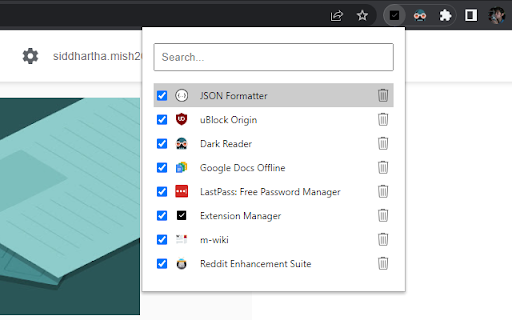
Extension that manages other extensions If you have tons of extensions but don't want to leave them all on at the same time - this extension is for you. You can use this to turn them on and off. Ctrl+L is the default keybinding to open the popup Move with arrow keys Press enter to turn toggle extensions on and off This is mostly for personal use but if you find it useful as well then great :)

Ultra Button
A button for everything. You can now access most of chrome features in one Ultra Button. Functions Including: Bookmarks, Extensions, Downloads, History and Tabs. Mouse Middle Button Behaviors Bookmarks: Open bookmark in background Extensions: Remove extension Downloads: Remove download record History: Open history in background Tabs: Close tab or window ~~~~~~~~~~~~~~~~~~~~~~~~~~~~~~~~~ The icons in this extension were downloaded from Noun Project. https://thenounproject.com/ v 0.9.0 add download notification You can enable it in the options v 0.4.1 add session control You can now restore closed tab or windows

Awesome Button Bar
Button bar, combining downloads, bookmarks, extensions, history, view source, print, and more from a single button. Awesome! Extensions, history, downloads, bookmarks, view source, options, new window, and print are all here. Recently added buttons are duplicate tab, second home, and refresh all tabs. Showing each button on the bar is optional so you don’t have to have them all if you don’t want them all. Also, each button can be configured to open either in the current window or in a new window. Note: print to a new window now works too!

ExtManager
Manage the chrome extensions. One click to enable or disable extension. Group extensions and drag it. Sort extensions by drag it. You can easily enable, disable, and uninstall your extensions,applications and themes by "ExtManager". No need to enter the chrome own extensions page every time. Features: 1. Display enabled extensions on top. 2. Display enabled/group/all extensions simply. 3. Enable/disable extension by one click. 4. Group extensions and drag it into the group. 5. Sort extensions by drag it. 6. Uninstall extension simply when you confirm. Support text list, large icon list and small icon list of a variety of permutations, suitable for different expansion of the number of people. You can easily open the system pages, such as the download page, history page, page extensions, plug-ins page, chrome settings page, the search engine settings page, clear the browser cache pages, page content settings, font and encoding settings, language settings, reset the browser settings page and so on.

Extension Manager
Professional Chrome extension management tool. Quickly enable/disable extensions, set favorite extension mode, and search all your… 1. Manage extensions, disable/enable your extensions with one click 2. Set common extensions, you can open the common extension mode 3. Quickly search for your extensions and configure them 4. View extensions in the chrome app store 5. Open the expanded configuration page 6. Uninstall the extension 7. Added some shortcuts If you have a better UI design and function recommendations, please leave a message yo. Test phase, welcome to comment.
