
jijileelaefjahodboljljdgfpbjjlac

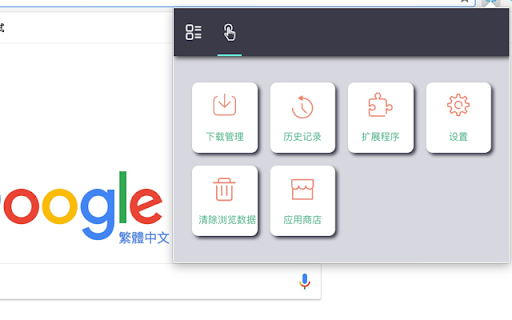
Professional Chrome extension management tool. Quickly enable/disable extensions, set favorite extension mode, and search all your… 1. Manage extensions, disable/enable your extensions with one click 2. Set common extensions, you can open the common extension mode 3. Quickly search for your extensions and configure them 4. View extensions in the chrome app store 5. Open the expanded configuration page 6. Uninstall the extension 7. Added some shortcuts If you have a better UI design and function recommendations, please leave a message yo. Test phase, welcome to comment.

Custom Cursor for Chrome™
Fun custom cursors for Chrome™. Use a large collection of free cursors or upload your own. Customize your Chrome browser experience with our free collection of mouse cursors at Custom Cursor. At Custom Cursor we have created a giant collection of hand-drawn cute cursors. We have over 10,000 different packs available on our website for you to enjoy. With your help, our collection has grown so big that we divided it into categories that should fit every taste, like: - Minecraft; - Cute Cursors; - Anime mouse packs; - Memes; - Spy x Family pointer packs with Anya Forger; - Among Us; - Two types of Minimal pointers for work and studies; - Games; - Roblox; - And many, many other funny elements for you to play with. Some of our mouse pointer packs are bundled with the Custom Cursor browser extension, but most of them await you on our website. Keep an eye out for new and trending additions. To simplify navigation, we've organised our collection into Editor's Picks collections, each with a unique theme. Examples include: - Green arrows for autumn; - Christmas themed arrows; - Holidays editor's picks; - Halloween; - Custom Cursor collaboration with Daieny Schuttz; - Pink pointers editor picks; - Summer mouse decorations; - Rainbow colors; and much, much more on our website. If you can't find what you're looking for, use the "UPLOAD CURSOR" button to add your own. Manage your personal arrow collection on the Upload page and adjust cursor size in the "Manage" section. Newly added collections will be uploaded to the Custom Cursor for Chrome extension and can be found at the bottom of the collection list. Your added packs will appear in “My Collection”. Create your own collection of mouse cursors from any images with Custom Cursor Creator tool on our website. It will allow you to create new packs from almost any arrow or pointer shaped image on the internet. ------------------- ! After installing the extension, refresh previously opened tabs to use it on those pages. Note that the extension may not work on Chrome Web Store pages or the home page. Open another website (e.g., google.com) to test the extension. If you like the extension you can also check our Custom Cursor for Windows app. Preview arrow appearance by clicking on it in the extension window and moving the mouse to the empty space within the window.

Custom Chrome - Extension Manager
A beautiful Google Chrome extension manager to turn on/off other extensions quickly and easily without leaving your current tab A beautiful Google Chrome extension manager to turn on/off other extensions quickly and easily without leaving your current tab. Make useful profiles which can turn on/off multiple extensions with one click. Have one for shopping which activates discount finding extensions or a profile for web developers who can activate colour palettes, debuggers, browser reloaders etc.

Extensions Manager
This extension will allow you to easily turn on and off your chrome extension and applications as and when you need them This extension will allow you to easily turn on and off your chrome extension and applications as and when you need them * easily search in your extensions list. * see extension you didn't know you have installed. Note: too many running extension takes up memory and resources from your computer for no reason. using this extension you can disable all unnecessary extensions and only enable them when needed.

Extension Manager - Extensio
Extension Manager with profiles. Enable & Disable all your extensions with one click. Auto enable/disable per website Extension Manager with profiles. One Click Extension Manager. Temporarily enable or disable all your extensions with one Click. Auto enable or disable extensions only where you need them with site-specific rules. THE EXTENSION MANAGER Organize your Chrome extensions into profiles and switch contexts instantly. The extension manager built for developers, professionals, and power users who need to manage extensions efficiently. ✓ EXTENSION PROFILES Create profiles for Work, Personal, Development, or any context. Switch all extensions with one click—no more manual toggling. Manage extensions by activity, not one-by-one. ✓ ONE-CLICK ENABLE/DISABLE Bulk enable or disable extensions instantly. The fastest way to manage Chrome extensions without visiting chrome://extensions. ✓ SITE-SPECIFIC RULES Auto-enable extensions only where you need them. Auto-enable only on selected sites, keep disabled everywhere else. Enable dev tools only on localhost. Smart extension management on autopilot. ✓ PIN EXTENSIONS Keep essential extensions always enabled across all profiles. Pin your must-have extensions so they're never accidentally disabled. ✓ BEAUTIFUL INTERFACE Modern dark/light mode that syncs with your system. Instant search to find any extension in seconds. Grid and list views for the way you prefer to manage extensions. 1. Install Extensio — your new extension manager 2. Create profiles for different activities (work, coding, personal) 3. Assign extensions to each profile 4. Switch profiles with one click to enable/disable all 5. Add site rules to auto-manage extensions per website PERFECT FOR • Developers managing dev tools and debugging extensions • Professionals separating work and personal browsing • Privacy-focused users controlling extension access per site • Power users with 10+ Chrome extensions installed • Anyone tired of manually enabling and disabling extensions ✓ Lightweight — Fast and under 1MB ✓ Privacy-first — All data stored locally on your device ✓ 10 Languages — English, Spanish, French, German, Japanese, Chinese, Portuguese, Russian, Korean, Italian ✓ Premium Available — Unlimited profiles and rules for power users ✓ Active Development — Regular updates and responsive support • Minimal permissions — Only extension management + local storage • No browsing history access • No password or form data access • All profiles and rules stored on YOUR device only • Transparent privacy policy at korchix.com • Management — Required to enable/disable and list your extensions • Storage — Required to save your profiles and rules locally • Tabs — Required to detect current site for auto-rules (URL only, no content) Install Extensio, The extension manager that makes Chrome extensions easy to organize and control! What's New in v1.3.0: • Fixed: Disabled site rules no longer affect an extension's state when you navigate, refresh, or switch tabs What's New in v1.3.0: • Update Radar now tracks permission changes: See exactly which permissions were added or removed when extensions update • Version History Timeline: View complete update history for each extension with detailed permission changes • Permission Change Severity: High-risk permissions are clearly marked for your security • Red dot navigation: Subtle indicators guide you to review updated extensions • In-app language selector: Change the extension language directly from settings What's New in v1.2.11: • New "Backup & Restore": Export your profiles, rules, and settings to a file and import them on any device • New "Update Radar": See which extensions have silently updated in the background • New Settings Panel: Centralized location for all your preferences and data management What's New in v1.2.10: • New "Manage All Rules" panel to view and edit rules across all extensions in one place • EUR pricing now available for European users • Added option to restore previous purchases What's New in v1.2.9: • Increased free tier from 1 to 5 rules per extension • New option to keep enabled extensions when creating a profile • New settings menu with quick access to theme, view mode, and more • Moved feedback to settings menu for a cleaner main UI • Added in-app changelog to see what's new in each version • New version notification dot on menu icon
