
ogdlpmhglpejoiomcodnpjnfgcpmgale
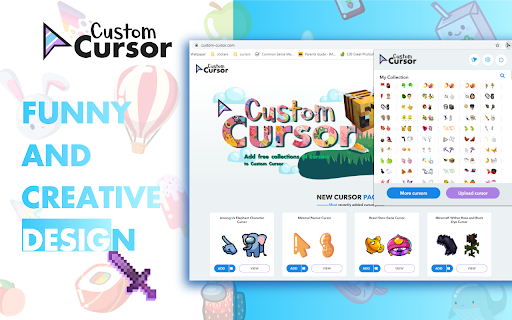


Fun custom cursors for Chrome™. Use a large collection of free cursors or upload your own. Customize your Chrome browser experience with our free collection of mouse cursors at Custom Cursor. At Custom Cursor we have created a giant collection of hand-drawn cute cursors. We have over 10,000 different packs available on our website for you to enjoy. With your help, our collection has grown so big that we divided it into categories that should fit every taste, like: - Minecraft; - Cute Cursors; - Anime mouse packs; - Memes; - Spy x Family pointer packs with Anya Forger; - Among Us; - Two types of Minimal pointers for work and studies; - Games; - Roblox; - And many, many other funny elements for you to play with. Some of our mouse pointer packs are bundled with the Custom Cursor browser extension, but most of them await you on our website. Keep an eye out for new and trending additions. To simplify navigation, we've organised our collection into Editor's Picks collections, each with a unique theme. Examples include: - Green arrows for autumn; - Christmas themed arrows; - Holidays editor's picks; - Halloween; - Custom Cursor collaboration with Daieny Schuttz; - Pink pointers editor picks; - Summer mouse decorations; - Rainbow colors; and much, much more on our website. If you can't find what you're looking for, use the "UPLOAD CURSOR" button to add your own. Manage your personal arrow collection on the Upload page and adjust cursor size in the "Manage" section. Newly added collections will be uploaded to the Custom Cursor for Chrome extension and can be found at the bottom of the collection list. Your added packs will appear in “My Collection”. Create your own collection of mouse cursors from any images with Custom Cursor Creator tool on our website. It will allow you to create new packs from almost any arrow or pointer shaped image on the internet. ------------------- ! After installing the extension, refresh previously opened tabs to use it on those pages. Note that the extension may not work on Chrome Web Store pages or the home page. Open another website (e.g., google.com) to test the extension. If you like the extension you can also check our Custom Cursor for Windows app. Preview arrow appearance by clicking on it in the extension window and moving the mouse to the empty space within the window.

Fun Cursors
Have fun browsing the web with a new mouse cursor. Spice up your browsing on Chrome by changing your cursor for a fun one. This extension gives you new cursors for your mouse / trackpad on Chrome. You can always get back your default cursor by clicking cancel. Please note cursor cannot work on the Chrome store pages and new tab.

Cursor Trails - Custom Cursor Trails
Add a touch of magic to your browsing with Custom Cursor Trails! A sparkling trail of stars will follow your cursor Customize your browsing experience with the Custom Cursor Trails extension! Are you bored with the standard mouse cursor? With Custom Cursor Trails, you can now add a touch of sparkle and vibrant trails to your cursor, transforming every movement on your screen into a festive experience! This browser extension creates stunning and colorful trails that follow your cursor, enhancing your browsing experience and making it more lively and enjoyable. Why should you consider trying Custom Cursor Trails? - Simple installation: Adding the extension takes just a few seconds. Once it's in your browser, you're ready to enjoy a new experience! - Variety of effects: Custom Cursor Trails features a broad selection of effects – from sparkling glitter to twinkling stars. You can quickly change trails to suit your mood and style. - Unique personalization: Give your cursor a personal touch. Select from numerous options and settings to make your cursor truly yours. - Better navigation: With colorful trails, you’ll never misplace your cursor among open tabs or while multitasking. Easily locate your cursor on any webpage! - Custom trail builder: Our website includes a builder where you can create your own unique cursor trails that fit your preferences. 💫 An extension for any mood 💫 Whether you want to add a bit of magic to your workday or just entertain yourself while browsing web pages, Custom Cursor Trails is here to help. Choose from sparkling glitter, stars, and other delightful animations that will add fun and brightness to every click. 🚀 How does it work? 🚀 - Install the extension: Go to your browser's extension store and add Custom Cursor Trails. - Refresh tabs: After installation, be sure to refresh previously opened tabs to use the new features on those pages. - Choose and customize: Go to the extension settings and choose your favorite custom cursor effects. You can also use the constructor on our website to create your trails. - Enjoy: Use your new, bright cursor and enjoy the enhanced browsing experience. 🌐 Available cursor trail collections on our website 🌐 On our website, you'll find a vast collection of cursor trails. From classic glitter and stars to unique animations created by our users. With constant updates, you'll always have access to new and exciting designs. Personalize your cursor with our ready-made collections or create something unique using the trail constructor. Our popular collections include: 1. Suspect Trails: Among Us Cursor Collection: Fun trails designed for fans of the Among Us game. 2. Circle Approach: Cursor Trail Collection: Elegant and minimalist trails shaped like circles. 3. Journey's Beginning: Cursor Trail Collection: Inspired by travel and the thrill of new discoveries. 4. Abstract Whispers: Cursor Trail Collection: Abstract and artistic trails for those who appreciate creativity. 5. Sparkling Trails: Cursor Trail Collection: Shimmering trails for those who enjoy bright effects. 6. Autumn Breeze: Cursor Trail Collection: Trails inspired by autumn that evoke warmth and coziness. 7. Winter Wonderland: Cursor Trail Collection: Winter-themed trails that create a festive atmosphere. 8. Raindrop Rhythms: Cursor Trail Collection: Trails shaped like raindrops for a soothing effect. 9. Feline Footprints: Cursor Trail Collection: Cat paw trails perfect for cat enthusiasts. And this is just part of our collections! We have many other options that are constantly updated with new designs. Custom Cursor Trail Constructor ✨ Our constructor allows you to create your unique cursor trails. You can choose colors, shapes, effects, and animations to create something truly special. It's the perfect way to express your creativity and add even more individuality to your browser. 🔧 Regular updates and support 🔧 We are constantly working on improving our extension and adding new features. With regular updates, you'll always have access to fresh and exciting trail designs. Our support team is always ready to help you with any questions or issues you may encounter. ⚠️ Note ⚠️ After installing the extension, don't forget to refresh previously opened tabs to use it on those pages. Please note that the extension may not work on Chrome Web Store pages or the browser's home page. To test the extension, open another website like google.com. Don't waste any time - try Custom Cursor Trails today and let your cursor shine! ✨ Functionality: * Open on site and Rating on CWS page * * More products * * Promo *

Awesome Custom Cursor
Awesome Custom Cursor replaces your default boring cursor with 100+ fun and cool customized cursors. Awesome Custom Cursor is a Chrome extension to let you define your own cursor style. Hope you enjoy it! Please note that due to Chrome's security restrictions, we can't update the cursor for you on: 1) Internal browser pages (for example, browser-settings page, extension-management page, etc.) 2) Chrome Web Store related pages (for example, this page). 3) Extension related pages (for example, some of your other extensions' option pages) 3.1 - Updated on Jan 25, 2024 * Improved performance * Rebuilt with Manifest V3 2.0 - Updated on Nov 24: * Added many new funny and cool cursors * Bug fixes 1.9 - Updated on Nov 23: * Bug fixes and optimization. 1.8 - Updated on Nov 22: * Settings available for helper cursor style and color * Added a group of holiday cursors! 1.2 - Updated on Jul 25: * New UI Design * Fixed some UI bugs for Windows Operating System. 1.0 - Updated on Jul 4: * Updated with 100+ supercool cursors. * Removed unnecessary permission request.

Custom Cursor Trails
Add sparkle to your browsing experience with Custom Cursor Trails! A shiny star trail will follow your mouse cursor on the screen. Enhance your browsing experience with the fun and exciting Custom Cursor Trails browser extension, designed to add sparkle and personality to your mouse cursor. This user-friendly extension allows you to choose from an array of glitter, stars, and other unique trails to follow your cursor, making your time online more enjoyable and entertaining. With Custom Cursor Trails, you can effortlessly customize your cursor to match your mood or style. Choose from a diverse range of options, including shimmering glitter trails, twinkling stars, and playful animations, transforming your everyday browsing into a dazzling and interactive experience. This easy-to-use browser extension not only adds an element of excitement to your online activities but also helps you navigate through web pages with ease. The eye-catching trails make it simple to locate your cursor on busy pages or during multitasking sessions, ensuring a seamless and engaging browsing experience. Installing the Custom Cursor Trails extension is a breeze, and with regular updates, you can always look forward to new and exciting trail designs. To get started, simply add the extension to your browser and explore the extensive collection of cursor trails available. Personalize your cursor and let it shine, making every click an adventure. Discover the joy of adding glitter, stars, and other delightful trails to your mouse cursor with the Custom Cursor Trails browser extension – a simple yet impactful way to elevate your browsing experience and express your unique style. ------------------- ! After installing the extension, refresh previously opened tabs to use it on those pages. Note that the extension may not work on Chrome Web Store pages or the home page. Open another website (e.g., google.com) to test the extension.
