
hdghceafmahkdiaoenecabpfokplecfi
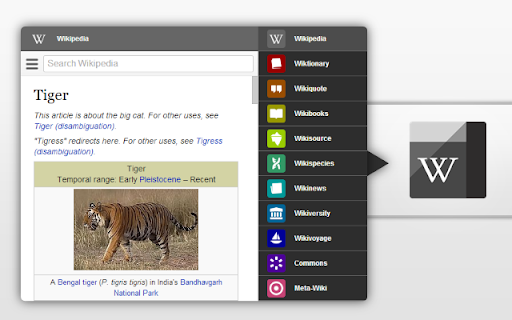


Easy access to the Wikipedia universe Black Menu for Wikipedia lets you access the best of the Wikipedia Universe, in a simple, easy, and convenient way. This extension has a comprehensive menu of Wikimedia Foundation projects. You can access them by browsing through the black menu entries. By clicking the menu entry of your choice, you'll go to the corresponding Wikimedia Foundation project in a new tab. Wikipedia – The primary page, containing a search box which lets you access the vast collection of Wikipedia articles right inside Black Menu for Wikipedia. This page also features today's featured Wikipedia article and recent news reported by Wikipedia. Wiktionary – Search for thousands of words featured in the Wiktionary dictionary and thesaurus. This page also features Wiktionary the word of the day. Wikiquote – Browse Wikiquote's broad collection of quotes using the search bar or search for quotes by categories. This page also features the Wikiquote quote of the day. Wikibooks – The Wikibooks page includes an overview of the Wikibooks project and a search bar to search and access an array of 2,600+ books. Wikisource – Browse through the ample library of Wikisource texts using the search bar at the top of the page. The Wikisource page also include the featured text of the month, new texts, and Wikisource highlights. You can also browse through texts by categories and author. Wikispecies – Search through Wikispecies' collection of organisms using the search bar at the top of the page. A featured author and the species of the week are also displayed on this page. Wikinews – Check up on the news as reported by Wikipedia. If you want to look through the news archives, just use the search bar at the top of the Wikinews page. Wikiversity – This page includes a introduction to Wikiversity and the search bar at the top of this page lets you search through Wikiversity's extensive assortment of educational resources. Wikivoyage – Explore the world using the free worldwide travel guide that anyone can edit. Search for travel guides by continent or use the search bar at the top of the page. Also look for itineraries, phrasebooks, travel topics and other topics. The Wikivoyage page also features the destination of the month, a destination off the beaten path and the featured travel topic. Commons – Search for and view all the media files Wikipedia Commons has to offer using the search bar. Also browse through media files by topic, location, type, author, license and source. This page also features the Commons' picture of the day. Meta-Wiki – This page includes an introduction to Meta-Wiki, the global community site for Wikimedia projects and the Wikimedia movement. Use the search bar to browse through various projects and pages.

Category Tabs for Google Keep™
Better organise your Google Keep notes Tired of wasting time looking look through and re-sorting all of your notes on Google Keep? With Category Tabs for Google Keep™, you can now sort your new and existing notes by category. Each category represents one color. Adding a note to a category is very easy, just change the color of the note. When you want to view the notes you have sorted by color, simply click on the note color you wish to view. If you would like to view your you entire collection of notes/checklists, there is an “All” option next to the color options (this option is set by default). Category Tabs for Google Keep™ seamlessly integrates into the page and the options to look at your notes/checklists in list view or gird view is still available. The ability to post a quick note/list/picture is still available as well and is still placed in the same spot as it usually is. This application supports all the colors offered by Google Keep. You can access the settings by opening the menu in google keep, and hit "Customize Categories"

Ink for Google™
Get your favourite Google sites a new coat of paint. Update their look with Material Design Ink for Google improves the look of well-known Google websites like Search, Gmail and Calendar. It unifies them under the guidelines defined by the Material Design team at Google. Ink takes inspiration from the visual style of Android apps and their newest websites to create a better and consistent experience across all of these services. Ink currently works on most Google websites, even websites which already have material design. On those websites, it improves the design to better match the guidelines. This extension requires the permission to read and change your data on google.com sites to make the visual changes. See something that you think needs a visual tweak? Click the Ink icon to send us some feedback or to report a bug.

Awesome Button Bar
Button bar, combining downloads, bookmarks, extensions, history, view source, print, and more from a single button. Awesome! Extensions, history, downloads, bookmarks, view source, options, new window, and print are all here. Recently added buttons are duplicate tab, second home, and refresh all tabs. Showing each button on the bar is optional so you don’t have to have them all if you don’t want them all. Also, each button can be configured to open either in the current window or in a new window. Note: print to a new window now works too!

Wikipedia Search
Search Wikipedia in every language from the address bar and context menu. Wikipedia Search is an extension that adds multiple ways to search Wikipedia, the free encyclopedia, right in your web browser. You can type "wiki" in the browser search bar, then the Space or Tab key, to start a search with live suggestions as you type. Also, selecting a word or phrase in a web page and opening the context menu will show a Wikipedia search option. You can change the default search language to any language Wikipedia supports, and the optional multi-language search feature can override it with a different choice. Search results can be opened in the desktop Wikipedia site, the mobile site, or Wikiwand. Wikipedia is a trademark of the Wikimedia Foundation. Wikipedia Search is in no way affiliated with Wikipedia or the Wikimedia Foundation.
