
hacmefkjeiehmlkndbaleojngjekkdia
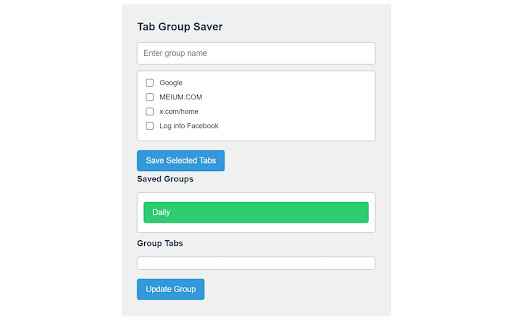
Save and manage groups of tabs Tab Group Editor: Streamline Your Browsing Experience Effortlessly organize and manage your browser tabs with Tab Group Editor. This powerful extension allows you to create, edit, and save groups of tabs, helping you stay organized and boost your productivity. Key Features: • Create custom tab groups: Easily group related tabs together for better organization. • Save and restore: Save your tab groups and restore them later, even after closing your browser. • Quick access: Quickly switch between different tab groups with just a click. • Edit on the fly: Add or remove tabs from existing groups as your needs change. • Context menu integration: Conveniently add tabs to groups or remove them using the right-click menu. • Multi-language support: Enjoy a localized experience with support for multiple languages. Whether you're a student juggling research projects, a professional managing multiple tasks, or simply someone who loves an organized browsing experience, Tab Group Editor is the perfect tool to keep your digital workspace clean and efficient. Take control of your tabs today and experience a more organized way of browsing with Tab Group Editor!

Session Buddy - Tab & Bookmark Manager
Save and restore sessions, manage tabs and bookmarks, and stay organized with a powerful and trusted privacy-first session manager. Session Buddy helps you save open tabs, restore previous sessions, and organize your browsing. It is designed for users who regularly work with many tabs and need a reliable way to save, organize, share, and recover or revisit them later. Save Tabs Instantly Save all open tabs in one click and access them anytime. Restore them later exactly as you left them. Oversee Your Tabs Cut through the chaos of scattered windows. Visualize and control all of your open tabs from a single, unified dashboard. Rely on First-Class Protection Recover tabs after browser crashes, restarts, or accidental closure with history that shows your windows and tabs exactly as they were at a specific moment in time. Get Organized Use collections to organize saved tabs by topic, timeline, or whatever suits your workflow. Search Everywhere Find what you need in seconds with unified search across open tabs, collections, and tab history. Share With Flexibility Move tabs and bookmarks freely in and out of Session Buddy with versatile import, export, copy and paste that includes support for 15+ formats including plain text, links, JSON, CSV, Markdown, and HTML. Solid As A Rock Hoarding tabs at an industrial scale? No problem. Session Buddy is engineered for heavy workloads and can easily handle thousands of tabs and bookmarks. - Save tabs before restarting your computer - Switch to another session before a presentation - Organize research - Collect and share project links - Reduce tab clutter - Free up memory - Restore tabs after a crash Can Session Buddy recover lost tabs? Yes. It automatically saves sessions and allows full restoration of windows and tabs exactly as they were right before the crash. Does it sync across devices? No. Data is stored locally for privacy. Opt-in cloud based storage will be offered in the future for convenience and additional data protection. Is it free? Yes. Access to all features is free and does not require an account. A cloud-based storage alternative, once offered, will be the only premium-level feature.

Tab Groups to Bookmarks
Manage and Save Your Tab Groups Tab Groups to Bookmarks allows you to easily organize your tabs into groups and save them as bookmark folders. It was built for multitaskers who often find themselves with many unrelated tabs open. With it you’ll be able to easily switch between tasks and tabs while staying focused and keeping your chrome session clean. - It’s recommend to pin the extension in the extensions menu but you can also open it with Ctrl+M (MacCtrl+Command+M). - Most of the features are accessed by context menus: try right clicking groups, saved groups and tabs. 📚 Some of the features: - Group all tabs on a window; - Save a group as a bookmark folder (saved under the folder “Tab Groups”); - Drag tabs in/out of tab groups; - Copy or download the tab groups URLs; - Rename a tab group by double clicking it; - Close, ungroup or delete tab groups. --- The extension is open source and does not collect any sort of data. 📦 You can check the source code here: https://github.com/FernandoLins8/Tab-Groups-to-Bookmarks ☕ You can also buy me a coffee if you want to support the extension development. Thanks in advance.

Save That Group - Save & Sync your GroupTabs
A simple extension to save and sync your group tabs 🔥A simple way to save and sync your group tabs!🔥 ⭐️Just hit Save group and it will save new groups and update any existing one! ⭐️It will sync automatically across any Chrome browser that you are logged into! ***Important notes*** ✔️All groups are stored by the group name! ✔️Same name groups are currently not supported ✔️If a group with the same name is already open it won't open again! ✔️Currently limited to 50 groups and 30 tabs per group. ✔️Chrome sync needs to be one for the groups to be synced across different browsers.

Tab Groups Extension
Automatically group tabs, save tabs/groups, and provide shortcuts for tabs/groups. 📢 February 2026: Sorry, Chrome 145 has a bug that causes problems with tab group operations (collapse and modify title). This bug will be fixed in Chrome 146. This is a Chrome bug, not an extension bug. All browser extensions with similar functionality are affected. In addition to general tab management functions, this extension specifically enhances the browser built-in "Tab Groups" feature. Features: ● Automatically create group for tabs through custom matching rules. ● Save and restore current tabs or groups (snapshots). ● Opened tabs/groups management: activate, close, expand/collapse, move to other window, modify group name and color, new tab in group. ● Saved tabs/groups management: delete, edit, add, expand/collapse, merge same name groups, data import/export. ● Grouping rules management: add, edit, delete, enable/disable, import/export. ● Keyboard shortcuts: group/ungroup, activate, move, close, pin, duplicate, expand/collapse, auto group by domain.
