
mllgjknmdjhhbljhlcopkohfkadaakcn
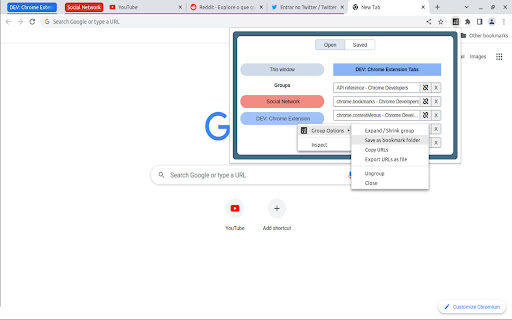
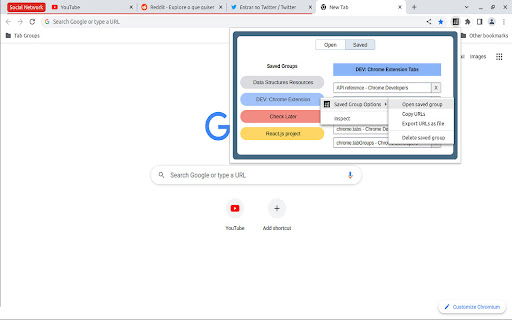
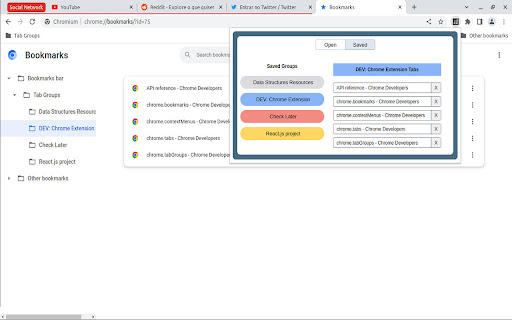
Manage and Save Your Tab Groups Tab Groups to Bookmarks allows you to easily organize your tabs into groups and save them as bookmark folders. It was built for multitaskers who often find themselves with many unrelated tabs open. With it you’ll be able to easily switch between tasks and tabs while staying focused and keeping your chrome session clean. - It’s recommend to pin the extension in the extensions menu but you can also open it with Ctrl+M (MacCtrl+Command+M). - Most of the features are accessed by context menus: try right clicking groups, saved groups and tabs. 📚 Some of the features: - Group all tabs on a window; - Save a group as a bookmark folder (saved under the folder “Tab Groups”); - Drag tabs in/out of tab groups; - Copy or download the tab groups URLs; - Rename a tab group by double clicking it; - Close, ungroup or delete tab groups. --- The extension is open source and does not collect any sort of data. 📦 You can check the source code here: https://github.com/FernandoLins8/Tab-Groups-to-Bookmarks ☕ You can also buy me a coffee if you want to support the extension development. Thanks in advance.

Tab Group Manager
Tab Group Manager exends the native Tab Groups in Chrome letting you store, sync and resume them anytime and anywhere. Tab Group Manager extension automatically stores the tab groups you create as a bookmark group so you can sync and restore them anytime and anywhere you want. Tab groups are stored under a bookmark folder `Other Bookmarks > Tab Group Manager`. Everytime you open a new tab, close an opened tab or navigate a tab to a new page in the tab group, the stored bookmark gets updated, so they are always in sync. * To change the group name, change the tab group name on Chrome. * To change the group color, change the tab group color on Chrome. * Closing an opened tab in a tab group on Chrome gets automatically synced, but you can also click on a close icon beside the tab in the Tab Group Manager to have the same effect. * Closing an opened tab group on Chrome leaves the group left in the Tab Group Manager, but you can also click on a close icon beside the tab group in the Tab Group Manager to have the same effect. * Remove a stored tab group from Tab Group Manager just by clicking on the trash bin icon beside the tab group. * Quickly search through the stored tab groups and tabs in the Tab Groups Manager using the search bar at the top. * When a tab group stored in Tab Group Manager is out of sync with Chrome's, click on the reload icon at the top right corner of the Tab Group Manager to force resync. * To open a tab group in a new window, click the tab group with "Shift" key in the Tab Group Manager. * To open a tab group without focusing on the opened tab, click the tab group with "Option" key on Mac or "Windows" key on Windows in the Tab Group Manager.

Tab Groups Exporter
Very simplistic chrome extension to save tab groups as sessions. Export/Import sessions as JSON file.

Tab Manager in Side Panel
Compatible with built-in and adds more easy-to-use features, lives in side panel This extension provides some easy and intuitive ways to manage all your tabs across all your windows in side panel. In particular, a simplified tree style tab feature can facilitate the management and deletion of many temporarily opened tabs. ✨ Help you easier to find the target tab ✨ 1. Support searching opened tabs and history. 2. Support show 7 most recent tabs. ✨ Help you easier to create and close tabs ✨ 1. Create a new adjacent child tab for any tab with one click. 2. Support tabGroup and display non-tabGroup tabs with auto group(one level tree), and you can close all tabs belong same tree by "Alt + click" close icon of the parent tab. ✨ Help you easier to navigate through tabs ✨ 1. Navigate to any tab across all your windows with one click, even when tab group which tab belongs to has been collapsed. 2. Collapse or expand all tab groups in same window with one click. 3. Collapse or expand any tab group with one click. 4. Press "Tab" and "Shift+Tab" to navigate and "Enter" to switch. ✨ Help you easier to organize tab and tab group ✨ 1. Drag some tab or tab group and drop into a new postion ✨✨ Bonus tips: 1. You can go to chrome://extensions/shortcuts and set your shortcut for any chrome extension. 2. You can go to chrome://settings/appearance and adjust side panel's some appearance, such as left or right postion, font size and page zoom. Tab Manager In Side Panel is designed to help you save time, reduce clutter, and improve your productivity when working with multiple tabs across multiple windows, such as easily managing and deleting many temporary opened tabs. It is lightweight, fast, easy to use and compatible with built-in features. If you are looking for a simple tab manager in side panel, give this extension a try! Here is recent change log: v1.4.5 Feature: improve search function v1.4.4: Feature: add simple view transition animation v1.4.3: Feature: support close tab in recent tabs v1.4.0: Feature: support drag and drop to organize tab and tab group v1.3.13: Feature: stick tab group name when scrolling tabs v1.3.9: Feature: support show 7 most recent tabs v1.3.5: Feature: indent tab by one click v1.3.2: Feature: simple dark mode v1.2.4: Feature: create a new adjacent tab from one tab with one click

Bookmark Groups
Bookmark and restore Chrome's tab groups A Chrome extension which adds to the context menu of tabs the following: * Save all tabs of the current group in a "Saved Groups" folder in the "Bookmarks bar" * Restore a saved group from the "Saved Groups" folder * Copy the bookmarked folder's content (title and URL) to the clipboard The extension code is at https://github.com/avigruda/ChromeBookmarkTabGroups Some points: * The "Saved Groups" folder can be edited manually (add/remove folders) with Chrome's UI * No duplicate group name support, and the URL's from will be added to the same bookmark folder * Existing URL's, aren't saved again in the bookmark folder * Group colors aren't saved The extension icon is taken from http://www.iconbeast.com
