
gppokbigpecbboffnklnbcpddjipodpo
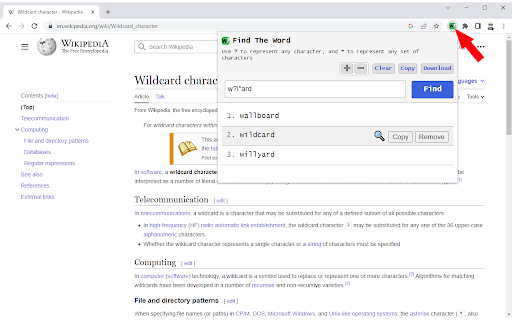
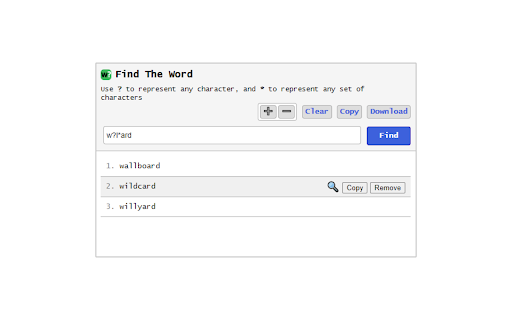
Chrome extension to find an English word using wildcards (?,*) [Search examples] Searching for wo?d will yield the following results: Searching for wor*d will yield the following results: [Links] - Home page: https://www.vincenzodevivo.com/ - GitHub: https://github.com/deltavi ... or you can buy my books on Amazon 📚 https://www.amazon.it/Vincenzo-De-Vivo/e/B09MPTBBFY

Multi Find: Search and Highlight
Find and highlight multiple words on webpages. Count occurrences, scroll to the results and locate words with scrollbar marks. Searching for several terms at once shouldn't mean running the same search over and over. Multi Find lets you highlight multiple words, phrases, or fragments simultaneously, each in a distinct and customizable color, so you can scan any webpage at a glance without losing context. Built for researchers, analysts, students, and professionals who work with dense content every day. Key Features ✔ Multi-Word Highlighting: Enter multiple search terms and see each one highlighted instantly in its own color, directly on the page. ✔ Up to 20 Customizable Colors: Choose between solid or glow-style highlights to visually distinguish each search term. ✔ Instant Occurrence Count: See exactly how many times each term appears, displayed in real time within the search panel. ✔ Precise Search Options: Toggle case sensitivity, whole-word matching, and diacritic sensitivity for accurate, tailored results. ✔ Persistent Highlights: Your search terms stay highlighted across page reloads and dynamic navigation, no need to re-enter them. ✔ Keyboard Shortcuts & Panel Navigation: Jump between results quickly without interrupting your reading flow. ✔ Flexible Search Window: Drag it to any corner, or enable transparency to keep it out of the way. ✔ Panel Always in Sync: What you see in the search panel always matches exactly what is highlighted on the page. ✔ Bulk Import & Export: Load a text file with dozens of terms at once, or export your current list for later use. ✔ Lightweight & Fast: Optimized to handle large pages without slowing down your browser. ✔ No Tracking, No Ads: Multi Find works entirely locally. Your searches and data never leave your device. Four Ways to Add Words to Your List: - Type directly into the search panel - Paste words or phrases from anywhere - Import a text file with multiple terms at once - Right-click any word on a page → "Add to Multi Find" Multi Find is free to use, with no account required and no hidden permissions. Upgrade your browsing experience with Multi Find, a smarter way to search and highlight!

Find
An extension for Regex Find. Search for regular expressions within webpages Feature: - Blazing fast: achieves an overall time complexity of O(n), where n is the total content on the page. - Seamless integration: Adopts keyboard shortcuts consistent with Chrome's default settings. Limitations: - Due to limitations in ECMAScript regular expression implementations, certain features are not supported, such as positive lookbehind with `?

HD Multiple Search
A Chrome extension that allows you to highlight multiple terms on web pages. ✨ HD Multiple Search - Advanced Text Highlighting Supercharge your web browsing with HD Multiple Search - the ultimate tool for highlighting multiple search terms simultaneously across any webpage. Perfect for students, researchers, editors, and anyone who needs to analyze text efficiently. Key Features: ✨ Highlight multiple terms with custom colors 🎨 Choose from 3 highlight styles (background, underline, bold) 📊 Real-time match counter 🔄 Auto-syncs across tabs 💾 Export/import your highlight settings 🌐 Works on all websites 🎯 Easy-to-use interface Click the extension icon Enter your search term Choose a color and highlighting style Click "Add" to start highlighting Manage Highlights Enable/disable individual terms Edit colors and styles anytime Group and sort your terms See match count instantly Customize Settings Set default opacity Choose preferred highlight style Customize default colors Back up your settings ✨ Pro Tips: Use different colors for different categories of terms Combine styles for better visual organization Export your settings to share with colleagues Use the keyboard shortcut to quickly access the extension Perfect for: Install HD Multiple Search today and transform how you read and analyze web content!

Multi Words Search
An easy way to search multiple words in the document. Lets say you want to find some words in web page. You can still use Ctrl+f. But if you want to find 10 words in the page at the same time? Here is the solution. You just type multi words in the box and let this tool search them. We will highlight words simultaneously.
