
oegmndaeiebaikmiiofifdnjlggnelfi
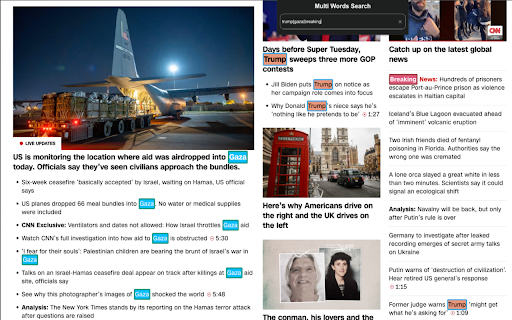

An easy way to search multiple words in the document. Lets say you want to find some words in web page. You can still use Ctrl+f. But if you want to find 10 words in the page at the same time? Here is the solution. You just type multi words in the box and let this tool search them. We will highlight words simultaneously.

Multiple Search and Highlight (Dev Edition)
Highlight multiple words separated by comma, space or arbitrary separator with persistent history This extension is meant to highlight multiple terms on large documents as fast as possible. This version uses native highlighting which guarantees the highliest possible searching performance without altering the DOM tree. Features: 1. Does not manipulate DOM tree 2. Fast response on large document trees 3. Fast response on multiple queries 3. Supports regular expression highlighting 4. Supports a few different word separator 5. Supports keyboard navigation (Enter to search for the next match and Shift + Enter to search the previous match) 6. Works completely offline Privacy: This extension works completely offline. There is no server-side interaction whatsoever. Query History: This extension automatically saves your search queries per domain (After pressing Enter or Shift + Enter). It offers the previous queries when the popup appears on the same domain. To alter the storage method, visit the options page. Keyboard Shortcuts: This extension supports keyword-only usage: -> Open chrome://extensions/shortcuts in a browser tab -> Find the extension and assign a keyboard shortcut 1. You can open the search panel by configuring a shortcut for it. 2. You can also automatically search for the last search query without opening the search interface 3. There is a keyboard shortcut to hide search results as well in this interface. -- When the interface is open: 1. Press the Enter key to find the next match 2. Press the Shift + Enter keys to find the previous match 3. Press the Esc key to close the search panel 4. Press the Shift + Esc keys to close the search panel and keep the highlights Introduction: This extension can be used to dynamically mark search terms with optional custom regular expressions support and offers you built-in options like diacritics support or separate word search. The interface is similar to the default browser's find interface. You can press the Enter key to select the next occurrence, or press the Shift + Enter combination for backward matching. This extension works offline and has no server-side interaction whatsoever to protect user privacy. Also, it only gets activated once the user opens the popup. There is no resource usage when the extension is not being used. To enhance the searching capability of the extension, sub-queries are only being applied to the page once.

HD Multiple Search
A Chrome extension that allows you to highlight multiple terms on web pages. ✨ HD Multiple Search - Advanced Text Highlighting Supercharge your web browsing with HD Multiple Search - the ultimate tool for highlighting multiple search terms simultaneously across any webpage. Perfect for students, researchers, editors, and anyone who needs to analyze text efficiently. Key Features: ✨ Highlight multiple terms with custom colors 🎨 Choose from 3 highlight styles (background, underline, bold) 📊 Real-time match counter 🔄 Auto-syncs across tabs 💾 Export/import your highlight settings 🌐 Works on all websites 🎯 Easy-to-use interface Click the extension icon Enter your search term Choose a color and highlighting style Click "Add" to start highlighting Manage Highlights Enable/disable individual terms Edit colors and styles anytime Group and sort your terms See match count instantly Customize Settings Set default opacity Choose preferred highlight style Customize default colors Back up your settings ✨ Pro Tips: Use different colors for different categories of terms Combine styles for better visual organization Export your settings to share with colleagues Use the keyboard shortcut to quickly access the extension Perfect for: Install HD Multiple Search today and transform how you read and analyze web content!

Multi Search & Multi Jump
Searches web pages and PDF files, and highlights the text it finds. Since the search field does not disappear even if you click on the page, it can be searched continuously. Pressing the Enter key in the search field jumps to all search results. When you press the F1 - F12 key, it jumps only to the search term of the number that was pressed. [About display of search field] Click the icon or display it with [Ctrl + Shift + F]. * If you display with the character selected, it automatically sets it as the search word. Use the ESC key to hide the search field (finish a search). You can make the screen easier to read by using Ctrl + Alt + .

Multi Highlight
Efficiently and flexibly highlight your online reading. Are you tired of losing track of important information in your online reading? Multi Highlight is here to help! With this powerful and efficient chrome extension, you can easily highlight all your user-specified words in webpages with beautiful colors. Multi Highlight can do real-time highlighting as you type, automatically re-highlight your word list when the webpage content changes or when the page is loaded, and it accepts custom word separators. You can save your user-specified word list, do whole word and case-sensitive searches, and even group words by colors. With Multi Highlight, you can stay focused and efficient while reading online. It's perfect for students and professionals who regularly read online content for studying or work. Try Multi Highlight today and take your online reading to the next level! 2023 February * Adapt to manifest V3 * Refresh words (1) when textbox is focused but inactive for short a period (2) when popup is closed * Fix style broke in browser's built-in page and in pages that loaded before extension installation. In these pages, disable textbox and show notification * Update UI 2022 September * Feature Auto-Rehighlight * Bug fix: rehighlight words when extension is softly disabled * Bug fix: webpage broke if website customize element 2022 June * Improve adaptability -- add support to highlight asynchronous text (e.g. AJAX content) * Fix option page's saving issue 2022 January * Support nested highlight * Bug fix: innerHTML deleted unintentionally * Bug fix: Word boundary not working for keyword-list * DEV Change keyword data structure and update the version to "2.8.0" due to * Feature Re-highlighting. * Feature Toggle highlighting. * Improve stability * Adjust interface * Fix bug (show current keyword list right after popup; properly remove highlights when NewLineNewColor mode is on) 2021 December * Add options: Whole words only, Casesensitive * Update the highlight lib from [npmjs](https://www.npmjs.com/package/jquery-highlight) * Modified: Handle the options change in one callback function. * Modified: Use 2D array to store the keywords in `NewColorNewLine` mode. * Bugfix: Keywords removal should not remove the container. * Add keywords display zone * Check wheter the page contains the keyword(s) or not, if not, gray it * `Ctrl+Click` to delete the correspond keyword 2019 May * Minimize extension size 2019 January * Highlight any strings (not just full word) * Add Instant Search (highlight on-the-fly) * Add customizable delimiter * Make Highlight Words individual to each tab * UI changes * Add Ctrl+Shift+F as default shortcut 2018 December * Organize code * Change UI (based on Multi-Highlight) * Change extension icon
