
oahidkobkdbfbknbloljgpjbeaefgapa
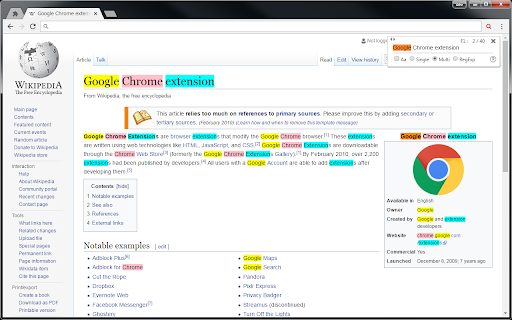

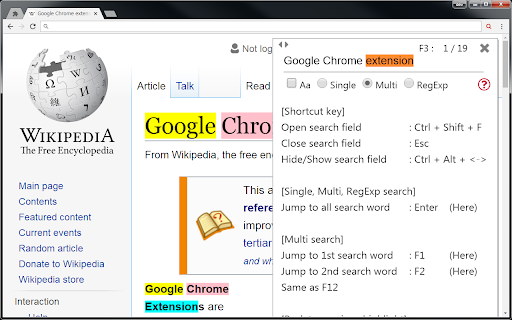
Searches web pages and PDF files, and highlights the text it finds. Since the search field does not disappear even if you click on the page, it can be searched continuously. Pressing the Enter key in the search field jumps to all search results. When you press the F1 - F12 key, it jumps only to the search term of the number that was pressed. [About display of search field] Click the icon or display it with [Ctrl + Shift + F]. * If you display with the character selected, it automatically sets it as the search word. Use the ESC key to hide the search field (finish a search). You can make the screen easier to read by using Ctrl + Alt + .

Search Highlighter
Search and highlight keywords in any webpage via toolbar popup. Search Highlighter is an extension that enables you to find and highlight desired keywords on any web page. Simply navigate to a web page, then, open toolbar popup UI and type your keyword in the designated area. Then click on the - Find - button or press - Enter - on your keyboard. All the matching words within the web page will be highlighted with yellow color. If you click on the - Clear - Button, the highlighted words will be cleared. There are also a few options in the popup interface to adjust highlight functionality. Moreover, to switch the interface theme to dark, please press the moon icon in the top-right toolbar. To report bugs, please fill out the bug report form on the addon's homepage (https://mybrowseraddon.com/search-highlighter.html).

Mark My Search
Mark My Search is a complete word finder for anything you search online. Powerful highlighting and advanced features combine with a friendly, intuitive interface to provide effortless text finding without the compromise. Vibrant highlight colors look great on any page, complemented by scroll markers for locating matches and a keyword edit bar which stays until you're done. Shortcuts are available for every action while varied options let you personalise to your taste. Search for anything, on any search engine - DuckDuckGo, Google, Bing, even Reddit - and Mark My Search will pick out the words you're looking for, in that page and through any links you follow. Highlighting happens without having to press a button! Activate on any page using Alt+M or the context menu. Mark My Search is Free and Open Source on GitHub(1). See the Roadmap(2) for planned improvements! Main Features: • Enter keywords to find in the page • Create and automate keyword lists in the popup • Search query highlighting on any search engine • Compact toolbar to view and edit the query • Popup and settings menu for configuration • Rapid scrolling to matches • Keyword scrollbar markers • Completely operable by mouse or keyboard • Specific websites can be filtered To turn off visibility for automatic highlighting, simply open the options page at chrome://extensions > Mark My Search [Details] > [Extension options] and disable both visibility settings. The highlights will be hidden, while the toolbar and scroll markers remain visible, ready to be shown at a moment's notice. This does not apply to manually activated highlighting. To turn off automatic highlighting completely, click the extension's icon to open the popup, and disable "Detect search engines". You may wish to press the top-right puzzle piece (Extensions) and 'pin' the Mark My Search icon, so that you can easily click it to open the popup.

Instant Multi Search
Search on multiple websites, instantly. An ideal companion for power searchers. - Want to quickly learn about a new movie on your favorite review websites? - Need to look at several dictionaries for a definition that finally clicks? - Curious to see how different AIs answer the same question? - Tired of typing the same search term again and again? *** Then Instant Multi Search is for you! *** HOW TO USE - Type m and Space/Tab in the address bar. - Enter your search. - Profit. The results open up in multiple tabs. FEATURES - Lightning fast and lightweight (

isear
複数ワードに対応したページ内検索ツール 【統合検索ツールisear】 Google検索対応のページ内検索ツールです。 ニュースの閲覧、wikiや辞典での検索、知らない単語の検索等で活躍します。 解説サイト https://isear.intelfike.net/ ◎ 特徴 ・ スペース区切りで複数ワード検索が可能 ・ ワードごとにボタンが生成され、ページ内のワードをたどることができる ・ Google検索の検索ワードを自動取得します(設定でOFFにできます) ・ 範囲選択→右クリックで簡単に検索ワードを追加 ・ 画面右側に表示されるカラフルな「ハイライトバー」で、検索されたワードの位置や数がひと目でわかります。 ◎ 使い方 https://isear.intelfike.net/usage_functions.html ◎ 基本操作 ・ 「ON/OFF」ボタンをクリック : 全検索ワードのハイライトをON/OFF ・ 「検索ワードボックス」で「Enter」 : 全検索ワードを巡回 ・ 「検索ワードボックス」で「Shift+Enter」 : 全検索ワードを逆巡回 ・ 「検索ワードボックス」で「Ctrl+Enter」 : 現在開いているページにてGoogle検索 ・ 「検索ワードボックス」で「Ctrl+Shift+Enter」 : 新しいタブでGoogle検索 ・ 「検索ワードボタン」をクリック : 検索ワードを巡回 ・ 「検索ワードボタン」で「Enter」 : 検索ワードを巡回 ・ 「検索ワードボタン」をShift+クリック : 検索ワードを逆巡回 ・ 「検索ワードボタン」で「Shift+Enter」 : 検索ワードを逆巡回 ・ 閲覧ページで文字列の範囲指定 ⇒ 右クリック ⇒「isear検索ワードに追加」を選択 : 検索ワードの追加 ◎ その他の設定 オプション設定 https://isear.intelfike.net/usage_settings.html ショートカット https://isear.intelfike.net/usage_sKey.html 検索テキスト https://isear.intelfike.net/usage_sWord.html ◎ プライバシー保護 本拡張機能はプライバシーに関するいかなるデータも収集致しません。 通常の使用の場合、検索ワードはブラウザに一時保存されます。 履歴化機能を有効化することで長期保存されますが、ブラウザの機能によって外部から読み取れない形で保存されます。 また本拡張機能は通信の許諾を得ませんので、外部に送信される危険もございません。 ◎ Thanks(名前のみ、詳しくは解説サイトで) DreamHope 青銅 abeshi ありさん バージョンアップ情報はホームページに記載
