
lijbnhoniejpjjgemoifpjklobhakinb


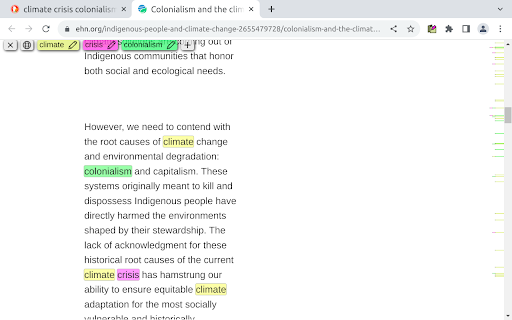
Mark My Search is a complete word finder for anything you search online. Powerful highlighting and advanced features combine with a friendly, intuitive interface to provide effortless text finding without the compromise. Vibrant highlight colors look great on any page, complemented by scroll markers for locating matches and a keyword edit bar which stays until you're done. Shortcuts are available for every action while varied options let you personalise to your taste. Search for anything, on any search engine - DuckDuckGo, Google, Bing, even Reddit - and Mark My Search will pick out the words you're looking for, in that page and through any links you follow. Highlighting happens without having to press a button! Activate on any page using Alt+M or the context menu. Mark My Search is Free and Open Source on GitHub(1). See the Roadmap(2) for planned improvements! Main Features: • Enter keywords to find in the page • Create and automate keyword lists in the popup • Search query highlighting on any search engine • Compact toolbar to view and edit the query • Popup and settings menu for configuration • Rapid scrolling to matches • Keyword scrollbar markers • Completely operable by mouse or keyboard • Specific websites can be filtered To turn off visibility for automatic highlighting, simply open the options page at chrome://extensions > Mark My Search [Details] > [Extension options] and disable both visibility settings. The highlights will be hidden, while the toolbar and scroll markers remain visible, ready to be shown at a moment's notice. This does not apply to manually activated highlighting. To turn off automatic highlighting completely, click the extension's icon to open the popup, and disable "Detect search engines". You may wish to press the top-right puzzle piece (Extensions) and 'pin' the Mark My Search icon, so that you can easily click it to open the popup.

123 Multi-Highlight PRO
Highlight multiple words and search for expressions and patterns on web pages with professional-grade precision. Highlight multiple words with different colors, get real-time stats, and make complex search queries. Think of this extension as your personal search wizard for web pages! Using * in your search is like a magic key that can stand for any word. For example, if you search "I * unicorns," you'll find sentences like "I love unicorns" and "I hate unicorns." It's like having a super-smart search that gets the magic behind your words! Privacy is our priority! 123 Highlighter PRO keeps all your data on your local machine. We don't access or save your queries.

Multiple Search and Highlight (Dev Edition)
Highlight multiple words separated by comma, space or arbitrary separator with persistent history This extension is meant to highlight multiple terms on large documents as fast as possible. This version uses native highlighting which guarantees the highliest possible searching performance without altering the DOM tree. Features: 1. Does not manipulate DOM tree 2. Fast response on large document trees 3. Fast response on multiple queries 3. Supports regular expression highlighting 4. Supports a few different word separator 5. Supports keyboard navigation (Enter to search for the next match and Shift + Enter to search the previous match) 6. Works completely offline Privacy: This extension works completely offline. There is no server-side interaction whatsoever. Query History: This extension automatically saves your search queries per domain (After pressing Enter or Shift + Enter). It offers the previous queries when the popup appears on the same domain. To alter the storage method, visit the options page. Keyboard Shortcuts: This extension supports keyword-only usage: -> Open chrome://extensions/shortcuts in a browser tab -> Find the extension and assign a keyboard shortcut 1. You can open the search panel by configuring a shortcut for it. 2. You can also automatically search for the last search query without opening the search interface 3. There is a keyboard shortcut to hide search results as well in this interface. -- When the interface is open: 1. Press the Enter key to find the next match 2. Press the Shift + Enter keys to find the previous match 3. Press the Esc key to close the search panel 4. Press the Shift + Esc keys to close the search panel and keep the highlights Introduction: This extension can be used to dynamically mark search terms with optional custom regular expressions support and offers you built-in options like diacritics support or separate word search. The interface is similar to the default browser's find interface. You can press the Enter key to select the next occurrence, or press the Shift + Enter combination for backward matching. This extension works offline and has no server-side interaction whatsoever to protect user privacy. Also, it only gets activated once the user opens the popup. There is no resource usage when the extension is not being used. To enhance the searching capability of the extension, sub-queries are only being applied to the page once.

Multi Search & Multi Jump
Searches web pages and PDF files, and highlights the text it finds. Since the search field does not disappear even if you click on the page, it can be searched continuously. Pressing the Enter key in the search field jumps to all search results. When you press the F1 - F12 key, it jumps only to the search term of the number that was pressed. [About display of search field] Click the icon or display it with [Ctrl + Shift + F]. * If you display with the character selected, it automatically sets it as the search word. Use the ESC key to hide the search field (finish a search). You can make the screen easier to read by using Ctrl + Alt + .

Auto Highlight
Auto Highlight is text highlighter with RegExp support 🟨 Auto Highlight a fully automatic and easy to use text marker / highlighter / eraser / searcher / style fixer with RegExp search support (regular expression). No need to use search anymore to find important information, it will be marked when page loads! ⭐ TOP FEATURES: - highlight keywords (metadata) like: 1080p, HDR, 4K, x265, BluRay, etc. - hide text - by changing font size to zero or by making it transparent - advanced search options using regular expressions (regexp), exact match, ignore diacritics and more - change style - background, text size and color of all marked words - automatic synchronization 🔄 to all your devices (using native Browser Sync.) - highlight "Free shipping", "Out of stock", pricing or discount labels - doing research about specific topic? Use "Temporal highlight" feature to highlight keywords on every page (without using search all the time) ☕ I'm extension developer since 2016 and my goal is to build powerful extensions for your web-browser to make you more productive. If you think I'm doing a good job, please donate :) - Ko-Fi.com: https://ko-fi.com/fastaddons - PayPal.Me: https://paypal.me/fastaddons/ - Patreon.com: https://www.patreon.com/fastaddons 💥 Thank you for supporting my work!
