
begjjnkmpjhpleiefokjhfenionaffkn
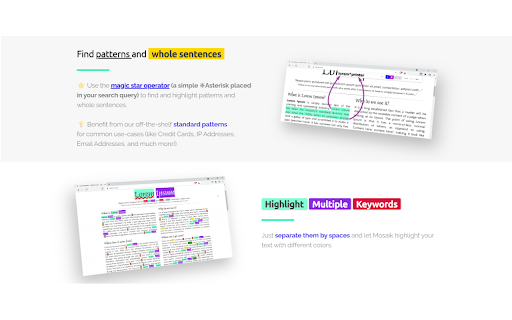


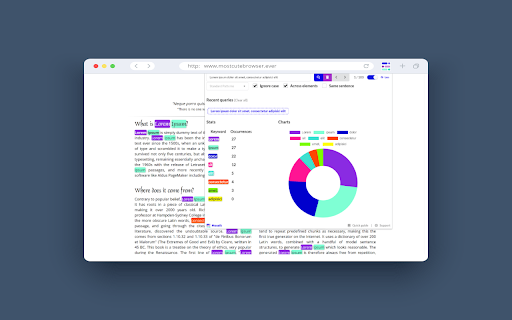
Highlight multiple words and search for expressions and patterns on web pages with professional-grade precision. Highlight multiple words with different colors, get real-time stats, and make complex search queries. Think of this extension as your personal search wizard for web pages! Using * in your search is like a magic key that can stand for any word. For example, if you search "I * unicorns," you'll find sentences like "I love unicorns" and "I hate unicorns." It's like having a super-smart search that gets the magic behind your words! Privacy is our priority! 123 Highlighter PRO keeps all your data on your local machine. We don't access or save your queries.

Multi-Highlighter V3
Simply way to search and highlight multiple words on web pages for manifest_version V3. Support Google new manifest V3 policy. It allow user to add the keywords in the box , the keywords are separated by the space, It will highlight the keywords if it is existed in webpage.

Multi Web find,Highlight,Export
One-click full-word matching and fuzzy search, multi-keyword searches with individual highlights, Export search results Detailed Description **Multi Web Search, Highlight, and Export Tool** - Simplify Web Searches Beyond Imagination! Basic Search - **Initiate Search**: Regardless of the webpage you are on, simply click on the plugin icon in the browser toolbar to open the search panel. The search panel is docked on the right side of the browser, always staying open for easy access. - **Enter Keywords**: Type the keywords you wish to find into the search box, then click the “Whole Word Search” button or press Enter to start an exact search. - **Fuzzy Search**: In addition to whole-word matching, the “Fuzzy Search” button allows for more flexible searches, finding relevant content even if the keywords are slightly off. - **Highlight Results**: Search results will be highlighted prominently on the webpage. Click on the contextual links in the search panel to jump directly to the location of the keywords. Multi-Keyword Search - **Multiple Keyword Input**: Support for entering multiple keywords simultaneously, separated by spaces. - **Context Switching**: Arrow buttons next to the search results help you quickly switch between different search results. - **Personalized Highlighting**: Each keyword can have its own highlight color, making differentiation easier. A color picker and highlight toggle button are provided below the search box for customizable search experiences. - **Match Count Statistics**: The number of matching results for each keyword is displayed after it, giving you a quick overview of the search results. Search Result Export - **Export Functionality**: Click the “Export Results” button in the search panel, choose a save location, and the current search results will be exported as a CSV file. The filename prefix is “search_results_”, followed by the date and time of export, ensuring file uniqueness. The exported content includes the keywords and corresponding context sentences, facilitating further review and analysis. Shortcuts - **Quickly Open Search Panel**: Use the `Ctrl + Shift + F` key combination to open the search panel without needing to click the icon manually. - **Close Search Panel**: Press the `Esc` key to quickly close the search panel and restore the browser’s original layout. - **Execute Search**: After entering keywords in the search box, press `Enter` directly to start the search, making the process smoother. This intelligent search tool is designed to boost your online search efficiency, whether you are researching materials, reading long articles, or browsing casually. Install it now and enjoy a new level of search convenience! If you have any thoughts or suggestions while using the plugin, feel free to contact me! Here is my contact information. yaofa218@gmail.com https://x.com/victa666

Multiple Search and Highlight
Highlight multiple words separated by comma, space or arbitrary separator with persistent history This extension is meant to highlight multiple terms on large documents as fast as possible. This version uses native highlighting which guarantees the highliest possible searching performance without altering the DOM tree. Features: 1. Does not manipulate DOM tree 2. Fast response on large document trees 3. Fast response on multiple queries 3. Supports regular expression highlighting 4. Supports a few different word separator 5. Supports keyboard navigation (Enter to search for the next match and Shift + Enter to search the previous match) 6. Works completely offline Privacy: This extension works completely offline. There is no server-side interaction whatsoever. Query History: This extension automatically saves your search queries per domain (After pressing Enter or Shift + Enter). It offers the previous queries when the popup appears on the same domain. To alter the storage method, visit the options page. Keyboard Shortcuts: This extension supports keyword-only usage: -> Open chrome://extensions/shortcuts in a browser tab -> Find the extension and assign a keyboard shortcut 1. You can open the search panel by configuring a shortcut for it. 2. You can also automatically search for the last search query without opening the search interface 3. There is a keyboard shortcut to hide search results as well in this interface. -- When the interface is open: 1. Press the Enter key to find the next match 2. Press the Shift + Enter keys to find the previous match 3. Press the Esc key to close the search panel 4. Press the Shift + Esc keys to close the search panel and keep the highlights Introduction: This extension can be used to dynamically mark search terms with optional custom regular expressions support and offers you built-in options like diacritics support or separate word search. The interface is similar to the default browser's find interface. You can press the Enter key to select the next occurrence, or press the Shift + Enter combination for backward matching. This extension works offline and has no server-side interaction whatsoever to protect user privacy. Also, it only gets activated once the user opens the popup. There is no resource usage when the extension is not being used. To enhance the searching capability of the extension, sub-queries are only being applied to the page once.

Multiple Search and Highlight (Dev Edition)
Highlight multiple words separated by comma, space or arbitrary separator with persistent history This extension is meant to highlight multiple terms on large documents as fast as possible. This version uses native highlighting which guarantees the highliest possible searching performance without altering the DOM tree. Features: 1. Does not manipulate DOM tree 2. Fast response on large document trees 3. Fast response on multiple queries 3. Supports regular expression highlighting 4. Supports a few different word separator 5. Supports keyboard navigation (Enter to search for the next match and Shift + Enter to search the previous match) 6. Works completely offline Privacy: This extension works completely offline. There is no server-side interaction whatsoever. Query History: This extension automatically saves your search queries per domain (After pressing Enter or Shift + Enter). It offers the previous queries when the popup appears on the same domain. To alter the storage method, visit the options page. Keyboard Shortcuts: This extension supports keyword-only usage: -> Open chrome://extensions/shortcuts in a browser tab -> Find the extension and assign a keyboard shortcut 1. You can open the search panel by configuring a shortcut for it. 2. You can also automatically search for the last search query without opening the search interface 3. There is a keyboard shortcut to hide search results as well in this interface. -- When the interface is open: 1. Press the Enter key to find the next match 2. Press the Shift + Enter keys to find the previous match 3. Press the Esc key to close the search panel 4. Press the Shift + Esc keys to close the search panel and keep the highlights Introduction: This extension can be used to dynamically mark search terms with optional custom regular expressions support and offers you built-in options like diacritics support or separate word search. The interface is similar to the default browser's find interface. You can press the Enter key to select the next occurrence, or press the Shift + Enter combination for backward matching. This extension works offline and has no server-side interaction whatsoever to protect user privacy. Also, it only gets activated once the user opens the popup. There is no resource usage when the extension is not being used. To enhance the searching capability of the extension, sub-queries are only being applied to the page once.
