
dffaiikpbncahnghlfnkhagffaemhgfo


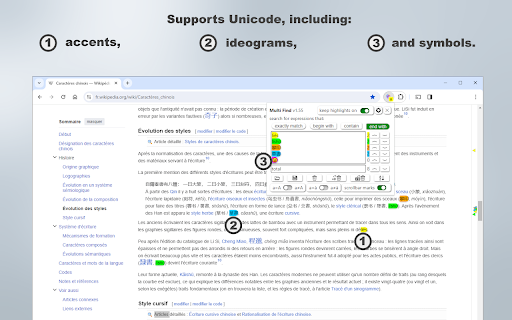

Find and highlight multiple words on webpages. Count occurrences, scroll to the results and locate words with scrollbar marks. Searching for several terms at once shouldn't mean running the same search over and over. Multi Find lets you highlight multiple words, phrases, or fragments simultaneously, each in a distinct and customizable color, so you can scan any webpage at a glance without losing context. Built for researchers, analysts, students, and professionals who work with dense content every day. Key Features ✔ Multi-Word Highlighting: Enter multiple search terms and see each one highlighted instantly in its own color, directly on the page. ✔ Up to 20 Customizable Colors: Choose between solid or glow-style highlights to visually distinguish each search term. ✔ Instant Occurrence Count: See exactly how many times each term appears, displayed in real time within the search panel. ✔ Precise Search Options: Toggle case sensitivity, whole-word matching, and diacritic sensitivity for accurate, tailored results. ✔ Persistent Highlights: Your search terms stay highlighted across page reloads and dynamic navigation, no need to re-enter them. ✔ Keyboard Shortcuts & Panel Navigation: Jump between results quickly without interrupting your reading flow. ✔ Flexible Search Window: Drag it to any corner, or enable transparency to keep it out of the way. ✔ Panel Always in Sync: What you see in the search panel always matches exactly what is highlighted on the page. ✔ Bulk Import & Export: Load a text file with dozens of terms at once, or export your current list for later use. ✔ Lightweight & Fast: Optimized to handle large pages without slowing down your browser. ✔ No Tracking, No Ads: Multi Find works entirely locally. Your searches and data never leave your device. Four Ways to Add Words to Your List: - Type directly into the search panel - Paste words or phrases from anywhere - Import a text file with multiple terms at once - Right-click any word on a page → "Add to Multi Find" Multi Find is free to use, with no account required and no hidden permissions. Upgrade your browsing experience with Multi Find, a smarter way to search and highlight!

Multi Highlight Hub
An easy to use multi-keyword highlighter with live stats report Multi Highlight Hub: Elevate Your Web Highlights Multi Highlight Hub is an easy-to-use multi-keyword highlighter with live statistical reporting. -- Custom Styles: Tailor your highlight styles and apply them to lists of search terms. -- Live Summary: Instantly view a summary of keywords found on the page, making it a must-have for research and analysis. -- Dynamic Page Compatibility: Works seamlessly on highly dynamic pages like Facebook or Amazon without page refreshing. -- Secure Storage: All keywords are stored in the browser's local storage. -- Create Lists: Organize your keywords into lists or groups. -- Import/Export Lists: Conveniently transfer your keyword lists. -- URL Control: Whitelist or blacklist specific URLs for precise control (see options). If something seems off, try toggling an item on and off or refreshing the page. Found a bug? Report it, and we'll promptly address it to enhance your experience.

Multi Highlight
Search and highlight multiple words on web pages. "Multi Highlight" is a powerful browser extension designed to enhance your web browsing experience. With its advanced features, you can highlight multiple words or phrases on any webpage with ease, making it easier for you to find the information you need. This extension allows you to customize your highlighting experience by selecting different colors for each keyword or phrase, making it easier to distinguish between different terms. You can also quickly toggle between different highlight colors, making it easy to organize and categorize your highlights. Additionally, "Multi Highlight" features a search function that enables you to quickly find all instances of a highlighted term or phrase on the current webpage. This feature saves you time and makes it easier to navigate lengthy documents or web pages with multiple instances of the same term. Overall, "Multi Highlight" is an indispensable tool for researchers, students, and anyone who wants to streamline their web browsing experience and stay organized while working online. Features: • No tracking/analytics of any kind. • Ads-free. • Instant notification about found or not found queries on any website. • Search query by selecting element on website. • Customly assigned colors for the queries. • Works on dynamic (endless) pages like Facebook, LinkedIn, Reddit, etc. It's automatically searching for new queries. • Unlimited queries. • Lots of filtering features. (Diacritic sensitivity, Case sensitivity, find only Complete words, etc.) • Full compliance with privacy and data security. • A highly flexible tool. All the settings are optional, you can turn every function off anytime you wish to. • An easy-to-use, friendly interface makes searching a pleasure.

Mark My Search
Mark My Search is a complete word finder for anything you search online. Powerful highlighting and advanced features combine with a friendly, intuitive interface to provide effortless text finding without the compromise. Vibrant highlight colors look great on any page, complemented by scroll markers for locating matches and a keyword edit bar which stays until you're done. Shortcuts are available for every action while varied options let you personalise to your taste. Search for anything, on any search engine - DuckDuckGo, Google, Bing, even Reddit - and Mark My Search will pick out the words you're looking for, in that page and through any links you follow. Highlighting happens without having to press a button! Activate on any page using Alt+M or the context menu. Mark My Search is Free and Open Source on GitHub(1). See the Roadmap(2) for planned improvements! Main Features: • Enter keywords to find in the page • Create and automate keyword lists in the popup • Search query highlighting on any search engine • Compact toolbar to view and edit the query • Popup and settings menu for configuration • Rapid scrolling to matches • Keyword scrollbar markers • Completely operable by mouse or keyboard • Specific websites can be filtered To turn off visibility for automatic highlighting, simply open the options page at chrome://extensions > Mark My Search [Details] > [Extension options] and disable both visibility settings. The highlights will be hidden, while the toolbar and scroll markers remain visible, ready to be shown at a moment's notice. This does not apply to manually activated highlighting. To turn off automatic highlighting completely, click the extension's icon to open the popup, and disable "Detect search engines". You may wish to press the top-right puzzle piece (Extensions) and 'pin' the Mark My Search icon, so that you can easily click it to open the popup.

Multi Words Search
An easy way to search multiple words in the document. Lets say you want to find some words in web page. You can still use Ctrl+f. But if you want to find 10 words in the page at the same time? Here is the solution. You just type multi words in the box and let this tool search them. We will highlight words simultaneously.
