
gmlmjmfonjbpjgbnkimflomfhbdeggem
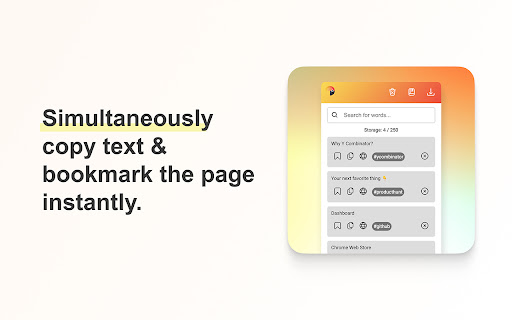


🚨 Please make use of the support tab for any suggestions, questions, or problems you may have. Touclip revolutionises your Chrome clipboard experience, allowing you to store, search, and organise text snippets effortlessly. With intuitive search, bookmarking, and direct source website links, Touclip empowers you to reclaim control over your clipboard and supercharge your productivity. Say goodbye to scattered information and hello to seamless snippet management with Touclip. 🔄 Clipboard History: Touclip automatically stores all the text you copy, creating a timeline of snippets for easy reference. 🔍 Search and Filter: Quickly find specific snippets using the search functionality, making information retrieval a breeze. 🔖 Bookmark Snippets: Mark important snippets as bookmarks for quick access to frequently used or critical information. 📄 Export Snippets: Export your snippets and source URLs to a txt file, allowing you to create backups or share them with others. 🔒 Save to Chrome Storage: Securely save your snippets to Chrome local storage. 🗑️ Clear All Snippets: Start fresh by clearing all stored snippets with a single click, providing a clean slate for new content. ☝️ Storage Counter: Track your snippet count with the storage counter, always aware of how many slots you have used. 🪫 Badge Display: Receive a badge notification on the Touclip icon when your storage reaches 100% capacity, prompting you to manage your snippets efficiently. 📋 Copy Snippet to Clipboard: Copy snippets to your clipboard with a simple click, streamlining your workflow. ❌ Delete Single Snippet: Remove individual snippets when they are no longer needed, keeping your collection organised and clutter-free. 🌐 Source Website Button: Each snippet includes a convenient button that takes you directly to the source website. Clicking on the button opens the original webpage, allowing you to revisit the context and gather more information.

Stash
A tiny browser extension that saves and syncs your favorite links across all your browsers. Never lose a link again. Stash is your witty, no-nonsense assistant for bookmarks—syncing your favorite websites across Chrome, Edge, Arc, Dia and all your Chromium-based browsers. Effortlessly save, organize, and access your links, no matter where you are or what account you’re using. Ever emailed yourself a link and felt like a caveman? Us too. That’s why we built Stash—a tiny (but mighty) browser extension that remembers your favorite websites, syncs them across all your browsers and devices, and keeps them safer than your Halloween candy stash. - Save links in a flash (shortcut: Shift + Alt + S) - Works with multiple browsers and accounts—no more “Where did I save that?” - No folders, no fuss—just stash and go - Your data, your rules—encrypted and private, powered by Github - 100% free, forever—no hidden fees, no premium tears Stop being a digital squirrel. Start stashing like a boss. - 🚀 One-click save: Add links instantly from any page - 🔄 Cross-browser sync: Chrome, Edge, Arc, Vivaldi, Brave, and more - 🦾 Github-powered: Your data, your control - 🔒 End-to-end encryption: Only you can see your stash - 🆓 No signup required: Just connect your Github - 🌴 Completely free forever - Works everywhere you browse - No vendor lock-in—your data lives in your Github - Designed for privacy and speed - No learning curve, just stash and go - Built by someone who’s been burned by lost links (that’s me) - A Github account (to keep your stash safe and synced) - Any Chromium-based browser (Chrome, Edge, Arc, Vivaldi, Brave, etc.) Ready to stop losing links? Add Stash to Chrome and start syncing your bookmarks like a tech-savvy wizard. Support Questions? Feedback? Just want to chat about your favorite bookmarks? Email me at hello@rafaelgandi.com or visit https://rafaelgandi.com/contact. Made with 🤙 by Rafael G.

clipboard History
Easily manage clipboard history. Copy, paste, and access recent items. Never lose important text.Boost productivity for multitaskers Your ultimate clipboard assistant, making copy and paste more efficient and secure! 1. Automatic Clipboard History Saving - Real-time recording of all text content you copy - Everything happens automatically in the background, no manual operation required 2. Quick Search and Retrieval - Powerful search function to easily find any previously copied content - Supports fuzzy search, helping you quickly locate needed information 3. One-Click Copy - Click to recopy content from history to clipboard - Eliminates the hassle of repeated input, improving work efficiency 4. Pin Important Content - Pin frequently used or important clipboard content for easy access - Quickly access your most needed information anytime 5. Clean and Intuitive Interface - Clear list display of all clipboard history - Each record shows text preview and creation time 6. Privacy Protection and Data Security - All data is stored on your local device, never uploaded to the cloud - You have full control over your data, ensuring the highest level of privacy and security - Support for manual deletion of individual or all history records 1. After installation, the plugin runs automatically in the background, recording your clipboard history 2. Click the plugin icon in the browser toolbar to open the main interface 3. Enter keywords in the search box to quickly find specific content 4. Click on items in the list to copy them to the clipboard 5. Use features like pinning and deleting to manage your clipboard history We highly value your privacy and data security. This plugin uses local storage technology, and all clipboard history records are saved only on your device. We do not collect, transmit, or store any of your personal data. You can use it with complete peace of mind, enjoying convenience while ensuring absolute data security. This plugin is your reliable assistant for daily work and study, making your copy and paste experience smoother, more efficient, and secure! If you have any questions or suggestions, please contact us at: cameronchen01@gmail.com Install now and experience intelligent and secure clipboard management!

Pondr: Tab Manager & Bookmark Reminder
The extension that manages bookmarks and finds the best time to remind you to revisit. Bookmarks are meant to be consumed, not clog up your browser as an open tab. Save tabs and ACTUALLY remember to visit them. 💡 Simply save a tab and keep working See an interesting article or video suggestion while researching something? Queue the tab with Pondr and alleviate the pressure of having to remember to view it later. 💡 Relieve the mental toll of planning With the Google Calendar™ integration, all you need to do is pick the tab you want to save, we'll do find the time for you. No more combing through your schedule and setting an alarm/reminder. Nothing's worse than an endless list of bookmarks or too many tabs open at once. It's hard to look at and a pain to comb through. Pondr's clutter-free tab display gives you simple oversight of what matters. View tabs in a grid view or list view. 💡 An easier way to remember deadlines Have a job application or assignment deadline coming up? Queue the submission page to the specific date, and the tab will reappear on the day it's due! 💡 Save and view all corners of the internet Pondr can be accessed anywhere within the Chrome browser. From articles, videos and anything else under the (digital) sun. 💡 Stop emailing yourself links Access Pondr on any page just by opening the pop-up. Now you can spend more time doing work while queuing up all of your favorite articles to read later. Instead of keeping open tabs or making tons of bookmarks for tasks, you hope to do later, easily save articles, videos, or any webpage on your browser while simultaneously scheduling the reminder with only one click. Your tabs will miraculously appear when it's show time🕺! Get back to what's important and your tabs will be patiently waiting for you out of sight! For users with Google Calendar™, connecting with Pondr allows you to take reminders a step further by automatically finding the best time to remind you to revisit your bookmark. Pondr identifies the best time to remind you based off certain criteria in your calendar such as open time slots. ⚡ Automated bookmark reminders Simply hit the Pondr button on a tab you want to save for later and Pondr will find the best time to remind you via your Google Calendar 🎨Customizable Preset Reminders Have a frequent time you’re available? Simply turn it into a preset reminder time to assist your tab management 📌 Pinned Tabs Not all tabs are meant to be visited only once! Pondr lets you speed dial into the websites or apps you use on a daily basis. 🔍 Search for Tabs Get instant access to the tabs you need to get the job done. Pondr is able to search for any website inside your library, letting you find exactly what you’re looking for in seconds. 📅 Agenda View Get actionable oversight of what’s coming up today with Agenda View. You don’t need to be bombarded with every single bookmark you’ve queued just when you want to see whats upcoming. 🗓️ Reschedule Reminders Something come up? Seamlessly reschedule your tab for another day within your library. ⌨️ Keyboard Shortcuts Easily Pondr a tab without touching your mouse! ✅ Private Library Passcode-protected library for sensitive tabs and data Who is Pondr for?: ✓ Students ✓ Help Desk & Customer Support ✓ Sales CRM ✓ Sales Representatives ✓ Task Management ✓ Finance ✓ Operations ✓ Human Resources and Recruiting ✓ Project Management ✓ Onboarding ✓ Marketing ✓ Remote Work ✓ Those with too many tabs!! HELP & SUGGESTIONS Help Center Email: support@pondr.app Suggestions: https://pondr.canny.io/feature-requests If you have any problems or find a bug - please write to us at pondr.extension@gmail.com. We will definitely help! PRIVACY AND PERMISSIONS https://www.pondr.app/privacy-policy DISCLAIMER Please note Pondr is not made by Google™ or affiliated with Google™. Google™, Google Calendar™, and Google Chrome™ is trademarks of Google Inc. Use of this trademark is subject to Google Permissions. to be temporary, not clog up space on your browser.

myReach Web Clipper
Save the things that matter on the web in an interconnected network Introducing myReach: Unleash Your Productivity with AI-Powered Superpowers Discover the browser extension that revolutionizes how you save, organize, and access your digital knowledge. myReach is your second brain, seamlessly integrating with your browser to empower you with AI-driven intelligence and effortless retrieval of information. 📚 Save Anything, Find Everything: Capture websites, files, images, notes, and contacts effortlessly, and connect them to relevant tags. No more struggling to remember where you saved that important document or the name of a website – myReach lets you search based on your personal context, empowering you to find what you need quickly and effortlessly. 💡 AI-Assistant at Your Fingertips: Meet your smart AI-Assistant powered by myReach. Simply ask any question about your saved items, and it will instantly provide answers. Whether you need contract details, summarized articles, or reminders from your past conversations, it has the knowledge to assist you effortlessly. No more tedious searching or reading through endless pages – just ask and get instant answers. 🗂️ Organize Your Way: Say goodbye to traditional folders and embrace the freedom of myReach’s flexible workspaces. Create customized workspaces to separate business and personal matters, ensuring efficient organization and effortless collaboration for teams. With myReach, everyone can find the same document using their own context, eliminating the need for extensive training or navigating complex folder structures. 🔍 Intelligent Search, Even in Images: Extracted text from images and files makes every piece of content searchable, delivering unparalleled convenience and efficiency. Locate information buried within images effortlessly, saving you time and frustration. ⚡️ Enhance and Integrate: Customize your saved items with properties like rating, description, cost, and more, allowing for deeper organization and personalization. Seamlessly integrate myReach with your favorite tools, including Evernote, Zapier, Twitter, Google Maps, and more, expanding its capabilities and streamlining your workflow. Welcome to your personal knowledge hub, designed to boost productivity and streamline information retrieval. With myReach, your browser gains superpowers, empowering you to save, connect, and access your digital world effortlessly. Embrace the future of intelligent organization and download myReach today. Get myReach, and unlock a world of limitless knowledge at your fingertips
