
glmhnchbmjhmjcopmmfamopongifahan


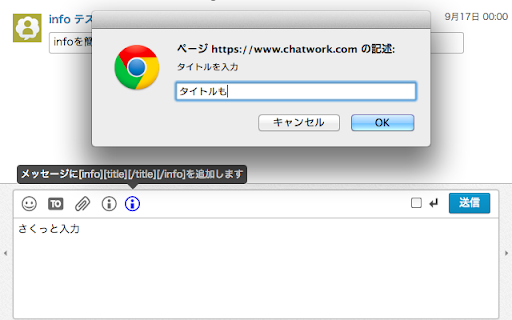


Chatworkの[info][/info]を素早く入力する拡張機能 Chatworkのチャットで、[info]...[/info]などのタグを素早く入力するための拡張機能です。 title付き[info]や[code]、[qt]、[hr]のタグも対応しています。 ■ Chatwork APIドキュメント メッセージ記法 https://developer.chatwork.com/ja/messagenotation.html 拡張機能をインストールすると、Chatworkのチャットメッセージ入力エリアの上にアイコンが追加されます。 スクリーンショットのようにテキストを選択し、アイコンをクリックすると、選択した文字を囲うように[info]...[/info]が追加されます。 テキストを選択していない状態の場合は入力エリアのカーソル位置に[info][/info]が追加されます。 ショートカットキー(Ctrl+i)で[info][/info]を入力することも可能です。 ■ Chatwork https://go.chatwork.com/ja/ ■ 更新履歴 ・2023/07/25 見た目の調整、左カラムの高さ変更部分修正 ・2022/01/27 Chatwork仕様変更対応 ・2021/03/31 Chatwork仕様変更対応 ・2021/03/15 [title]のショートカットキー不具合の修正 ・2021/03/11 2021/03/10の修正で発生した不具合の修正 ・2021/03/10 Chatwork仕様変更対応 ・2019/10/07 Chatwork仕様変更対応 ・2018/05/09 Chatwork仕様変更対応 ・2018/03/02 各アイコンのサイズ調整 ・2017/10/27 hrの見た目の調整 (https://github.com/YukiAsano/CW_QuickInfoInput/pull/1) ・2017/02/28 ボタンの見た目を調整、KDDI版を試験的に対応 ・2016/04/15 idの被り修正、ボタンクリック後のフォーカス調整 ・2016/04/14 qtタグとhrタグのボタンを追加 (https://blog-ja.chatwork.com/2014/06/decorate-chat.html) ・2015/01/21 codeタグのボタンを追加 (https://blog-ja.chatwork.com/2015/01/codetag-release.html?pmg=54bcbb8053355) ・2014/10/02 ショートカットキーが被っていたので修正 ・2014/10/02 ショートカットキー対応(Ctrl+iまたはCtrl+t) ・2014/09/17 公開 ■ ソース(MacでFluidなどを使用している方はこちら) https://github.com/YukiAsano/CW_QuickInfoInput ■ Chatwork Quick Info Input – 🦊 Firefox (ja) 向け拡張機能を入手 https://addons.mozilla.org/ja/firefox/addon/chatwork-quick-info-input/

G-calize
On Google Calendar... Sunday, Saturday, Today, and other weekdays, You can select the text color and background color. 1. Click the extension icon or select "G-calize" from the context menu to open the settings screen. 2. Set your preferred colors for each day of the week. 3. Optional: Select a holiday calendar and set holiday colors. * You must reload the calendar page once after installation. * Works with the URL calendar.google.com/calendar. Does not work if you use a Google Workspace custom address. ### 🆕 2024.12.05 Version 2.3.0 - Supports schedule display. - Added a function to display the settings screen in a smaller size only in month view. - Other fine-tuning. ### 2023.11.27 Version 2.1.0 - Added background color and border color to today's color. - Fixed an issue where colors were misaligned in week view. ### 2023.08.20 Version 2.0.0 - Changed the way to open the settings screen. - Renewed the settings screen. - Removed today's text color and background color, changed to accent color selection. - Fixed an issue where the holiday calendar could not be selected. ### 2018.02.02 Version 1.4.0 - Supports the new Google Calendar design.

GMailSend Address Checker - 誤送信防止 -
バージョン:0.24.0 * 「Mailtrack for Gmail」と同時使用可能になりました バージョン:0.20 ・不具合対応 Salesforce Inbox for Gmail と併用すると、「確認」後、「確認」ボタンが「送信」ボタンに戻らない不具合解決のため、ロジックを変更。

Calendar Selector for Google Calendar
Save and restore groups of calendars selected Version 0.1.7 - Bug fix: More resilient finding of calendar in the left panel, will skip list items that do not appear to be built-in Google calendar entries Version 0.1.6 - Enhancement: quick fix for Chrome deprecating Manifest v2, upgraded to v3. Some keyboard shortcuts for preset management don't work, but functionality is available in the UI. Version 0.1.5 - Bug fix: Breakage introduced by Google Calendar changing the page HTML structure Version 0.1.4 - Bug fix: Agenda view displays items correctly - Enhancement: Added a license file to the repository (MIT), and provided privacy policy and data practices in the store listing (no data is ever shared or leaves the user's browser). See https://gitlab.com/bluenexa/google-calendar-selector for all version updates This extension creates a set of buttons in the Google Chrome UI that allow you to easily create, save, and display groups of calendar presets. If you have many calendars and often need to switch between which calendars are shown (such as colleagues and teams), this extension is for you. Your presets are stored in your local browser storage and sync across devices automatically (using Chrome's built in syncing mechanism). Keyboard Shortcuts: Press Ctrl+Alt and the highlighted key for the main functions (highlighted key is one of e, s, r, c, i, x, or p). Except Chrome's built-in sync mechanism, the extension functions completely offline in the browser and no data leaves the user's computer. Local storage in the browser is used to persist saved calendar groups and to sync saved groups across computers via Chrome's built-in sync mechanism (tied to the logged in Chrome user). All software is fully open source and available at https://gitlab.com/bluenexa/google-calendar-selector. Built by the team at Bluenexa.

AUNライブキャプチャ
ページ全体を「見たまま」スクリーンショット-AUN拡張機能 スクロールが必要な長いページ全体や、非公開のテストページなど、 多様なウェブページを「見たまま」丸ごとフルサイズのスクリーンショットでキャプチャできる機能です。 撮影したスクリーンショット📸はコピーやダウンロードの他、 ✏️修正指示を書き込んで共有(※)することができます。 ※登録不要の修正依頼ツール『AUN』にボタン1つで送信できます。 ★こんな時に★ .................................................................................. ・縦に長いページ全体のスクリーンショットを撮りたい ・非公開テストページのスクリーンショットを撮りたい ・モーダルが表示された状態を撮りたい ・マウスをホバリングした状態を撮りたい ・カルーセル画像などを、狙ったタイミングで撮りたい ・スクロールにあわせて遅れて読み込まれるページを撮りたい ・ログインが必要な管理画面を撮りたい .................................................................................. 今すぐAUNライブキャプチャを体験して、Web上でのキャプチャ、共同作業、コミュニケーションの方法に革命をもたらしましょう。 1 クリックするだけで生産性が向上します。 (ご留意事項)Macでご利用の際は、ブラウザが最新の状態でないと動作が不調な場合があります。ご了承ください。 ─────────────────────────────── 使い方 ─────────────────────────────── 1️⃣ Chrome拡張機能バーのAUNアイコンをクリックし、 メニューを表示 ▼ 2️⃣ キャプチャタイプを選択すると処理開始 .................................................................................. 【ページ全体】ウェブページ全体をキャプチャ。 【ページ可視部分】今見えている部分をキャプチャ。 【選択した範囲】気になる部分だけをキャプチャ。 .................................................................................. 【設定|キャプチャのタイミング】 時間を指定して遅れてキャプチャすることもできます(秒単位)。 マウスの動きや読み込みの遅いコンテンツをキャプチャするのに便利です。 ▼ 3️⃣ 撮影されたスクリーンショットが 新しいタブに表示されます。 ▼ 4️⃣ 画面右に表示されるメニューで 任意のアクションを選択 ─────────────────────────────── プライバシーの保証 ─────────────────────────────── スクリーンショット:AUNライブキャプチャー拡張機能内でキャプチャーされたスクリーンショットを保護するために、適切なセキュリティ対策を実施しています。 データ:AUNライブキャプチャー拡張機能はデータを保持しません。データはユーザーのローカルのブラウザ環境内に存在します。ブラウザ自体が提供するセキュリティ対策と保護策の対象となります。 ─────────────────────────────── AUNとは ─────────────────────────────── 登録不要の修正依頼ツール(無料) https://aun.tools/
