
nmliklikilkjommabacojbijjimlgjck
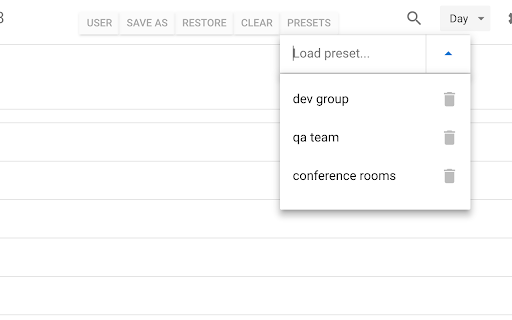
Save and restore groups of calendars selected Version 0.1.7 - Bug fix: More resilient finding of calendar in the left panel, will skip list items that do not appear to be built-in Google calendar entries Version 0.1.6 - Enhancement: quick fix for Chrome deprecating Manifest v2, upgraded to v3. Some keyboard shortcuts for preset management don't work, but functionality is available in the UI. Version 0.1.5 - Bug fix: Breakage introduced by Google Calendar changing the page HTML structure Version 0.1.4 - Bug fix: Agenda view displays items correctly - Enhancement: Added a license file to the repository (MIT), and provided privacy policy and data practices in the store listing (no data is ever shared or leaves the user's browser). See https://gitlab.com/bluenexa/google-calendar-selector for all version updates This extension creates a set of buttons in the Google Chrome UI that allow you to easily create, save, and display groups of calendar presets. If you have many calendars and often need to switch between which calendars are shown (such as colleagues and teams), this extension is for you. Your presets are stored in your local browser storage and sync across devices automatically (using Chrome's built in syncing mechanism). Keyboard Shortcuts: Press Ctrl+Alt and the highlighted key for the main functions (highlighted key is one of e, s, r, c, i, x, or p). Except Chrome's built-in sync mechanism, the extension functions completely offline in the browser and no data leaves the user's computer. Local storage in the browser is used to persist saved calendar groups and to sync saved groups across computers via Chrome's built-in sync mechanism (tied to the logged in Chrome user). All software is fully open source and available at https://gitlab.com/bluenexa/google-calendar-selector. Built by the team at Bluenexa.

Slim Chatwork
Slim Chatwork is a 3rd party extension that adds a few minimal features to Chatwork. 20+ features to supercharge your Chatwork experience and streamline your daily chat workflow. * AI-powered message rewriting (business, casual, and more) * Auto-check message quality before sending (textlint + AI analysis) * Insert frequently used messages with one-click templates * Export chats to CSV / save messages as PNG images * Syntax highlighting for code blocks * Fully customizable fonts, sizes, and layout * Status switch, mention assist, accidental send prevention, and more [Streamline Message Creation] - Message Templates — Insert frequently used messages with one click. Supports short-codes (date, time, etc.) - AI Rewriter — Transform your message tone with AI. Choose from business, casual, and other presets - Text Linter — Auto-check message quality before sending with textlint rules + AI-powered style analysis, forbidden word rules, date-weekday mismatch detection, and character count [Customize Your View] - Font Change — Switch to your preferred Google Font - Room List Size Adjustment — Fine-tune avatar size, font size, and padding - Main Content Size Adjustment — Optimize chat input and font sizes - Expand Right Column — Extend the summary panel height [Share Code Smartly] - Syntax Highlighting — Color-coded code blocks with a built-in copy button [Data & Export] - CSV Export — Export visible chat messages to CSV format. UTF-8 BOM for Excel compatibility - Message Capture — Save individual messages as PNG images [Handy Utilities] - Status Switch Assist — Switch your status with preset options in one click - Open Room in New View — Open a room in split view, a new tab, or a new window - Open Mention List with @ — Just type @ to bring up the member list - Add Day of the Week — Show weekday labels on message timestamps - Punctuation Conversion (Japanese) — Convert full-width punctuation to half-width - Disable Modifier Key + Enter Posting — Prevent accidental sends with modifier key combos - Hide Avatars / Disable Display Name Truncation Supercharge your Chatwork experience with Slim Chatwork. Try it today! ■ Privacy This extension includes an opt-in error reporting feature for quality improvement. When enabled, anonymous error data is sent to Sentry (a third-party service). No personally identifiable information is collected or transmitted. You can enable or disable this feature at any time in the settings. Note: This is an independent third-party Chrome extension and is not affiliated with Chatwork, Inc. Use at your own discretion. The developer assumes no liability for any damages arising from the use of this extension.

Chatwork Input Tools
Add text decoration icons to ChatWork. 選択したメッセージをタグで囲むことができます。 タグの効果については公式サポートページをご覧ください。 http://support-ja.chatwork.com/hc/ja/articles/203127904-投稿に装飾はできますか- -- 2017/03/15 ChatWorkの仕様変更に対応しました。 2016/07/10 メッセージ入力欄にリスト作成のサポートを追加しました。 TOリストにすべて選択 (アイコンのみ)を追加しました。 2015/12/25 TOリストの大きさを2倍にしました。 2015/10/28 公開しました。

Easy Grouping for Google Calendar
Easily group calendars and switch between them quickly in Google Calendar. Groups can be defined for project teams, departments,… Easily group calendars and switch between them quickly in Google Calendar. Groups can be defined for project teams, departments, or managers, depending on your use case. To create a group, simply enter the name of the group and the name of the target calendar from "My Calendars” and “Other Calendars" in the text area. You can easily combine, select and switch between calendars from a list of calendars you have defined. Key Features * You can easily define groups of calendars to which you are subscribed and switch between calendar groups. * Settings can also be imported and exported as JSON files. Privacy * This extension does not send or store any information to external services. Recent Updates * 2026-05-10: Minor improvements and dependency updates. * 2025-12-01: Fixed compatibility with Google Calendar UI update. Changed calendar container detection to find lists containing checkboxes, ensuring reliable detection regardless of UI structure changes.

GMailSend Address Checker - 誤送信防止 -
バージョン:0.24.0 * 「Mailtrack for Gmail」と同時使用可能になりました バージョン:0.20 ・不具合対応 Salesforce Inbox for Gmail と併用すると、「確認」後、「確認」ボタンが「送信」ボタンに戻らない不具合解決のため、ロジックを変更。
