
nklehcoamlgpnlljogplljnidlciimgo

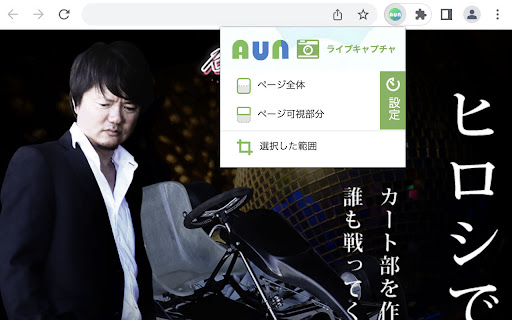


ページ全体を「見たまま」スクリーンショット-AUN拡張機能 スクロールが必要な長いページ全体や、非公開のテストページなど、 多様なウェブページを「見たまま」丸ごとフルサイズのスクリーンショットでキャプチャできる機能です。 撮影したスクリーンショット📸はコピーやダウンロードの他、 ✏️修正指示を書き込んで共有(※)することができます。 ※登録不要の修正依頼ツール『AUN』にボタン1つで送信できます。 ★こんな時に★ .................................................................................. ・縦に長いページ全体のスクリーンショットを撮りたい ・非公開テストページのスクリーンショットを撮りたい ・モーダルが表示された状態を撮りたい ・マウスをホバリングした状態を撮りたい ・カルーセル画像などを、狙ったタイミングで撮りたい ・スクロールにあわせて遅れて読み込まれるページを撮りたい ・ログインが必要な管理画面を撮りたい .................................................................................. 今すぐAUNライブキャプチャを体験して、Web上でのキャプチャ、共同作業、コミュニケーションの方法に革命をもたらしましょう。 1 クリックするだけで生産性が向上します。 (ご留意事項)Macでご利用の際は、ブラウザが最新の状態でないと動作が不調な場合があります。ご了承ください。 ─────────────────────────────── 使い方 ─────────────────────────────── 1️⃣ Chrome拡張機能バーのAUNアイコンをクリックし、 メニューを表示 ▼ 2️⃣ キャプチャタイプを選択すると処理開始 .................................................................................. 【ページ全体】ウェブページ全体をキャプチャ。 【ページ可視部分】今見えている部分をキャプチャ。 【選択した範囲】気になる部分だけをキャプチャ。 .................................................................................. 【設定|キャプチャのタイミング】 時間を指定して遅れてキャプチャすることもできます(秒単位)。 マウスの動きや読み込みの遅いコンテンツをキャプチャするのに便利です。 ▼ 3️⃣ 撮影されたスクリーンショットが 新しいタブに表示されます。 ▼ 4️⃣ 画面右に表示されるメニューで 任意のアクションを選択 ─────────────────────────────── プライバシーの保証 ─────────────────────────────── スクリーンショット:AUNライブキャプチャー拡張機能内でキャプチャーされたスクリーンショットを保護するために、適切なセキュリティ対策を実施しています。 データ:AUNライブキャプチャー拡張機能はデータを保持しません。データはユーザーのローカルのブラウザ環境内に存在します。ブラウザ自体が提供するセキュリティ対策と保護策の対象となります。 ─────────────────────────────── AUNとは ─────────────────────────────── 登録不要の修正依頼ツール(無料) https://aun.tools/

Pasty
Pasty is a very simple multiple URL opener. ================================ http://google.com/ http://gmail.com/ http://maps.google.com/ ================================ Please copy the URL list above and then click/touch the Pasty icon. No need to paste, just click the icon. Changelog: v1.8 - Remove the options page. v1.7 - Reimplement. v1.6 - Manifest v3. v1.5 - Update manifest. v1.4 - Automatic paste with clipboardRead permission. v1.3 - Remove "tabs" permission. - Remove background page. - "ttp://" and "ttps://" support. v1.2 - Textarea resizer disabled / etc. v1.1 - New url finder. v1.0 - Initial release. I do not sell this extension to anyone. Please do not email me for such purposes.

Gyazo - Share new screenshots. Instantly.
Gyazo for Chrome is an easy-to-use extension that lets you capture anything in your browser, share it instantly, and keep it as a visual bookmark. Use it to capture a specific image, page element, free selection, or entire web page in 2 clicks. You can also get instant previews of all Gyazo links posted online simply by hovering with your mouse. Everything you capture is saved together with the site and page title, link, and date so you can easily search and find it later. With Gyazo anything you see can be instantly saved, shared, and bookmarked. — Capture any image on the web with a right click Right click any image then hover 'Capture' and left click 'This image.' The full size image will be uploaded and a preview shown to confirm. — Capture with the Gyazo icon in your toolbar - Page Element Captures individual elements of a page such as an image, a text box, or other subsection of a page. - Free Selection Captures any part of a page you want freely, similar to the Gyazo desktop app. - Page Captures the entire visible area of the page. - Whole page Captures the entire page from the very top to the very bottom. - Home This button opens your captures page in a new tab so you can browse, search, and collect your captures. — Hover Previewing When you hover over a Gyazo link you can see an instant preview below the link, no click required. Anything you capture is instantly uploaded to https://gyazo.com with a unique link. The link is copied to your clipboard so you can paste it instantly to share. By default all Gyazo links are unlisted and only visible by people who have the unique link. — Browse, search, and collect easily On your captures page you can browse, search, and collect your captures. When you capture the app also saves metadata so you can find things more easily such as the site name, page title, link, and date so you can search your captures without needing to manually add tags or descriptions. This data is saved privately by default and you can choose to share it with viewers by clicking a button. This is very useful for creating visual bookmarks and for easy recall of your ideas. Note: We do not use this metadata except to provide convenient search and organization features for you. — Create collections to organize and even share together It's easy to add captures to a collection and give it a new title. This way you can organize your captures and share a set of captures at once. You can also invite other people and add captures to a collection. You get all this with the new Gyazo extension. You can also use Gyazo for Windows, Mac, iOS, Android, Firefox, and Edge. This extension and Gyazo Teams are the only official extensions for Chrome made by Gyazo.com. To provide the functionality listed above, there are certain permissions required. Please read on to see these details. activeTab - To capture the full web page or to capture an area defined by the bounding box of a DOM element. contextMenus - To add options to the context menu so you can capture different parts of the page or to upload a given image when you right click it. tabs - To get the page title and URL so it can be saved privately and used to help you find and organize your screen captures. clipboardWrite - To copy an uploaded capture's new link to the clipboard so you can paste it without an extra step. clipboardRead - To add support for direct embedding on github.com by converting the gyazo.com URL in the clipboard to a markdown style automatically. storage - To save and sync the extension's settings. Host Permission - To allow the extension to run on any website where you may want to capture. Please also see our linked privacy policy for more details about how your data is collected, stored, and processed.

mitekaku キャプチャエクステンション
このエクステンションは、株式会社Ryuki Design が提供するウェブサービス「mitekaku」に対して画像のキャプチャ / ペースト機能を提供します。 任意のサイトでキャプチャした画像を一時的に保存しておき、任意のタイミングでそれらの画像を mitekaku へ一括でペーストします。 (※mitekaku: 画像&動画への修正指示共有ツール) ◆◆【基本的な使い方】 1. mitekaku の Chrome拡張のアイコンをクリックしてメニューを表示し、キャプチャ種別を選択すると、キャプチャ処理が実行されます。 2. キャプチャ処理が完了後、確認ダイアログが表示されます。 3. 確認ダイアログで[ペーストする]をクリックした時、キャプチャされた画像が mitekaku へ一括でペーストされます。 ◆◆【キャプチャ種別】 ・[部品選択] : HTMLの要素に合わせたスクリーンショット ・[選択した範囲] : 任意の範囲のスクリーンショット ・[ページ可視部] : 現在表示している範囲のスクリーンショット ・[ページ全体] : 現在表示しているページ全体のスクリーンショット ◆◆【補足事項】 このエクステンションはユーザーのデータをどこにも送信しません。

Alt & Meta viewer
This extension show alt and meta.
