
knihldgljmkklphnbelanhngemlcgabn
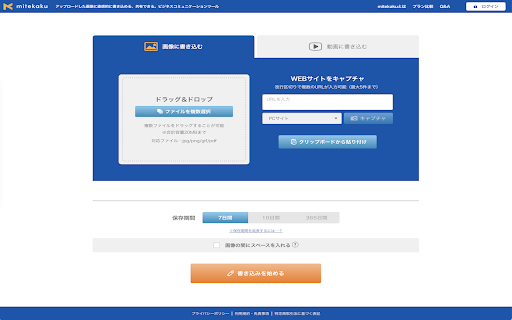
このエクステンションは、株式会社Ryuki Design が提供するウェブサービス「mitekaku」に対して画像のキャプチャ / ペースト機能を提供します。 任意のサイトでキャプチャした画像を一時的に保存しておき、任意のタイミングでそれらの画像を mitekaku へ一括でペーストします。 (※mitekaku: 画像&動画への修正指示共有ツール) ◆◆【基本的な使い方】 1. mitekaku の Chrome拡張のアイコンをクリックしてメニューを表示し、キャプチャ種別を選択すると、キャプチャ処理が実行されます。 2. キャプチャ処理が完了後、確認ダイアログが表示されます。 3. 確認ダイアログで[ペーストする]をクリックした時、キャプチャされた画像が mitekaku へ一括でペーストされます。 ◆◆【キャプチャ種別】 ・[部品選択] : HTMLの要素に合わせたスクリーンショット ・[選択した範囲] : 任意の範囲のスクリーンショット ・[ページ可視部] : 現在表示している範囲のスクリーンショット ・[ページ全体] : 現在表示しているページ全体のスクリーンショット ◆◆【補足事項】 このエクステンションはユーザーのデータをどこにも送信しません。

URL Shortener & Automatic copy
Generate a shortened URL from the URL of the current page with just one click. - Shorten a long URL with a single click. - Shortened URLs are automatically copied. - Access analysis function is provided. - No membership registration is required.

Pasty
Pasty is a very simple multiple URL opener. ================================ http://google.com/ http://gmail.com/ http://maps.google.com/ ================================ Please copy the URL list above and then click/touch the Pasty icon. No need to paste, just click the icon. Changelog: v1.8 - Remove the options page. v1.7 - Reimplement. v1.6 - Manifest v3. v1.5 - Update manifest. v1.4 - Automatic paste with clipboardRead permission. v1.3 - Remove "tabs" permission. - Remove background page. - "ttp://" and "ttps://" support. v1.2 - Textarea resizer disabled / etc. v1.1 - New url finder. v1.0 - Initial release. I do not sell this extension to anyone. Please do not email me for such purposes.

Chatwork Quick Info Input
Chatworkの[info][/info]を素早く入力する拡張機能 Chatworkのチャットで、[info]...[/info]などのタグを素早く入力するための拡張機能です。 title付き[info]や[code]、[qt]、[hr]のタグも対応しています。 ■ Chatwork APIドキュメント メッセージ記法 https://developer.chatwork.com/ja/messagenotation.html 拡張機能をインストールすると、Chatworkのチャットメッセージ入力エリアの上にアイコンが追加されます。 スクリーンショットのようにテキストを選択し、アイコンをクリックすると、選択した文字を囲うように[info]...[/info]が追加されます。 テキストを選択していない状態の場合は入力エリアのカーソル位置に[info][/info]が追加されます。 ショートカットキー(Ctrl+i)で[info][/info]を入力することも可能です。 ■ Chatwork https://go.chatwork.com/ja/ ■ 更新履歴 ・2023/07/25 見た目の調整、左カラムの高さ変更部分修正 ・2022/01/27 Chatwork仕様変更対応 ・2021/03/31 Chatwork仕様変更対応 ・2021/03/15 [title]のショートカットキー不具合の修正 ・2021/03/11 2021/03/10の修正で発生した不具合の修正 ・2021/03/10 Chatwork仕様変更対応 ・2019/10/07 Chatwork仕様変更対応 ・2018/05/09 Chatwork仕様変更対応 ・2018/03/02 各アイコンのサイズ調整 ・2017/10/27 hrの見た目の調整 (https://github.com/YukiAsano/CW_QuickInfoInput/pull/1) ・2017/02/28 ボタンの見た目を調整、KDDI版を試験的に対応 ・2016/04/15 idの被り修正、ボタンクリック後のフォーカス調整 ・2016/04/14 qtタグとhrタグのボタンを追加 (https://blog-ja.chatwork.com/2014/06/decorate-chat.html) ・2015/01/21 codeタグのボタンを追加 (https://blog-ja.chatwork.com/2015/01/codetag-release.html?pmg=54bcbb8053355) ・2014/10/02 ショートカットキーが被っていたので修正 ・2014/10/02 ショートカットキー対応(Ctrl+iまたはCtrl+t) ・2014/09/17 公開 ■ ソース(MacでFluidなどを使用している方はこちら) https://github.com/YukiAsano/CW_QuickInfoInput ■ Chatwork Quick Info Input – 🦊 Firefox (ja) 向け拡張機能を入手 https://addons.mozilla.org/ja/firefox/addon/chatwork-quick-info-input/

MONJI-izm
With the webOps enablement platform MONJI+, you can capture the exact state of the page you're viewing to create Feedback. Even pages that require login, expanded accordions, or switched tabs can be captured as-is—so you can create accurate Feedback without missing details. 1.Log in to MONJI+ If you haven’t signed up yet, create a free account at https://tool.monji.tech/signup 2.Launch the extension Open the page in Chrome and click the MONJI icon in the extensions bar. 3.Select capture mode Choose the area you want to capture. The screenshot will start automatically. 4.Screenshot captured. The Create Feedback screen opens in MONJI+ • Create a new feedback Select a Project and submit. A new browser tab will open and create the Feedback. • Add to existing feedback Open the Feedback you want to update and take a screenshot. The page will be added to the existing Feedback. 5.Create Feedback with MONJI+ MONJI+ is an all-in-one WebOps Enablement Platform built to streamline website production and operations for modern teams. It brings together Feedback creation, knowledge sharing, and asset management— all in one place. Powered by the industry’s first blend of a Website Management Tool and AI, MONJI+ helps teams work with more convenience, meaningful outcomes, and momentum— making web production not only efficient, but genuinely enjoyable. Web production operation with “Convenience“ & “Results“ & “Fun“ Power of “AI“ For more details about [MONJI+], please visit our service site. https://monji.tech/plus/
