
gjhojlhdipaimceapibdofdehkhokien
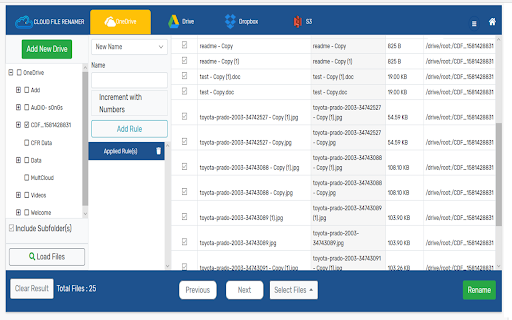
Rename Files on OneDrive, Google Drive, Dropbox and Amazon S3 What is the Cloud File Renamer (CFR) Chrome Extension? This extension lets you easily access and review your Cloud File Renamer account. In a few clicks, you can review added cloud drives , renaming jobs performed and open the Web Service and mass rename files, photos, songs, and videos. NOTE: The web-service allows you to load your files, add Renaming Rules, and preview the filenames. It will not rename your files until you become a Pro Subscriber. What is the purpose of CFR? CFR is a cloud-based application to bulk rename files on the Cloud. The online renaming utility supports Google Drive™, Microsoft OneDrive, Dropbox, and Amazon S3. You can change file names without even downloading the files to your computer, tablet, or the smartphone. How to Create a CFR Software-as-a-Service (SaaS) Account? Before you can start renaming files, you need to create an account on the website. The Cloud File Renamer app allows you to Signup using the following options: Signup with Google Signup with Microsoft Signup using your Email Once you have created an account, you will see the application’s dashboard. From that interface, you can load any of the supported Cloud Drives’ files for renaming at once. Adding Cloud Drives and Loading Files for Renaming After creating the account, you can follow the standard OAuth Login Verification-Procedure to let the CFR access and view your Google Drive™, OneDrive, Dropbox, or Amazon S3 files. Once a Cloud Drive is added, you will see its folders. Simply select one or more folders to load the files into the CFR app. Is It Secure? The Cloud File Renamer SaaS uses a secure and authentic procedure to access your files. It utilizes the official APIs and protects your information through a strong 256-bit encryption mechanism. The application doesn’t store your password and files. It also doesn’t view the content of your files. What Are the Renaming Rules? The Renaming Rules are the different ways for setting new names of the files. The online file renamer has useful rules such as: Uninstalling The Extension See the Vertical Dotted-Lines on top-right of your Chrome browser. Click to customize > then click on More Tools > Extensions > Find the CFR extension and click on Remove. Terminating the Account To terminate your CFR account, Sign In to the application and Click on My Account option. In the User Details column, click on the Terminate Account button. Privacy Policy https://www.cloudfilerenamer.com/privacy-policy Terms of Service https://www.cloudfilerenamer.com/terms-of-service FAQs https://www.cloudfilerenamer.com/faqs Support https://www.cloudfilerenamer.com/Support/form Pricing https://www.cloudfilerenamer.com/Pricing/index Google Drive™, Dropbox, OneDrive, and Amazon S3 logos are the trademarks owned by their respective companies.

Extension Manager
Extension that manages other extensions If you have tons of extensions but don't want to leave them all on at the same time - this extension is for you. You can use this to turn them on and off. Ctrl+L is the default keybinding to open the popup Move with arrow keys Press enter to turn toggle extensions on and off This is mostly for personal use but if you find it useful as well then great :)

Vaux Tab
Vaux Tab Manager and Window Organizer Vaux is an intuitive window manager with many robust features and simple interface. Perfect for tab management and window organization. Take your organizing skills to the max with Vaux! Latest feature: Share your saved windows with other Vaux users! Tab manager Window position recall Share windows with other Vaux users. Dark Theme Icon. Toggle icon from options page.

Simple Context Share
Share to Facebook, Twitter, Gmail and more using the context menu you can share the current webpage or any link on the web page from context menu. you can add/remove services to keep the menu customized to your requirement. The services provided are but not limited to: - Several social media - Imgur - GBookmarks - Gmail - Maps - Translate

Drive File List Printer
Drive File List creator >>> DONATE!
