
ekkddilaajmloaceknbpdaceobenejem

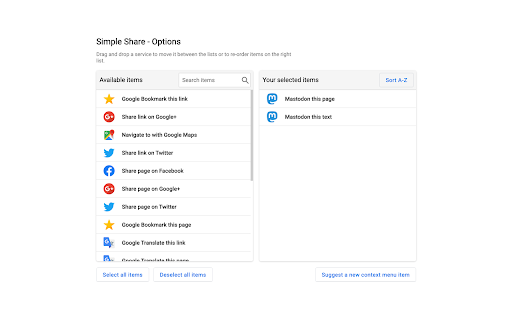
Share to Facebook, Twitter, Gmail and more using the context menu you can share the current webpage or any link on the web page from context menu. you can add/remove services to keep the menu customized to your requirement. The services provided are but not limited to: - Several social media - Imgur - GBookmarks - Gmail - Maps - Translate

Extentie - extension manager
A simple and elegant Chrome extension manager allows you manage your extensions in a popup window. Extentie is a simple and beautiful tool that allows you to toggle and manage Chrome extensions in a popup. Latest update: - Now you can create your own groups to manage your extensions - Revamped from ground up, added more features

Auto Dark for YouTube™
Automatically turns on Dark Theme at night for YouTube™ A tool which automatically toggles the darkmode based on the time of the day

Ultra Button
A button for everything. You can now access most of chrome features in one Ultra Button. Functions Including: Bookmarks, Extensions, Downloads, History and Tabs. Mouse Middle Button Behaviors Bookmarks: Open bookmark in background Extensions: Remove extension Downloads: Remove download record History: Open history in background Tabs: Close tab or window ~~~~~~~~~~~~~~~~~~~~~~~~~~~~~~~~~ The icons in this extension were downloaded from Noun Project. https://thenounproject.com/ v 0.9.0 add download notification You can enable it in the options v 0.4.1 add session control You can now restore closed tab or windows

G App Launcher (Shortcuts for Google™)
The best access to Google™ Services and Websites G App Launcher helps optimize your workflow by letting you open your most commonly-used websites from the browser toolbar. It opens shortcuts in a new tab so you can stay productive your own way. Easy to access Open the launcher extension from any page with just a click or through a keyboard shortcut. Packed with more than 1,000 shortcuts Add any Google website to the launcher or create your own shortcut to sites that you visit often. Over 1,000 shortcuts are available, including really obscure websites and action-based shortcuts. You can also add apps from Google Workspace. Customizable Personalize the launcher with shortcuts of your choice, with many options for layout and appearance. Dark theme is supported. Integrated Launch shortcuts with the same account as the page you’re currently on. Replace the default Google app launcher with this extension to bring your shortcuts with you on Google websites. Synced and secure Carry your personalized launcher across devices with support for browser-based extension sync. This means only you have access to your shortcuts; these are never sent to our system. Thoughtfully designed Feel at home with the familiar design based on the original app launcher. Your shortcuts are accessible through keyboard navigation. Note on permissions We value your privacy and security. G App Launcher requires additional permissions which the browser will inform about this on installation or first use. G App Launcher only uses these permissions for: - automatically getting the icon for websites you add manually, - making sure the shortcuts launched for Google websites are for the same account that you’re currently signed in on, and - correctly triggering action shortcuts related to the website you’re on (such as ‘Gmail send this’ or ‘Bookmark this’). - the permissions for google websites is needed for replacing the default app launcher on Google websites with G App Launcher.
