
gfimhhnghaeemolpihbejepoklogamcl

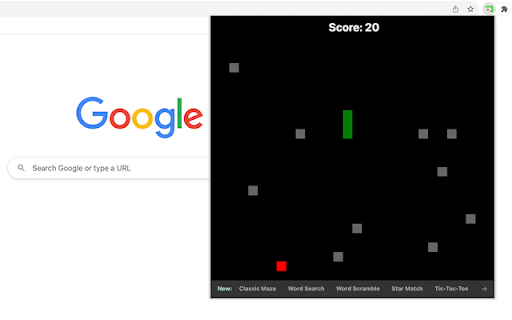
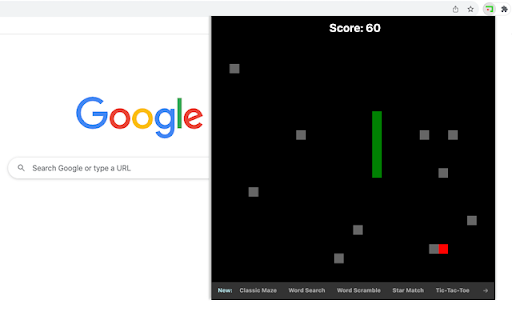

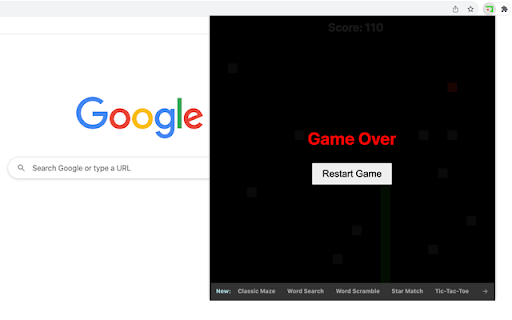
Collect food while avoiding collisions with random blocks. Snake vs Block is an engaging game where players skillfully guide a growing snake to collect food while avoiding collisions with blocks and the snake's own lengthening body. 1) Game Start: The snake starts moving automatically from a set position as soon as the game window opens. 2) Movement Controls: Use the Arrow Keys or WASD on your keyboard to control the snake's movement. 3) Objective: Your primary goal is to guide the snake to collect the red food item appearing randomly in game area. Each food item collected increases your score and the length of the snake. 4) Avoid Collisions: Be careful not to run into the blocks randomly positioned or the snake's body. If the snake collides with them, it’s Game Over! 5) Restart: If the game ends, the screen appears with a "Restart Game" button. Tips for Success: - Plan Your Route: As the snake grows, navigating becomes trickier. Plan your movements to avoid collisions with blocks ahead of time. Enjoy playing this snake game variant, and see how high you can score! We've also highlighted our novel snake game and featured game extensions after the game ends, offering you extra enjoyment. CHANGELOG ========== Version 0.1.4 - 0.2.3 - Update featured product name - Present novel snake game - Dynamic update of featured games - Add WASD movement support - Prettify code and styles - Update google analytics Version 0.1.2 - 0.1.3 - Add google analytics - Show the list of more games - Display featured products

Brick Break Game
Bounce the ball to break bricks placed in random locations. Brick Break is an entertaining game where you control a paddle to bounce a ball and destroy bricks. This game combines strategy, precision, and timing, offering endless fun directly from your browser. 1) Click the extension icon in your Chrome browser to open the game. You'll be presented with a 480x480 game area. 2) Game Area Layout: - Paddle: Located at the bottom, it's your tool to control the game. - Ball: Begins in the middle of game area, moving in a random downward direction. - Bricks: Randomly placed at the top of the game area in each round. 3) Controlling the Paddle: - Slide your mouse horizontally across the game area and the paddle will mirror its movement. 4) Game Rule: - The ball bounce off the paddle and left/right/top walls until all bricks are broken or it misses the paddle and hits the bottom wall. - Win: Clear all bricks to win the game. - Lose: The game ends if the ball passes the paddle and touches the bottom wall. - Restart: In case of a win/loss, a "Restart" button will appear. Click this button to reset the game and start fresh. 5) Tips for Success: - Focus: Keep a close eye on the ball and anticipate its bounce angles. - Strategic Positioning: Move the paddle to strategic positions to target hard-to-reach bricks. Give it a try and see how quickly you can break all the bricks! Ready for a challenge? Click 'Play More Levels' below the restart button to try Level-Up mode. Additionally, once you've finished the game, you'll find a selection of our featured game extensions at the bottom, added for your extra enjoyment. CHANGELOG ========== Version 0.1.1 - 0.1.9 - Add google analytics - Add the link of more levels - Show featured games after game over - Dynamic update of feature game list - Prettify code and styles Version 0.1.0 - Initial release of the game

Maze
Just click on the maze extension icon in the top right corner of your browser and the game will start immediately in a popup! The maze is randomly generated and changes every time the game starts or restarts. Your goal is to move the red block from the top-left corner to the green block in the bottom-right corner within 20 seconds. Use either the Arrow keys or WASD keys to move. The bar at the top of your maze shows how much time you have left. When the game ends, press the Restart button or the Space/Enter key to begin a new game. Have fun with the maze game! If you'd like to play the next level or check the shortest path, simply click the corresponding links below the 'Restart' button. Additionally, we've added some of our featured game extensions to the game over page for extra enjoyment. CHANGELOG ========== Version 0.3.0 - 0.4.2 - Update the link of the shortest path - Add the link of playing the next level - Dynamic update of featured game list - Add WASD movement support - Prettify code and styles Version 0.2.0 - 0.2.9 - Add the link of bonus features - Add the link of the shortest path - Display featured products after game over Version 0.1.7 - 0.1.8 - Add the section on new games - Update the game list with time Version 0.1.0 - 0.1.6 - Initial release and feature updates

Unique Triangle Hunt Game
Find unique triangle from the grid. This triangle hunt game is a fun and challenging way to test how well you notice details when you're in a hurry. The goal is to find the one unique triangle in a 3x3 grid within 100 seconds. Eight of these triangles are identical, but one is different and marked uniquely. To increase game difficulty, each triangle is rotated randomly, with a black line beneath it indicating its orientation. 1. Just click on the extension icon in the browser, you'll be presented with a grid of nine triangles and a section at the top showing your points and time left. 2. Click on the one you think is different. It will light up red. 3. If you're right, you get 5 points and automatically move to the next round. If you're wrong, keep guessing by clicking on another triangle. 4. You can keep playing to get as many points as you can until the time runs out. - In your quick review of the grid, focus more on any triangle that noticeably differs from the rest in triangle area. - Find the right mix of quickness and precision to boost your score the most. Good luck and enjoy the game! Plus, we've featured our other exciting game extensions after the game ends for even more fun! CHANGELOG ========== Version 0.1.1 - 0.1.7 - Add google analytics - Show featured games after game over - Dynamic update of featured game list - Prettify code and styles

Balloon Defense Game
Prevent balloons from touching the ground by popping them with your pin. "Balloon Defense" is an exciting game where you stop colorful balloons from reaching the ground. Use your pin to burst them before they land. You earn points for every balloon you pop and the balloons will drop faster as you progress. 1) Move the Pin: Slide your mouse side-to-side in the game zone to position the pin above the ground. 2) Speed Increases: The more you pop balloons, the quicker they will descend, making the game harder. 3) Game score: The points for each popped balloon add to your score. Check your total points in the top-left corner of the screen. 4) No Loss for Missed Balloons: If a balloon hits the ground, you won't lose, but you'll miss out on those points. Enjoy the game and have fun! We've also shown some of our featured games to provide extra enjoyment options after game over. CHANGELOG ========== Version 0.1.2 - 0.2.0 - Add google analytics - Show featured games after game over - Update featured game names - Dynamic update of featured game list - Prettify code and styles
